ToolPotion
AI Advisor
Submit a Tool (Free)

Blurt

AI AppsAI Transcription ToolsProductivity#175Free · macOS, Windows, Linux, iOS (self-compiled), Android (self-compiled)

Blurt is an open-source, local-first dictation and interaction tool for macOS, Windows, and Linux, designed for the agent era. It allows users to speak, screenshot, and screen record, transforming input into text, tasks, or translated content. Blurt integrates seamlessly with various applications and AI agents, offering fast, private, and efficient interaction.

Visit Website
Share
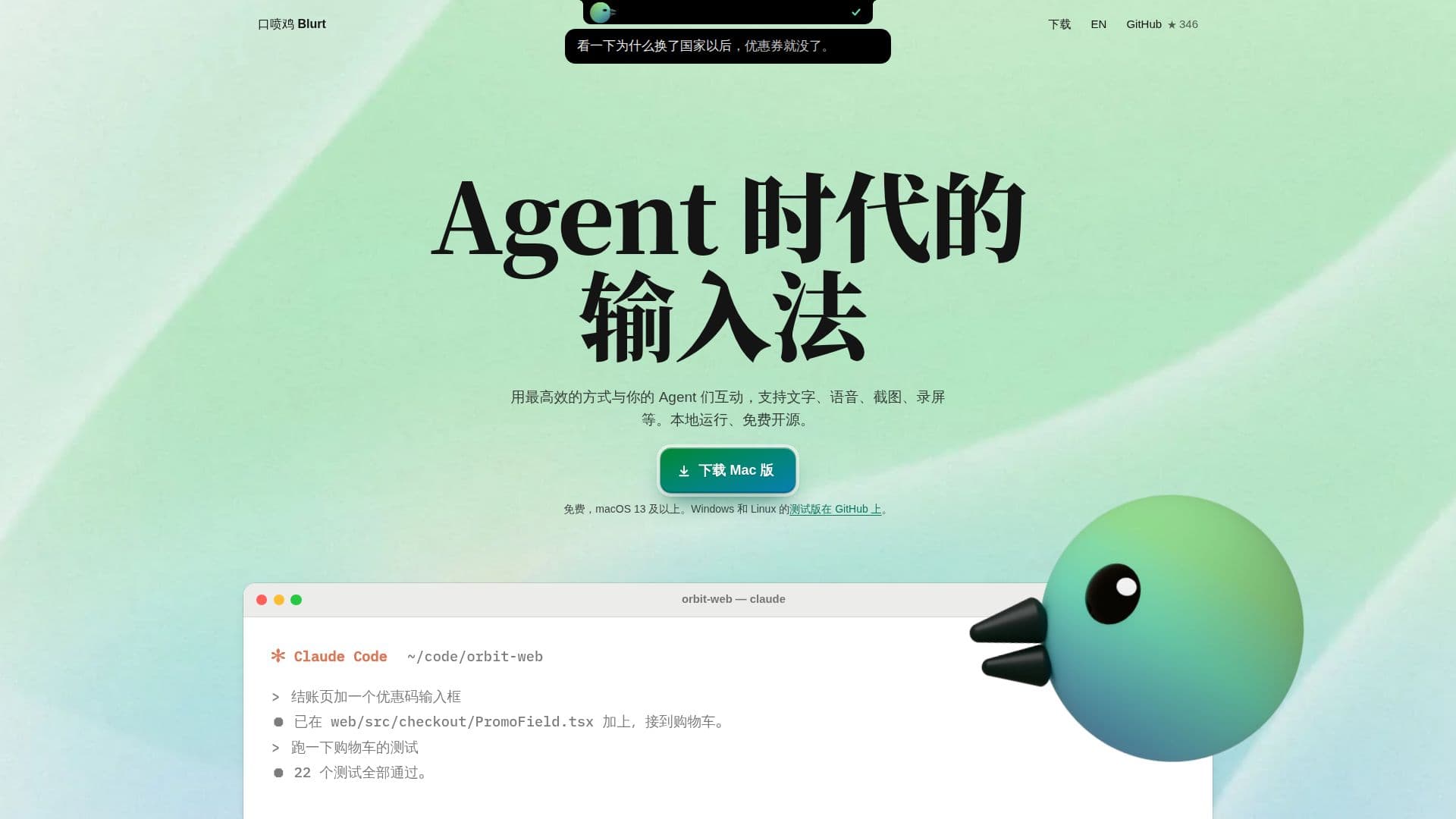
Blurt screenshot
Blurt screenshot

Blurt, also known as 口喷鸡, is an innovative input method designed for interacting with AI agents and enhancing productivity across various applications. It operates locally on your Mac, Windows, or Linux device, ensuring privacy and speed without requiring an internet connection for core dictation features. The tool supports multiple input modalities, including voice, screenshots, and screen recordings, making it versatile for different workflows.

Read More

At its core, Blurt functions as a dictation tool. Users can press the 'fn' key to speak, and their words appear at the cursor in any application. A double-tap of 'fn' sends the transcribed text. This local processing ensures rapid transcription, with Blurt boasting a processing time of 0.39 seconds, significantly faster than many cloud-based alternatives. It's free and open-source, offering unlimited usage without character limits.

Beyond basic dictation, Blurt offers advanced features for interacting with AI agents. Users can take screenshots, annotate them with voice comments, and then drag them into tools like Claude, where the image becomes an attachment and the voice comments are transcribed into the input box. Similarly, screen recordings can be made while speaking, and Blurt's agent integration can organize these into actionable items, complete with screenshots, steps, and potential code issues, ideal for developers or project managers.

Blurt also includes robust translation capabilities. By pressing 'fn' and speaking, users can translate between Chinese and English, or into other languages like Japanese, Korean, French, German, and Spanish. It leverages either local models for quick, rough translations or cloud-based AI keys for higher accuracy. The tool supports creating checklists by double-tapping 'Shift' while speaking, and it can extract text from screenshots with high accuracy, even translating it directly.

For team collaboration, Blurt allows users to select items and generate instructions for AI agents like Claude Code or Codex, facilitating automated task resolution. These items, including original dialogue, steps, and screenshots, can be bundled into ZIP files for easy sharing with colleagues. Furthermore, Blurt extends its functionality to mobile devices, allowing iPhones and Android phones to act as a remote trackpad, keyboard, and microphone for the computer, enhancing flexibility for users working away from their main setup. All data, including voice recognition and text, remains on the user's computer, with optional cloud services only used for specific features like enhanced translation or model downloads, ensuring a strong focus on user privacy.

  • CategoryAI Transcription Tools
  • Pricing ModelFree
  • DeploymentLocal
  • PlatformsmacOS, Windows, Linux, iOS (self-compiled), Android (self-compiled)

  • Local Voice Dictation: Press 'fn' to speak, text appears at cursor in any app.

  • Fast Transcription: 0.39-second processing for dictation on Mac.

  • Screenshot Annotation: Capture screens, add voice comments, drag to AI agents.

  • Screen Recording to Tasks: Record operations with voice, AI agent organizes into actionable items.

  • Multilingual Translation: Translate spoken Chinese/English to various languages.

  • Checklist Creation: Double-tap 'Shift' while speaking to generate lists.

  • Text Extraction from Screenshots: OCR functionality with high accuracy and translation.

  • Agent Interaction: Generate instructions for AI agents from selected tasks.

  • Team Collaboration: Bundle tasks, screenshots, and instructions into ZIP files.

  • Mobile Device Integration: Use iPhone/Android as remote trackpad, keyboard, and microphone.

  • Privacy-Focused: All data processed locally on your computer.

  • Open Source: Free to use with source code available on GitHub.

  • Cross-Platform Support: Available for macOS, Windows, and Linux (beta for Windows/Linux).

  • Customizable Keybindings: Remap control keys for personalized workflow.

  • Offline Mode: Optional local models for dictation without internet connection.

  1. Activate Dictation: Press the 'fn' key to start speaking; your words will appear at the cursor.

  2. Send Text: Double-tap 'fn' to stop speaking and send the transcribed text to your application.

  3. Annotate Screenshots: Use '⌥ A' to select an area, speak your comments, then drag the card to an AI agent.

  4. Record Tasks: Press '⌥ R' to select a window or area, speak while operating, and Blurt will organize it into actionable items.

  5. Translate Spoken Text: Press 'fn', then double-tap '⌘' while speaking Chinese to get English output, or vice-versa.

  6. Extract & Translate Text from Images: Use '⌥ C' to box unselectable text in a screenshot, then '⌥ T' to translate it to English.

  7. Connect Mobile Device: Open Blurt settings on your computer, go to 'Phone', and scan the QR code with your iPhone or Android device.

  • Efficient Coding with Agents
  • Bug Reporting & Task Management
  • Multilingual Communication
  • Quick Voice Notes & Checklists
  • Document Annotation & Feedback
  • Accessibility & Hands-Free Input
  • Remote Control & Dictation
  • Developer Workflow Automation

Blurt Reviews

Loading...

Popular AI Tools Like Blurt

Spokenly is a voice-to-text dictation app for macOS, Windows, Linux, and iOS. It offers free offline transcription using local models and supports over 100 languages. Users can…

AI Transcription Tools

Ranked #63 in AI Transcription Tools

View Tool

Voice-to-text dictation app for macOS, Windows, Linux, and iOS. It offers free offline transcription using local models and supports over 100 languages. Users can…Spokenly is a voice-to-text dictation app for macOS, Windows, Linux, and iOS. It offers free offline transcription using local models and supports over 100 languages. Users can…

AI Transcription Tools
Ranked #63 in AI Transcription Tools

VoiceInk

AI Apps

VoiceInk is a privacy-focused dictation app for macOS and iOS that uses local AI models for fast, accurate transcription. It offers offline processing, custom dictionaries, and…

AI Transcription Tools

Ranked #60 in AI Transcription Tools

View Tool

AI Apps

Privacy-focused dictation app for macOS and iOS that uses local AI models for fast, accurate transcription. It offers offline processing, custom dictionaries, and…VoiceInk is a privacy-focused dictation app for macOS and iOS that uses local AI models for fast, accurate transcription. It offers offline processing, custom dictionaries, and…

AI Transcription Tools
Ranked #60 in AI Transcription Tools

Aqua Voice offers fast, accurate, and private speech-to-text capabilities for Mac, Windows, and iPhone. It integrates seamlessly with AI workflows, allowing users to dictate text…

AI Transcription Tools

Ranked #56 in AI Transcription Tools

View Tool

Offers fast, accurate, and private speech-to-text capabilities for Mac, Windows, and iPhone. It integrates seamlessly with AI workflows, allowing users to dictate text…Aqua Voice offers fast, accurate, and private speech-to-text capabilities for Mac, Windows, and iPhone. It integrates seamlessly with AI workflows, allowing users to dictate text…

AI Transcription Tools
Ranked #56 in AI Transcription Tools

Willow Voice offers fast, accurate voice dictation for Mac, Windows, and iPhone. It seamlessly converts speech to text, enhancing productivity with context-aware AI and custom…

AI Transcription ToolsHealthcare & Life Sciences

Ranked #38 in AI Transcription Tools

View Tool

Offers fast, accurate voice dictation for Mac, Windows, and iPhone. It seamlessly converts speech to text, enhancing productivity with context-aware AI and custom…Willow Voice offers fast, accurate voice dictation for Mac, Windows, and iPhone. It seamlessly converts speech to text, enhancing productivity with context-aware AI and custom…

AI Transcription ToolsHealthcare & Life Sciences
Ranked #38 in AI Transcription Tools

Spoke

AI Apps

Spoke is a push-to-talk dictation app for macOS that transcribes your voice into any app fully on-device. It adds a visual Flow builder to turn speech into automated, AI-powered…

AI Transcription Tools

Ranked #178 in AI Transcription Tools

View Tool

AI Apps

Push-to-talk dictation app for macOS that transcribes your voice into any app fully on-device. It adds a visual Flow builder to turn speech into automated, AI-powered…Spoke is a push-to-talk dictation app for macOS that transcribes your voice into any app fully on-device. It adds a visual Flow builder to turn speech into automated, AI-powered…

AI Transcription Tools
Ranked #178 in AI Transcription Tools

Keebye

AI Apps

Keebye offers on-device voice dictation for Mac and Windows, enabling builders to manage parallel AI-agent workstreams. It supports 25 languages and ensures privacy by keeping all…

AI Transcription Tools

Ranked #182 in Productivity

View Tool

AI Apps

Offers on-device voice dictation for Mac and Windows, enabling builders to manage parallel AI-agent workstreams. It supports 25 languages and ensures privacy by keeping all…Keebye offers on-device voice dictation for Mac and Windows, enabling builders to manage parallel AI-agent workstreams. It supports 25 languages and ensures privacy by keeping all…

AI Transcription Tools
Ranked #182 in Productivity

MachinesFluent enables users to dictate text instead of typing in any Windows app. It offers voice dictation, AI text workflows, and supports offline use, ensuring privacy and…

AI Transcription Tools

Ranked #226 in AI Transcription Tools

View Tool

Enables users to dictate text instead of typing in any Windows app. It offers voice dictation, AI text workflows, and supports offline use, ensuring privacy and…MachinesFluent enables users to dictate text instead of typing in any Windows app. It offers voice dictation, AI text workflows, and supports offline use, ensuring privacy and…

AI Transcription Tools
Ranked #226 in AI Transcription Tools

Loqua

AI Apps

Loqua is a context-aware AI voice typing app designed for Mac and Windows. It transforms speech into polished text, removes filler words, and supports multilingual translation.…

AI Transcription Tools

Ranked #34 in Productivity

View Tool

AI Apps

Context-aware AI voice typing app designed for Mac and Windows. It transforms speech into polished text, removes filler words, and supports multilingual translation.…Loqua is a context-aware AI voice typing app designed for Mac and Windows. It transforms speech into polished text, removes filler words, and supports multilingual translation.…

AI Transcription Tools
Ranked #34 in Productivity
1 of 8