
ToolPotion
AI Advisor
Submit a Tool (Free)

AI Video Expander

AI AppsAI Video Editors#244Pay-Per-Clip, Credit Packs, Subscription · Web

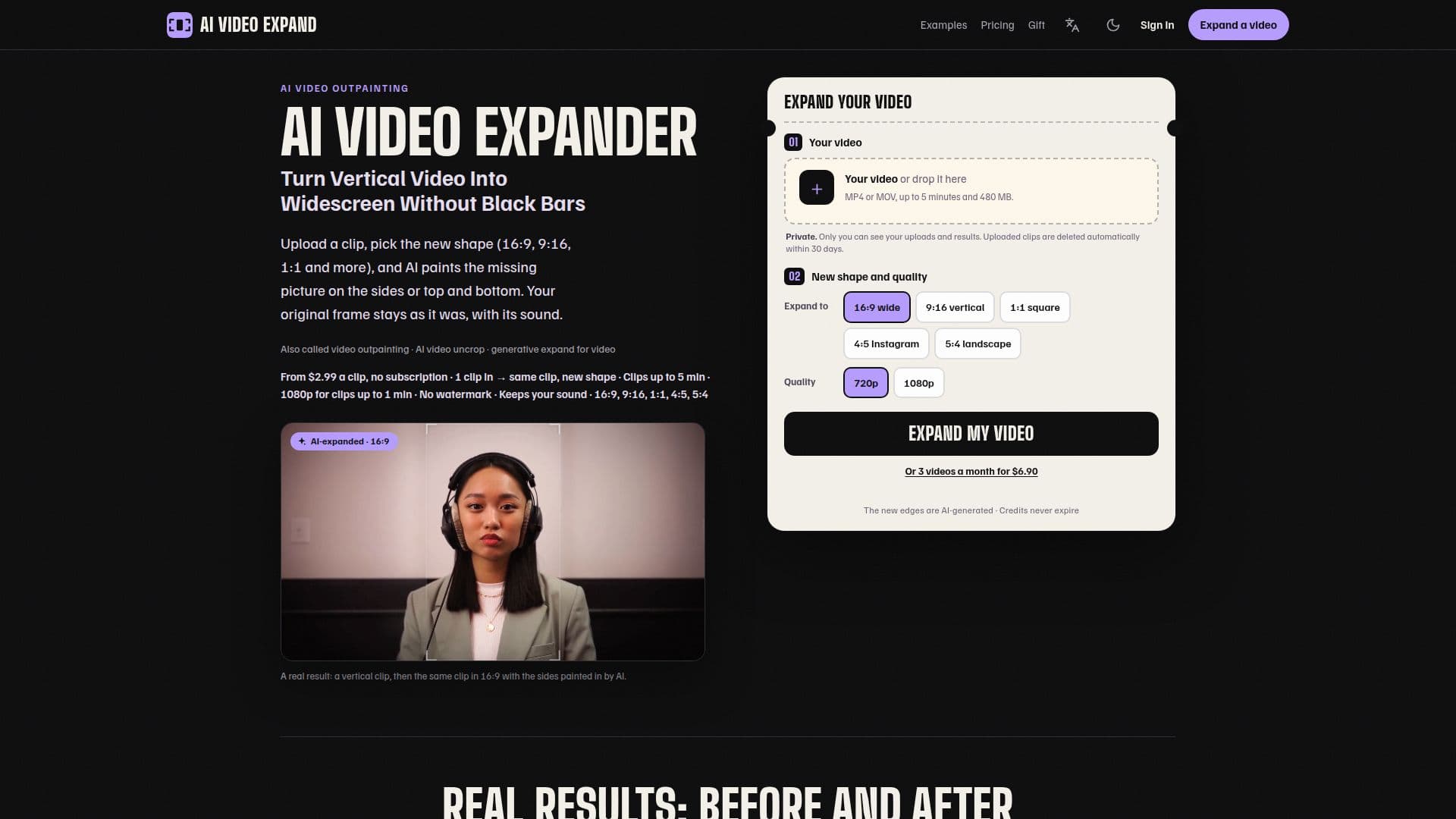
AI Video Expander transforms vertical or widescreen videos into various aspect ratios without black bars, blurring, or cropping. It uses AI to generate new visual content around the original frame, matching lighting and camera movement. Users can upload MP4 or MOV clips up to 5 minutes, choose output shapes like 16:9 or 9:16, and download the expanded video with original sound.

Visit Website
Share
AI Video Expander screenshot

AI Video Expander is an independent web-based tool designed to change video aspect ratios by intelligently generating new visual content around the original frame. Unlike traditional methods that involve cropping, adding black bars, or blurring backgrounds, this tool uses advanced AI video outpainting to seamlessly expand the video's canvas. It preserves the entire original frame and its sound, drawing new picture frame-by-frame that matches the existing lighting and camera motion.

Read More

The platform supports MP4 and MOV video clips up to 5 minutes in length and 480 MB in size. Users can select desired output aspect ratios such as 16:9 (widescreen), 9:16 (vertical), 1:1 (square), 4:5, or 5:4, and choose between 720p or 1080p quality. For clips over one minute, a second AI model redraws the entire picture at 720p, which may cause slight shifts in small details.

AI Video Expander is particularly useful for content creators who need to adapt videos for different social media platforms, such as converting a 9:16 phone video to 16:9 for YouTube, or a 16:9 video to 9:16 for TikTok and Reels. The process is straightforward: upload a clip, select the new shape and quality, pay per clip or use credits, and download the expanded MP4 within minutes. No sign-in is required for single clip processing, but Google sign-in allows users to save videos across devices and manage credit packs.

Pricing is based on video length and quality, charged in 10-second increments. A 10-second clip at 720p costs $2.99, with credit packs available for more frequent use. Credits never expire and are refunded if a video expansion fails. The service ensures no watermarks on paid videos and deletes uploaded clips after 30 days (or 2 days if not expanded). Results remain in 'My videos' until manually deleted. The AI models used, LTX 2.3 and MiniMax H3 Max, are from Lightricks and fal.ai, and user clips are never used for training.

While the AI excels at expanding videos with steady cameras and simple backgrounds, fast camera movements, busy edges, or text running off the side can be challenging. The AI invents content outside the original frame, meaning it cannot show what was truly there, and generated elements like faces or signs in the new area are fabricated. The service is an independent website and not affiliated with CapCut, Runway, Adobe, or TikTok.

  • CategoryAI Video Editors
  • Pricing ModelPay-Per-Clip, Credit Packs, Subscription
  • DeploymentCloud
  • PlatformsWeb

  • AI Video Outpainting: Generates new visual content around original video frames.

  • Aspect Ratio Conversion: Transforms videos to 16:9, 9:16, 1:1, 4:5, or 5:4.

  • No Black Bars or Cropping: Preserves the entire original video frame.

  • Original Sound Retention: Keeps the video's original audio track.

  • High-Quality Output: Supports 720p and 1080p resolution for expanded videos.

  • MP4/MOV Support: Accepts common video file formats.

  • Up to 5-Minute Clips: Processes videos up to 300 seconds long.

  • No Watermark: Delivers clean, watermark-free expanded videos.

  • Pay-Per-Clip Model: Offers single payments for individual video expansions.

  • Credit Packs: Provides credit bundles for multiple expansions.

  • Non-Expiring Credits: Purchased credits do not have an expiration date.

  • Refund for Failed Runs: Credits are returned automatically if a video fails to expand.

  • No Sign-in Required: Allows immediate video upload and processing.

  • Google Sign-in Option: Enables video management across devices and credit purchases.

  • Secure Payments: Uses Stripe for card, Apple Pay, and Google Pay transactions.

  1. Upload Clip: Upload an MP4 or MOV video file up to 5 minutes and 480 MB.

  2. Pick New Shape: Select the desired aspect ratio (e.g., 16:9, 9:16) and output quality (720p or 1080p).

  3. Pay and Expand: Pay for the clip or use credits; expansion starts immediately.

  4. Download Video: Access and download the expanded MP4 video from 'My videos' in minutes.

  • Vertical to Widescreen Conversion
  • Widescreen to Vertical Conversion
  • Square Video for Social Media
  • Instagram Feed Optimization
  • Eliminate Black Bars
  • Avoid Cropping Content
  • Professional Video Presentation
  • Adapting Content for Multiple Platforms

AI Video Expander Reviews

Loading...

Popular AI Tools Like AI Video Expander

AI Resize Video is a free online video editor that helps creators compress, resize, and convert videos directly in their browser. It features AI expansion to intelligently fill…

AI Video Editors

Ranked #113 in AI Video Editors

View Tool

Free online video editor that helps creators compress, resize, and convert videos directly in their browser. It features AI expansion to intelligently fill…AI Resize Video is a free online video editor that helps creators compress, resize, and convert videos directly in their browser. It features AI expansion to intelligently fill…

AI Video Editors
Ranked #113 in AI Video Editors

Video Extend is an online AI video extender that seamlessly continues short video clips. It adds smooth motion, expands duration, and maintains scene consistency using multiple AI…

AI Video Editors

Ranked #70 for Enhancing video quality

View Tool

Online AI video extender that seamlessly continues short video clips. It adds smooth motion, expands duration, and maintains scene consistency using multiple AI…Video Extend is an online AI video extender that seamlessly continues short video clips. It adds smooth motion, expands duration, and maintains scene consistency using multiple AI…

AI Video Editors
Ranked #70 for Enhancing video quality

Wink is an AI-powered video enhancer that improves video quality instantly. It fixes blurry videos, enhances low-resolution content to 4K, and preserves natural details. Free to…

AI Video EditorsMarketing & Creative Agencies

Ranked #240 in AI Apps

View Tool

AI-powered video enhancer that improves video quality instantly. It fixes blurry videos, enhances low-resolution content to 4K, and preserves natural details. Free to…Wink is an AI-powered video enhancer that improves video quality instantly. It fixes blurry videos, enhances low-resolution content to 4K, and preserves natural details. Free to…

AI Video EditorsMarketing & Creative Agencies
Ranked #240 in AI Apps

An AI video upscaler and enhancer that enlarges MP4 videos up to 4x and improves clarity, offering a fast in-browser preview and a high-quality cloud model for the strongest…

AI Video EditorsMedia & Entertainment
View Tool

An AI video upscaler and enhancer that enlarges MP4 videos up to 4x and improves clarity, offering a fast in-browser preview and a high-quality cloud model for the strongest…

AI Video EditorsMedia & Entertainment
See the Top 250 AI Apps

HitPaw VikPea is an AI video enhancer that upscales videos to 4K and 8K, repairs blurry footage, and colorizes old clips. It supports PC, Mac, web, and mobile, offering tailored…

AI Video Editors

Ranked #212 in AI Apps

View Tool

AI video enhancer that upscales videos to 4K and 8K, repairs blurry footage, and colorizes old clips. It supports PC, Mac, web, and mobile, offering tailored…HitPaw VikPea is an AI video enhancer that upscales videos to 4K and 8K, repairs blurry footage, and colorizes old clips. It supports PC, Mac, web, and mobile, offering tailored…

AI Video Editors
Ranked #212 in AI Apps

Aimages offers an online AI video enhancer and upscaler, transforming low-quality videos and images into professional-grade content. Users can easily upload media, select AI…

AI Video Editors

Ranked #91 for Enhancing video quality

View Tool

Offers an online AI video enhancer and upscaler, transforming low-quality videos and images into professional-grade content. Users can easily upload media, select AI…Aimages offers an online AI video enhancer and upscaler, transforming low-quality videos and images into professional-grade content. Users can easily upload media, select AI…

AI Video Editors
Ranked #91 for Enhancing video quality

Sunra AI Video Upscaler enhances video to 4K resolution online, using five specialized AI models tuned for general footage, live action, animation, and speed. It sharpens detail,…

AI Video EditorsMedia & Entertainment
View Tool

Enhances video to 4K resolution online, using five specialized AI models tuned for general footage, live action, animation, and speed. It sharpens detail,…Sunra AI Video Upscaler enhances video to 4K resolution online, using five specialized AI models tuned for general footage, live action, animation, and speed. It sharpens detail,…

AI Video EditorsMedia & Entertainment
See the Top 250 AI Apps

ModifyVideo.ai is an AI-powered tool that transforms video content by preserving motion and facial expressions while altering backgrounds, styles, and environments. It offers…

AI Video EditorsMarketing & Creative Agencies
View Tool

AI-powered tool that transforms video content by preserving motion and facial expressions while altering backgrounds, styles, and environments. It offers…ModifyVideo.ai is an AI-powered tool that transforms video content by preserving motion and facial expressions while altering backgrounds, styles, and environments. It offers…

AI Video EditorsMarketing & Creative Agencies
See the Top 250 AI Apps
1 of 8