ToolPotion
AI Advisor
Submit a Tool (Free)

3D Camera Control

3D Camera Control is an AI tool that generates new camera angles from a single reference image. Users can adjust rotation, elevation, and distance to create fresh perspectives for portraits, product visuals, and character references. It supports batch generation for multiple views and offers various tools for image and video creation, helping artists and designers explore different compositions without needing a 3D model.

Visit Website
Share
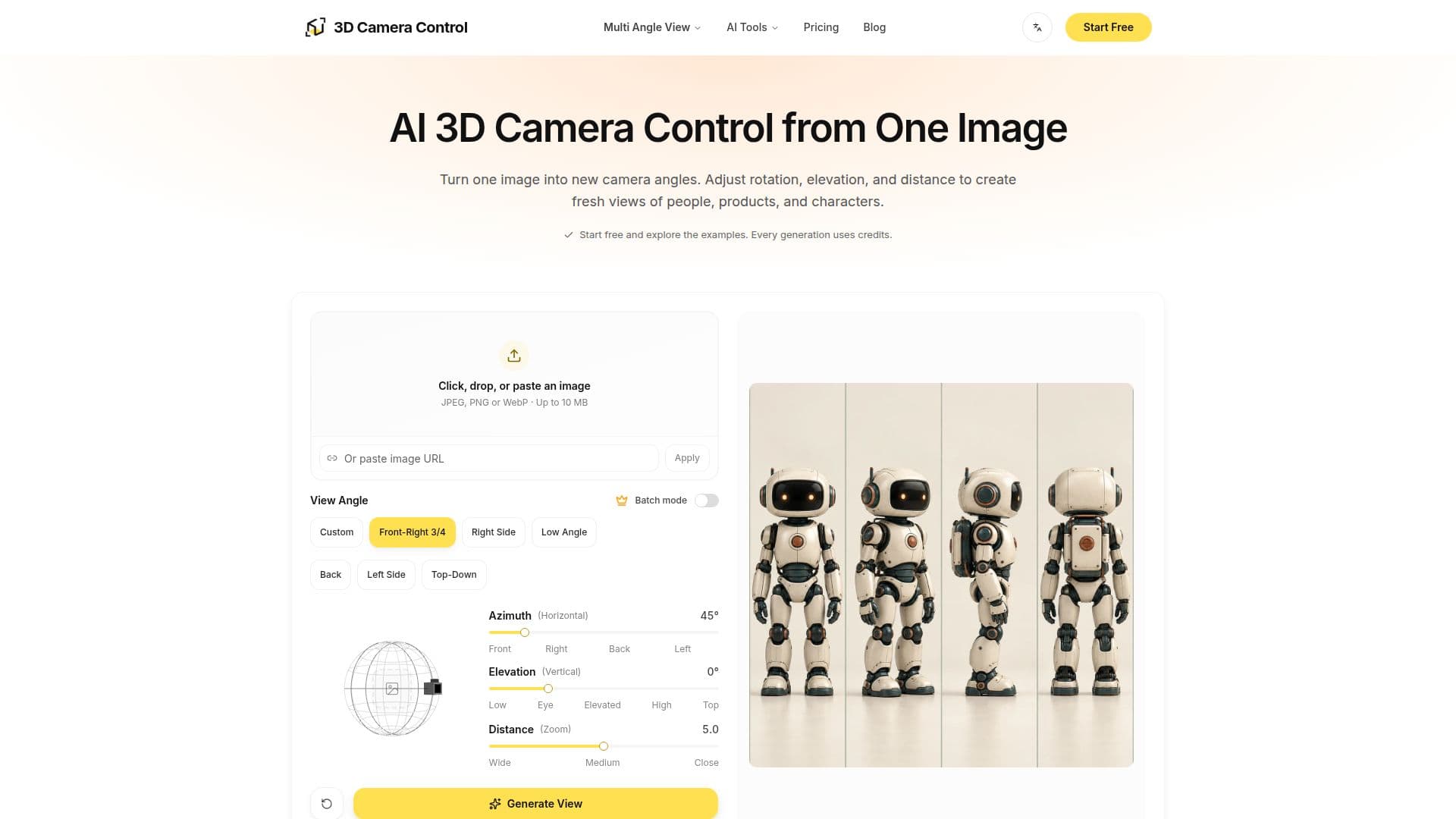
3D Camera Control screenshot

3D Camera Control is an innovative AI camera angle generator that allows users to transform a single 2D image into multiple new perspectives. By uploading a reference image, individuals can explore various viewpoints by adjusting horizontal rotation, elevation, and distance controls. This capability is particularly useful for creative professionals working with portraits, product photography, and character design, enabling them to visualize subjects from different angles without requiring a new source image or complex 3D modeling software.

Read More

The tool operates using the Qwen Image Edit 2511 Multiple Angles model, which combines the reference image with user-defined camera instructions to produce a new 2D image. It's important to note that the output is a still image, not an editable 3D model, and the AI infers hidden surfaces, meaning details and proportions can vary from the original. Users can generate multiple views simultaneously through batch generation, a feature available to eligible paid users, where each generated view consumes credits.

Beyond still images, 3D Camera Control also offers tools for video planning. Users can generate sequences of images to explore framing, plan storyboards, or prepare reference frames for video projects. The platform includes specific functionalities like "Character Turnaround" for developing multi-view character reference sheets and "Product Multiple Views" for exploring various angles of a product from a single photograph. Another related tool, "Camera Control for Video," allows users to guide AI video generation by defining camera paths with keyframes, adjusting angle, height, and distance over time to create dynamic moving shots from a still image.

Access to the workspace and example previews is free upon account registration, with complimentary credits often provided for initial tasks. However, generating images or videos requires available credits, which can be purchased through various plans or credit packs. The platform ensures that credits for failed generations are automatically refunded. This comprehensive suite of tools makes 3D Camera Control a versatile asset for artists, designers, marketers, and anyone needing to visualize subjects from diverse perspectives for creative projects.

  • CategoryImage Generation & Editing
  • Pricing ModelFreemium
  • DeploymentCloud
  • PlatformsWeb

  • Generate new camera angles from a single image

  • Adjust horizontal rotation, elevation, and distance

  • Supports portraits, product photos, and character illustrations

  • Batch generation for multiple views from one reference

  • Utilizes Qwen Image Edit 2511 Multiple Angles model

  • Output is a new 2D image, not an editable 3D model

  • No camera prompt needed; uses visual controls or presets

  • Explore different viewpoints without new source images

  • Create character turnaround sheets

  • Generate multiple product views (front, side, top, back)

  • Plan camera angle references for storyboards and video workflows

  • Camera Control for Video: guide AI video generation with keyframes

  • Edit camera paths with 2 to 9 keyframes for video

  • Video presets: orbits, spirals, swings

  • Supports JPG, PNG, WebP image uploads up to 10 MB

  1. Upload Image: Choose a clear photo or illustration with a visible subject (JPG, PNG, or WebP, up to 10 MB).

  2. Choose Camera Angle: Select a viewpoint preset or manually adjust horizontal rotation, elevation, and distance.

  3. Generate & Download: Generate your new view, review the result, and download the image.

  4. Explore Multiple Views (Paid): For batch generation, select several camera presets from the same reference.

  5. Plan Video Paths (Video Tool): For video, add your starting image, shape the camera path with keyframes, and generate the clip.

  • Portrait Angle Exploration
  • Product Visuals & Galleries
  • Character Reference Sheets
  • Video Storyboard Planning
  • Camera Path Planning for Video
  • Creative Brief Visuals
  • Design Review & Iteration
  • Social Media Content

3D Camera Control Reviews

Loading...

Popular AI Tools Like 3D Camera Control

Imagen3D

AI Apps

Imagen3D is an AI tool that converts photos into 3D models online with no 3D skills required. It generates viewable, shareable models with PBR textures and exports to GLB, OBJ,…

3D Model Generators
View Tool

AI Apps

AI tool that converts photos into 3D models online with no 3D skills required. It generates viewable, shareable models with PBR textures and exports to GLB, OBJ,…Imagen3D is an AI tool that converts photos into 3D models online with no 3D skills required. It generates viewable, shareable models with PBR textures and exports to GLB, OBJ,…

3D Model Generators
See the Top 250 AI Apps

Image to 3D AI converts images into 3D models for free, offering high-resolution generation and batch processing. It supports GLB and STL outputs, allowing users to create…

3D Model GeneratorsRetail & Consumer Goods
View Tool

Converts images into 3D models for free, offering high-resolution generation and batch processing. It supports GLB and STL outputs, allowing users to create…Image to 3D AI converts images into 3D models for free, offering high-resolution generation and batch processing. It supports GLB and STL outputs, allowing users to create…

3D Model GeneratorsRetail & Consumer Goods
See the Top 250 AI Apps

ArtCraft

AI Apps

ArtCraft is a comprehensive web studio for creative professionals, offering tools for image composition, 3D scene staging, and video editing. It integrates AI generation and…

AI Image Generators

Ranked #10 in 3D Model Generators

View Tool

AI Apps

Comprehensive web studio for creative professionals, offering tools for image composition, 3D scene staging, and video editing. It integrates AI generation and…ArtCraft is a comprehensive web studio for creative professionals, offering tools for image composition, 3D scene staging, and video editing. It integrates AI generation and…

AI Image Generators
Ranked #10 in 3D Model Generators

SAM 3D

AI Apps

SAM 3D is an independent third-party platform that makes Meta's SAM 3D Objects and SAM 3D Body models usable for single-image 3D reconstruction, letting developers and creators…

3D Model GeneratorsMedia & Entertainment
View Tool

AI Apps

Independent third-party platform that makes Meta's SAM 3D Objects and SAM 3D Body models usable for single-image 3D reconstruction, letting developers and creators…SAM 3D is an independent third-party platform that makes Meta's SAM 3D Objects and SAM 3D Body models usable for single-image 3D reconstruction, letting developers and creators…

3D Model GeneratorsMedia & Entertainment
See the Top 250 AI Apps

MagicShot.ai is an all-in-one AI platform for generating and editing images and videos. Create professional avatars, product photos, logos, illustrations, and even AI-generated…

AI Image Generators

Ranked #36 in AI Avatar Generators

View Tool

All-in-one AI platform for generating and editing images and videos. Create professional avatars, product photos, logos, illustrations, and even AI-generated…MagicShot.ai is an all-in-one AI platform for generating and editing images and videos. Create professional avatars, product photos, logos, illustrations, and even AI-generated…

AI Image Generators
Ranked #36 in AI Avatar Generators

Adobe Photoshop is a powerful online photo and design app that allows users to create, edit, and combine images. With advanced tools and AI-powered features, it enhances…

AI Photo Editors

Ranked #1 for Digital Artists

View Tool

Powerful online photo and design app that allows users to create, edit, and combine images. With advanced tools and AI-powered features, it enhances…Adobe Photoshop is a powerful online photo and design app that allows users to create, edit, and combine images. With advanced tools and AI-powered features, it enhances…

AI Photo Editors
Ranked #1 for Digital Artists

Image to 3D Studio is an online tool that converts 2D images into 3D models. Users can upload a photo and download the resulting 3D model in various formats like GLB, OBJ, STL,…

3D Model Generators

Ranked #163 for Game Developers

View Tool

Online tool that converts 2D images into 3D models. Users can upload a photo and download the resulting 3D model in various formats like GLB, OBJ, STL,…Image to 3D Studio is an online tool that converts 2D images into 3D models. Users can upload a photo and download the resulting 3D model in various formats like GLB, OBJ, STL,…

3D Model Generators
Ranked #163 for Game Developers

Image 2 is an AI image generator that allows users to create, edit, and refine images and videos. It offers a workspace for prompts, references, and projects, making it easier to…

AI Image Generators

Ranked #171 for Designing social media graphics

View Tool

AI image generator that allows users to create, edit, and refine images and videos. It offers a workspace for prompts, references, and projects, making it easier to…Image 2 is an AI image generator that allows users to create, edit, and refine images and videos. It offers a workspace for prompts, references, and projects, making it easier to…

AI Image Generators
Ranked #171 for Designing social media graphics
1 of 8