
Description
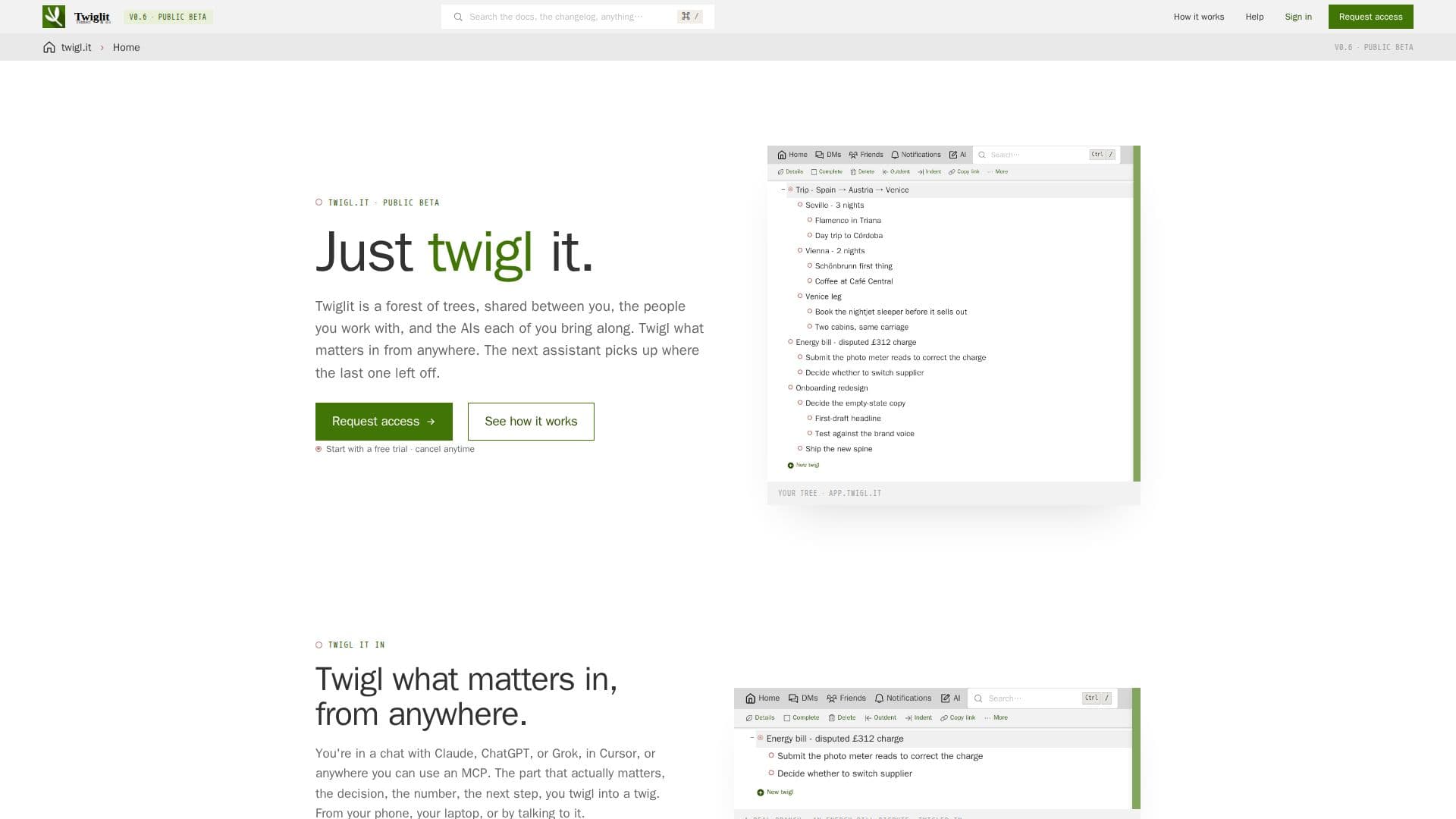
Twiglit offers a unique collaborative environment structured around a "forest of trees," designed for individuals and teams to manage information and projects. At its core, Twiglit allows users to "twigl" in important details, decisions, numbers, or next steps from any source—be it a chat with an AI, a document, or a conversation. These pieces of information land as individual "twigs" within a shared tree structure.
Read More
A key innovation of Twiglit is its seamless integration with various AI assistants, including Claude, ChatGPT, and Grok. Users can connect their preferred AI models and point them directly at a specific twig. This enables the AI to read the context and work within that twig, rather than relying on a transient chat history. This approach ensures that when an AI processes information or makes a decision, its findings, preferences, and facts are written directly onto the twig. This persistent storage means that the AI's "memory" stays with the work itself, not locked within a specific chatbot's account. Consequently, users can switch between different AI models without losing continuity or having to restart, as each new AI can access the complete, evolving context on the twig.
Twiglit is designed to be highly flexible and adaptable to various workflows. Twigs can be nested within other twigs, allowing for complex hierarchical organization. Each twig can also function as a task, complete with status, due dates, owners, priority, and custom fields. The platform supports multiple views of the same underlying tree structure, including a today list, week canvas, Kanban board, issue tracker, or work station, providing different lenses to manage projects. Documents, including headings, tables, images, and file attachments, can be embedded directly within any twig, keeping all relevant information consolidated.
Collaboration is central to Twiglit's design. Users can share any twig with individuals or AI models, granting them live access to the content and its context. Access can be revoked at any time, and specific sub-twigs can be excluded from sharing. Twigs can also exist in multiple places simultaneously within the tree, ensuring that updates made in one location are reflected everywhere, eliminating the need for duplicate copies. The platform also supports creating dynamic trees from saved searches or building custom trees from selected twigs, offering powerful organizational capabilities. With a stable REST API, MCP server, webhooks, and API keys, Twiglit is also built for developers, allowing for custom integrations and agent development.
- CategoryAI Knowledge Management
- Pricing ModelPublic Beta
- DeploymentCloud
- PlatformsWeb, iOS
Twiglit's Core Features
Collaborative workspace with shared trees and twigs
Integrate and connect multiple AI assistants (Claude, ChatGPT, Grok)
AI models read and write directly onto twigs, not chat history
Persistent storage of AI learnings, decisions, and preferences on twigs
Swappable AI assistants without loss of context
Nest any twig inside any other twig for hierarchical organization
Keyboard-first interface across web, iOS, and AI
Twigs can be tasks with status, due dates, owners, priority, and custom fields
Multiple views: today list, week canvas, Kanban board, issue tracker, work station
Documents with headings, tables, images, and file attachments on any twig
Share twigs with people or AIs, with live updates and access revocation
Twigs can live in multiple places simultaneously, updating everywhere
Build trees from saved searches or custom twig selections
Stable REST API, MCP server, webhooks, and API keys for developers
Import outlines or CSVs to start from existing work
How to use Twiglit?
Twigl in information: Capture decisions, numbers, or next steps from chats, documents, or conversations into a twig.
Organize your tree: Nest twigs within others, move them, and assign them as tasks with metadata like due dates and owners.
Connect your AIs: Integrate Claude, ChatGPT, or Grok and point them at specific twigs to read and write information.
Collaborate with AIs and people: Share twigs to enable real-time collaboration where AIs and team members contribute to the same context.
Manage workflows: View your tree as a today list, Kanban board, or issue tracker to manage projects and tasks.
Store AI learnings: Allow AIs to write their findings, decisions, and preferences directly onto twigs for persistent memory.
Customize and extend: Use the API, webhooks, and custom fields to tailor Twiglit to specific needs and integrations.
Twiglit's Use Cases
- Collaborative Project Management
- AI-Assisted Research
- Knowledge Base Creation
- Meeting Notes & Action Items
- Content Creation with AI
- Personal Information Management
- Customer Support Issue Tracking
- Legal Document Review