
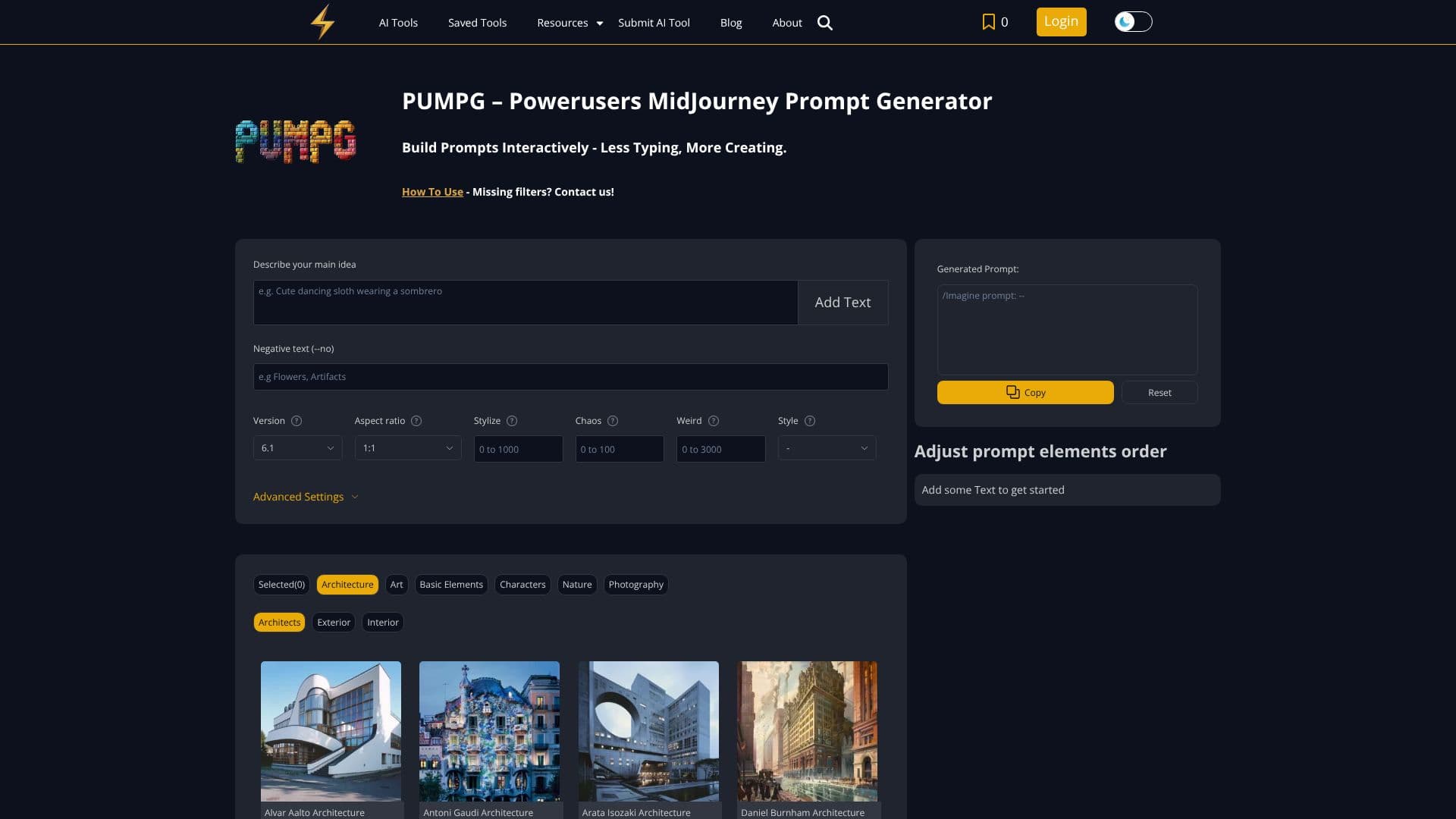
Description
PUMPG, the Powerusers MidJourney Prompt Generator, is designed to streamline the process of creating effective prompts for the Midjourney AI art generator. It transforms the often complex task of prompt engineering into an intuitive, interactive experience, allowing users to build prompts with less typing and more creative focus. The tool provides a user-friendly interface where users can input their main ideas, negative text prompts, and select from various Midjourney model versions, including Niji 5 and 6, along with aspect ratios suitable for different platforms like Instagram and TikTok.
Read More
Beyond basic parameters, PUMPG offers advanced settings to refine image generation. Users can leverage 'Stylize' and 'Chaos' parameters to control artistic interpretation and unpredictability, while 'Weird' introduces quirky elements. For more sophisticated control, 'Sref' (Style Reference) and 'Cref' (Character Reference) allow users to incorporate image URLs to influence the aesthetic and character consistency of generated images, with adjustable weight parameters. Other crucial settings include 'Seed' for reproducibility, 'Speed' to manage generation time and GPU credits (Relax, Fast, Turbo), and 'Quality' to balance sharpness with credit usage. The 'Stop' parameter enables early termination of generation for blurrier, less detailed results and credit savings, while 'Repeat' allows for multiple prompt runs.
The tool also supports specific features like 'Video' output of the generation process and 'Tile' for creating wallpaper-like patterns. PUMPG aims to be more than just a prompt builder; it's an educational tool that helps users understand and experiment with Midjourney's parameters. It addresses the challenge of remembering and effectively using numerous parameters by offering tooltips and a structured approach. This makes it ideal for artists seeking inspiration, looking to challenge their creative boundaries, maintain consistency in their practice, or simply have more fun with AI art generation. Unlike text-based AI assistants, PUMPG provides a visual, block-building approach to prompt creation.
For users new to AI art generation or those looking to enhance their skills, PUMPG simplifies the learning curve. It guides users through adding basic elements, detailed parameters, and advanced settings, encouraging iteration and refinement. The platform also provides guidance on uploading images for style and character references, explaining the difference between `--stylize` and `--style` parameters, and offering tips for creating both basic and advanced prompts. While PUMPG is primarily built for Midjourney, the developers are considering expanding to other AI art generators. The tool emphasizes user feedback and suggestions to continuously improve its functionality and user experience, aiming to be a go-to resource for Midjourney prompt generation.
- CategoryPrompt Engineering Tools
- Pricing ModelFreemium
- DeploymentCloud
- PlatformsWeb
Powerusers MidJourney Prompt Generator's Core Features
Interactive prompt building interface
Support for Midjourney model versions (2-6, Niji 5-6)
Parameter selection for aspect ratio, stylize, chaos, and weirdness
Advanced settings for style reference (Sref) and character reference (Cref)
Adjustable style and character weight parameters
Seed parameter for reproducibility
Speed control (Relax, Fast, Turbo) affecting GPU usage
Quality adjustment for generated images
Stop parameter for early generation termination
Repeat prompt functionality
Video output of generation process
Tile generation for wallpaper patterns
Tooltips for parameter explanations
User-friendly, building-block approach to prompt creation
How to use Powerusers MidJourney Prompt Generator?
Describe your main idea: Enter the core subject of your image.
Add Text & Negative Text: Specify desired elements and elements to exclude.
Select Model Version & Aspect Ratio: Choose the Midjourney model and image dimensions.
Adjust Stylize, Chaos, and Weirdness: Control artistic interpretation and uniqueness.
Utilize Advanced Settings: Incorporate image references (Sref/Cref) and adjust weights.
Configure Generation Parameters: Set Seed, Speed, Quality, and Stop settings.
Generate and Iterate: Copy the prompt to Midjourney, review results, and refine inputs.
Powerusers MidJourney Prompt Generator's Use Cases
- Prompt Engineering
- Creative Inspiration
- Artistic Exploration
- Consistent Art Style
- Time Saving
- Learning Midjourney