ToolPotion
AI Advisor
Submit a Tool (Free)

Pouchette

Pouchette is a macOS application designed to record meetings, lectures, and calls, generating detailed notes where each line links directly back to the exact moment it was spoken. It operates locally on your Mac without a bot joining calls, ensuring privacy and providing a free solution for remembering important information from spoken interactions.

Visit Website
Share
Pouchette screenshot

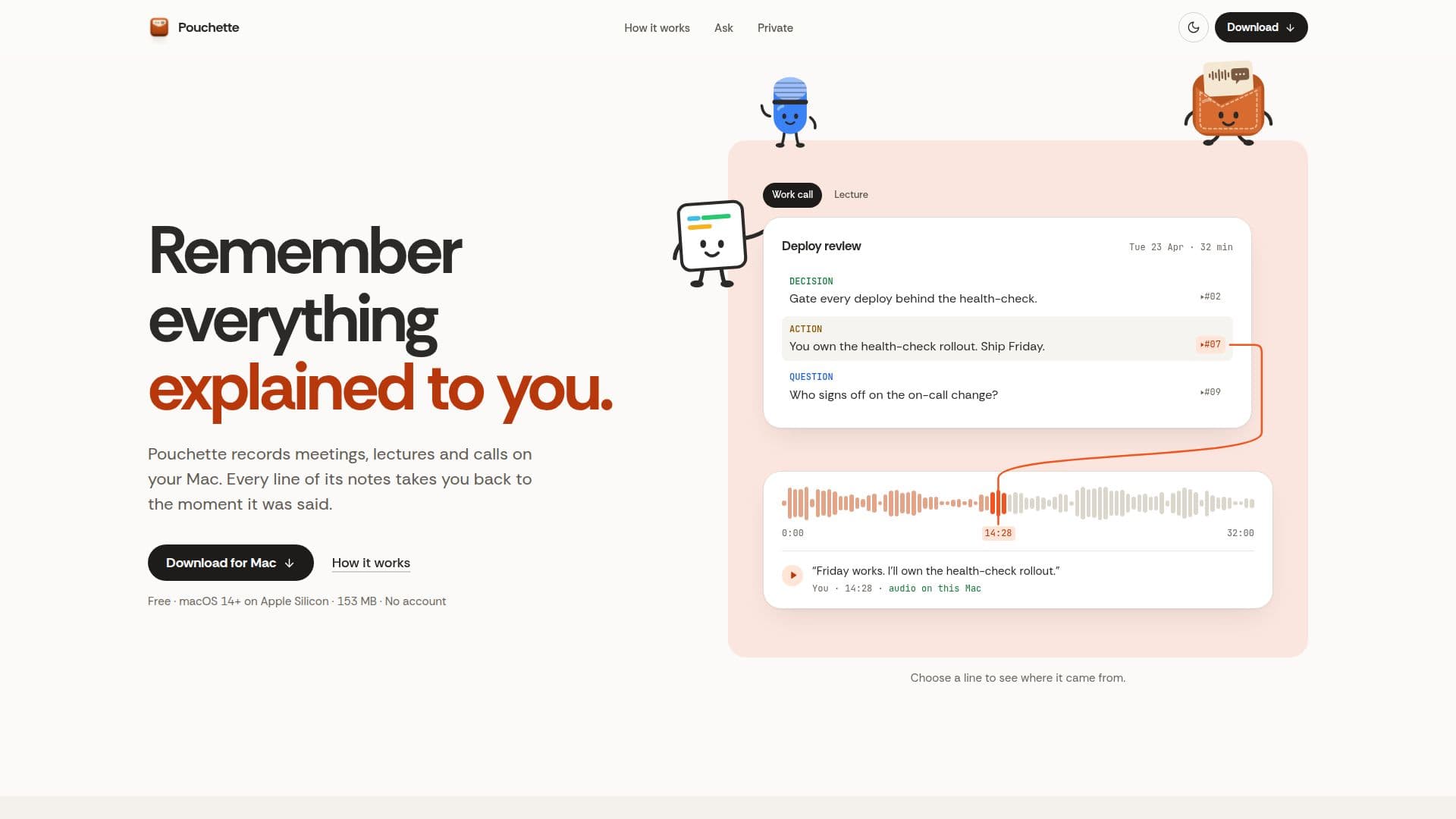
Pouchette is a dedicated macOS application that helps users remember everything explained to them during meetings, lectures, and calls. It records audio directly on your Mac and automatically generates comprehensive notes. A key feature is its ability to link every line of the generated notes back to the precise moment it was said in the recording, allowing for easy verification and recall of context.

Read More

The application operates entirely on your Mac, ensuring that no bot joins your calls and that recordings, transcripts, and notes remain as files in your local Library folder. This commitment to privacy means nothing is uploaded in the background unless you explicitly choose a cloud AI service for notes or connect external services like Claude or Codex, in which case only transcript and note text leaves your Mac. Voiceprints, used for speaker recognition, also stay on your device.

Pouchette simplifies the note-taking process. Users can initiate recording from the menu bar or with a keyboard shortcut (⌃⌥⌘R). It captures both your microphone and your Mac’s system audio. As conversations unfold, notes are formed in real-time, including summaries, key points, and open questions, all linked to their corresponding lines in the transcript. A small floating window can display what you've missed if you glance away.

After recording, Pouchette processes the audio to identify speakers and flags any note lines that cannot be matched to the transcript, though it does not perform fact-checking. It leverages local models like Ollama for model-generated live summaries directly on your Mac. The tool also offers a powerful search function, allowing users to ask questions in plain language weeks later and receive answers pieced together from all relevant past meetings or lectures, each part retaining its link to the source.

Additional functionalities include a daily brief summarizing open actions, recent decisions, and unanswered questions across all meetings. It can recognize voices, suggesting names after initial confirmation. Users can also convert meeting content into various document formats, such as follow-up emails or decision logs, using one of 10 available templates, with all lines still cited to their source. Pouchette is free for both work and personal use, requires macOS 14+ on Apple Silicon, and does not necessitate an account or AI subscription for its core features.

  • CategoryAI Meeting Assistants
  • Pricing ModelFree
  • DeploymentRuns locally
  • PlatformsmacOS

  • Records meetings, lectures, and calls on Mac

  • Generates notes with lines linked to audio moments

  • Operates locally on macOS 14+ with Apple Silicon

  • No bot joins calls, ensuring privacy

  • Real-time note generation during conversations

  • Model-generated live summaries (via Ollama on Mac)

  • Speaker recognition and flagging of unmatched notes

  • Search across all past meetings using natural language

  • Daily brief of actions, decisions, and questions

  • Converts meetings into documents (e.g., emails, decision logs)

  • Supports external AI services like Claude or Codex for notes

  • Free for work and personal use

  • Records mic and system audio

  • Keeps recordings, transcripts, and notes on your Mac

  1. Install Pouchette: Drag the signed, notarized disk image to your Applications folder and open it.

  2. Grant Permissions: Allow Screen & System Audio Recording in macOS settings, then quit and reopen the app.

  3. Choose Notes Engine: Select a notes engine (Quick notes require no account; Claude Code or Codex can use existing logins).

  4. Start Recording: Press record from the menu bar or use the shortcut ⌃⌥⌘R to begin capturing audio.

  5. Review Notes: Access generated notes, click on any line to jump to the corresponding audio moment.

  6. Ask Questions: Use the search function to query past meetings in plain language and retrieve relevant information.

  7. Generate Documents: Convert meeting content into follow-up emails, decision logs, or other templates.

  • Meeting Transcription
  • Lecture Note-Taking
  • Call Summarization
  • Decision Tracking
  • Action Item Management
  • Knowledge Retrieval
  • Follow-up Communication
  • Personal Memory Aid

Pouchette Reviews

Loading...

Popular AI Tools Like Pouchette

Otter.ai

AI Apps

Otter Meeting Agent is an AI-powered notetaker that provides real-time transcription, automated summaries, insights, and action items, enhancing productivity for teams and…

AI Meeting Assistants

Ranked #41 in AI Apps

View Tool

AI Apps

Otter Meeting Agent is an AI-powered notetaker that provides real-time transcription, automated summaries, insights, and action items, enhancing productivity for teams and…

FeaturedAI Meeting Assistants
Ranked #41 in AI Apps

NoteOwl

AI Apps

NoteOwl offers private AI meeting notes for Mac users. It records audio directly from your Mac, transcribes speakers, and generates summaries and action items. With a one-time…

AI Meeting Assistants
View Tool

AI Apps

Offers private AI meeting notes for Mac users. It records audio directly from your Mac, transcribes speakers, and generates summaries and action items. With a one-time…NoteOwl offers private AI meeting notes for Mac users. It records audio directly from your Mac, transcribes speakers, and generates summaries and action items. With a one-time…

AI Meeting Assistants
See the Top 250 AI Apps

Bluedot is a bot-free AI note taker for online and in-person meetings. It captures, transcribes, and summarizes conversations, generating actionable notes and action items.…

AI Meeting Assistants

Ranked #18 in AI Note-Taking Apps

View Tool

Bot-free AI note taker for online and in-person meetings. It captures, transcribes, and summarizes conversations, generating actionable notes and action items.…Bluedot is a bot-free AI note taker for online and in-person meetings. It captures, transcribes, and summarizes conversations, generating actionable notes and action items.…

FeaturedAI Meeting Assistants
Ranked #18 in AI Note-Taking Apps

Reline is a bot-free AI notepad designed for meetings, lectures, and calls. It captures audio locally, provides speaker-separated transcripts, and generates citation-backed…

AI Note-Taking AppsEducation & E-learning

Ranked #54 in AI Note-Taking Apps

View Tool

Bot-free AI notepad designed for meetings, lectures, and calls. It captures audio locally, provides speaker-separated transcripts, and generates citation-backed…Reline is a bot-free AI notepad designed for meetings, lectures, and calls. It captures audio locally, provides speaker-separated transcripts, and generates citation-backed…

AI Note-Taking AppsEducation & E-learning
Ranked #54 in AI Note-Taking Apps

Private voice workspace for Mac that allows users to record calls, dictate into any app, and capture voice notes. It keeps results as searchable local Markdown,…Daisy is a private voice workspace for Mac that allows users to record calls, dictate into any app, and capture voice notes. It keeps results as searchable local Markdown,…

AI Transcription Tools
See the Top 250 AI Apps

Jamie

AI Apps

Jamie is an AI note taker that creates detailed meeting notes and action items across various platforms, including offline meetings. It prioritizes privacy and security, ensuring…

AI Meeting Assistants

Ranked #32 in AI Note-Taking Apps

View Tool

AI Apps

AI note taker that creates detailed meeting notes and action items across various platforms, including offline meetings. It prioritizes privacy and security, ensuring…Jamie is an AI note taker that creates detailed meeting notes and action items across various platforms, including offline meetings. It prioritizes privacy and security, ensuring…

AI Meeting Assistants
Ranked #32 in AI Note-Taking Apps

Jottoo

AI Apps

Jottoo is a productivity app designed for professionals to capture, transcribe, and summarize meetings without a bot. It organizes notes, manages tasks, and integrates with…

AI Meeting Assistants

Ranked #167 in Productivity

View Tool

AI Apps

Productivity app designed for professionals to capture, transcribe, and summarize meetings without a bot. It organizes notes, manages tasks, and integrates with…Jottoo is a productivity app designed for professionals to capture, transcribe, and summarize meetings without a bot. It organizes notes, manages tasks, and integrates with…

AI Meeting Assistants
Ranked #167 in Productivity

Granola

AI Apps

Granola is an AI notepad designed for back-to-back meetings, capturing notes, actions, and memory without the need for a meeting bot. It seamlessly integrates with various meeting…

AI Meeting Assistants

Ranked #153 in AI Apps

View Tool

AI Apps

AI notepad designed for back-to-back meetings, capturing notes, actions, and memory without the need for a meeting bot. It seamlessly integrates with various meeting…Granola is an AI notepad designed for back-to-back meetings, capturing notes, actions, and memory without the need for a meeting bot. It seamlessly integrates with various meeting…

AI Meeting Assistants
Ranked #153 in AI Apps
1 of 8