
ToolPotion
AI Advisor
Submit a Tool (Free)

Plannotator Inbox

AI AppsProductivity#55Free · Web Browser

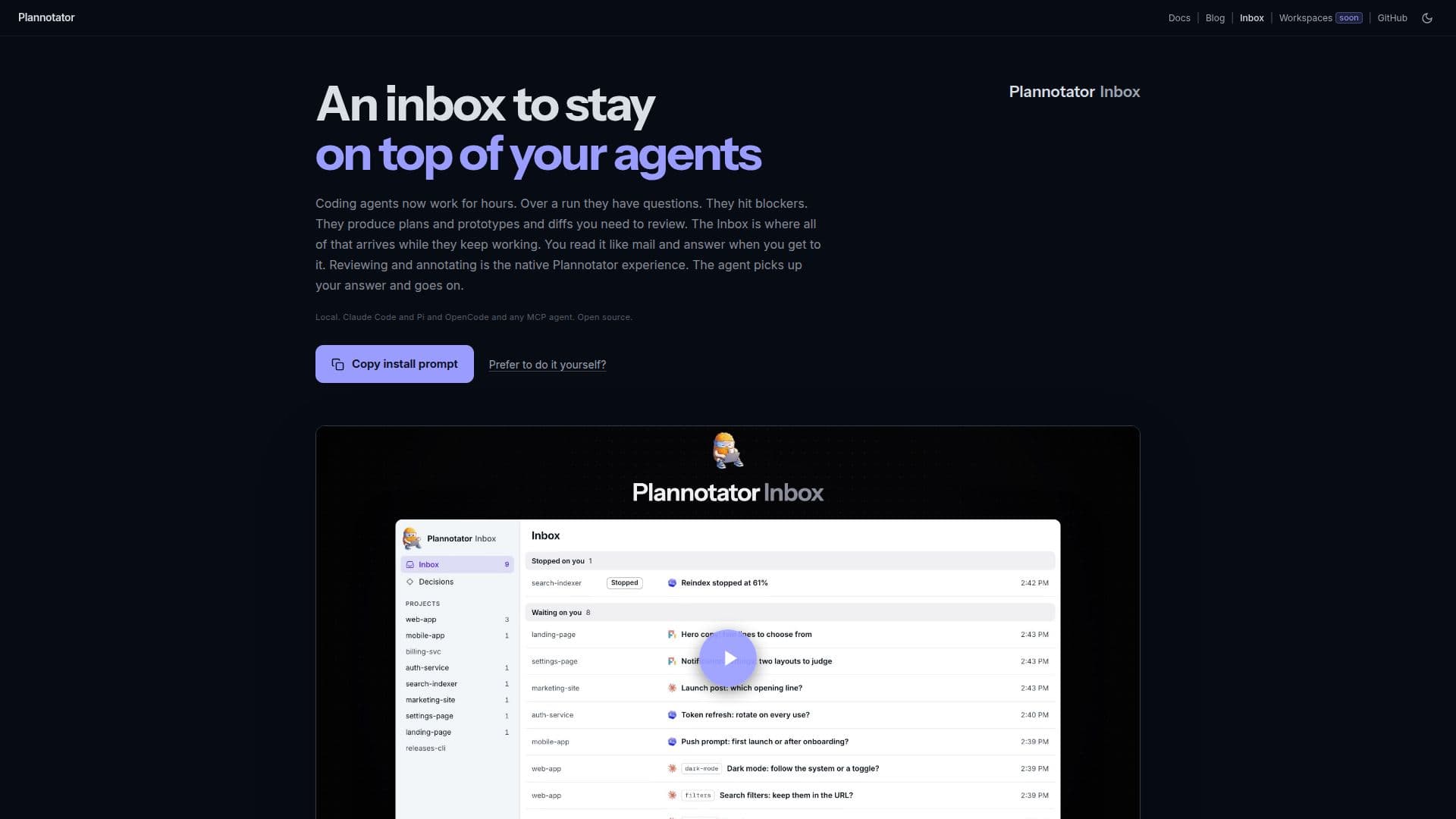
Plannotator Inbox provides a centralized interface for managing interactions with AI agents. It collects agents' questions, blockers, and finished work, presenting them as organized threads with context. Users can review design documents, prototypes, and code changes, providing structured feedback that agents use to continue their tasks. This tool enhances collaboration and oversight for long-running AI agent sessions.

Visit Website
Share
Plannotator Inbox screenshot

Plannotator Inbox serves as a dedicated hub for managing and interacting with AI agents, addressing the challenge of monitoring multiple long-running agent sessions. Instead of tracking agents within their individual windows, which can be impractical for extended tasks, the Inbox consolidates all agent communications into a single, accessible location. This includes questions, identified blockers, and completed work such as design documents, prototypes, and code reviews.

Read More

Each item in the Inbox is presented as a thread, complete with its relevant context, allowing users to address issues when ready. When an agent requires input, it writes to the Inbox, presenting options for questions, details on blockers, or artifacts like plans, prototypes, or diffs for review. Users can then respond directly within the Inbox by selecting options, annotating files using Plannotator's tools, or sending structured feedback. This feedback is delivered to the agent as the next turn in its session, enabling it to proceed with its work.

The Inbox supports various types of agent output. For design documents, it displays the document alongside the thread, allowing users to comment on specific lines. If an agent modifies the document after submission, the Inbox indicates this and opens the original version sent for review. When an agent sends a prototype, it can be viewed next to the thread or in full screen, with annotation tools available for pinning comments on parts needing change. The platform supports Markdown, HTML, Mermaid, and Graphviz for prototypes.

For code reviews, agents can send a guided review at the end of a run, splitting changes into sections with diffs and summaries. This allows for a comprehensive review of the entire change in one sitting. The Inbox also offers a full review surface where questions can include images as choices, and documents, prototypes, diagrams, images, videos, and code can be opened full screen for annotation and drawing. Plannotator Inbox integrates with various agent environments, including Plannotator's Claude Code mod, Pi extension, and OpenCode plugin, which write to the Inbox automatically. Other agents can connect via a local MCP server, with specific steps provided for tools like Codex, Cursor, VS Code, Gemini CLI, Zed, Goose, Amp, and Cline.

The Inbox runs locally, listening on 127.0.0.1 and opening in a browser. Threads and answers are stored as files under ~/.plannotator. It is part of the Plannotator open-source project, licensed under MIT or Apache 2.0. The tool also offers an excellent mobile experience, allowing users to access, read, answer, and review from anywhere via Tailscale, with content optimized for small screens. For team collaboration features, users can sign up for Plannotator Workspaces.

  • CategoryProductivity
  • Pricing ModelFree
  • DeploymentLocal
  • PlatformsWeb Browser

  • Centralized agent communication inbox

  • Threaded conversations with context

  • Review agent questions with options

  • Identify and resolve agent blockers

  • Review design documents with diagrams

  • Annotate prototypes (Markdown, HTML, Mermaid, Graphviz)

  • Guided code reviews with diffs and summaries

  • Full-screen review for documents, images, videos, code

  • Annotation tools for various file types

  • Integrates with Claude Code, Pi, OpenCode

  • Connects with Codex, Cursor, VS Code, Gemini CLI, Zed, Goose, Amp, Cline

  • Local deployment and data storage

  • Mobile-responsive interface

  • Open-source licensing (MIT or Apache 2.0)

  1. Install Plannotator: Download and install the Plannotator application.

  2. Run Plannotator Inbox: Execute the command `plannotator inbox` to start the local server.

  3. Access Inbox: Open your web browser and navigate to the local address (127.0.0.1) where the Inbox is running.

  4. Connect Agents: Configure your AI agents (e.g., Claude Code, Pi, OpenCode) to write to the Inbox.

  5. Review Agent Output: Open threads in the Inbox to view agent questions, blockers, design docs, prototypes, or code reviews.

  6. Provide Feedback: Use annotation tools, select options, or write responses directly in the Inbox.

  7. Send to Agent: Submit your feedback, which will be delivered to the agent to continue its work.

  8. Monitor Progress: Receive notifications when agents require your attention or submit new work.

  • AI Agent Oversight
  • Design Document Review
  • Prototype Feedback
  • Code Change Approval
  • Blocker Resolution
  • Structured Agent Interaction
  • Remote Agent Management

From Plannotator

Plannotator Inbox Reviews

Loading...

Popular AI Tools Like Plannotator Inbox

Pump Up

AI Apps

Pump Up transforms repetitive chat threads into interactive AI apps, enabling efficient management of hundreds of agents in parallel. It allows users to design apps with agents,…

AI Agent Builders

Ranked #47 for Responding to customer reviews

View Tool

AI Apps

Transforms repetitive chat threads into interactive AI apps, enabling efficient management of hundreds of agents in parallel. It allows users to design apps with agents,…Pump Up transforms repetitive chat threads into interactive AI apps, enabling efficient management of hundreds of agents in parallel. It allows users to design apps with agents,…

AI Agent Builders
Ranked #47 for Responding to customer reviews

Tokenrip

AI Apps

Tokenrip is a shared workspace designed for AI agents to collaborate and manage tasks efficiently. It allows teams to connect various AI agents like Claude, ChatGPT, and Grok,…

Automation & Agents

Ranked #85 in AI Project Management

View Tool

AI Apps

Shared workspace designed for AI agents to collaborate and manage tasks efficiently. It allows teams to connect various AI agents like Claude, ChatGPT, and Grok,…Tokenrip is a shared workspace designed for AI agents to collaborate and manage tasks efficiently. It allows teams to connect various AI agents like Claude, ChatGPT, and Grok,…

Automation & Agents
Ranked #85 in AI Project Management

Agent Inbox provides a unified inbox for AI agents, consolidating communications from email, Slack, and Telegram into a single interface. It enables agents to receive messages,…

AI Email Assistants

Ranked #75 in AI Email Assistants

View Tool

Provides a unified inbox for AI agents, consolidating communications from email, Slack, and Telegram into a single interface. It enables agents to receive messages,…Agent Inbox provides a unified inbox for AI agents, consolidating communications from email, Slack, and Telegram into a single interface. It enables agents to receive messages,…

AI Email Assistants
Ranked #75 in AI Email Assistants

Agent Inbox

AI Agents

Agent Inbox provides a user interface for interacting with AI agents, specifically designed for LangChain deployments. It allows users to manage threads, view agent status, and…

AI Agent Builders
View Tool

AI Agents

Provides a user interface for interacting with AI agents, specifically designed for LangChain deployments. It allows users to manage threads, view agent status, and…Agent Inbox provides a user interface for interacting with AI agents, specifically designed for LangChain deployments. It allows users to manage threads, view agent status, and…

AI Agent Builders
See the Top 250 AI Agents

Traycer

AI Apps

Traycer is a spec-first planning workspace for agentic coding that lets developers plan changes as specs and tickets, run multiple coding agents side by side, and review changes…

AI Coding Assistants

Ranked #40 in Coding & Development

View Tool

AI Apps

Spec-first planning workspace for agentic coding that lets developers plan changes as specs and tickets, run multiple coding agents side by side, and review changes…Traycer is a spec-first planning workspace for agentic coding that lets developers plan changes as specs and tickets, run multiple coding agents side by side, and review changes…

FeaturedAI Coding Assistants
Ranked #40 in Coding & Development

AgentRelay

AI Apps

AgentRelay is a free local AI hub that connects your existing AI clients like Codex, Grok Bot, and Antigravity to compatible extensions, desktop apps, and scheduled workflows on…

AI Agent Builders

Ranked #249 in Workflow Automation

View Tool

AI Apps

Free local AI hub that connects your existing AI clients like Codex, Grok Bot, and Antigravity to compatible extensions, desktop apps, and scheduled workflows on…AgentRelay is a free local AI hub that connects your existing AI clients like Codex, Grok Bot, and Antigravity to compatible extensions, desktop apps, and scheduled workflows on…

AI Agent Builders
Ranked #249 in Workflow Automation

Ret

AI Apps

Ret is a desktop workbench designed for managing Codex and Claude Code agents. It allows users to run multiple agents simultaneously across projects, providing features like…

AI Agent Builders
View Tool

AI Apps

Desktop workbench designed for managing Codex and Claude Code agents. It allows users to run multiple agents simultaneously across projects, providing features like…Ret is a desktop workbench designed for managing Codex and Claude Code agents. It allows users to run multiple agents simultaneously across projects, providing features like…

AI Agent Builders
See the Top 250 AI Apps

Convex Developer Hub offers tools for building AI agent applications using the @convex-dev/agent component. It supports workflows, RAG techniques, and debugging, enabling seamless…

AI Agent Builders
View Tool

Convex Developer Hub offers tools for building AI agent applications using the @convex-dev/agent component. It supports workflows, RAG techniques, and debugging, enabling seamless…

AI Agent Builders
See the Top 250 AI Apps
1 of 8