Description
Agent Inbox is a user interface designed to facilitate the interaction and management of AI agents, particularly those built using LangChain. The tool offers a streamlined experience for developers and users to engage with conversational AI applications. Its primary function is to provide a centralized dashboard where users can monitor the status of their AI agents, manage ongoing conversations (threads), and initiate actions.
Read More
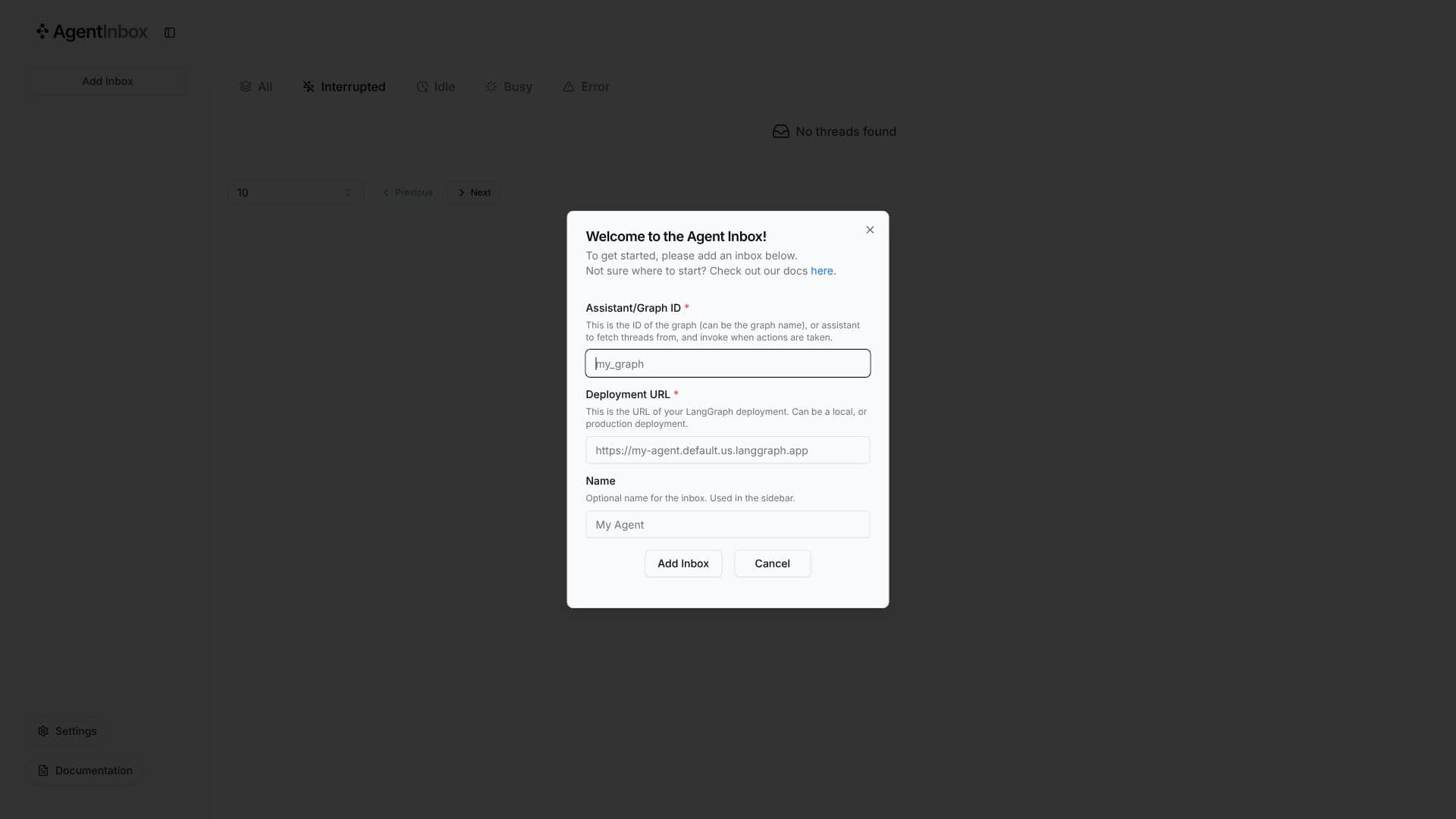
At its core, Agent Inbox connects to LangGraph deployments, requiring the Assistant/Graph ID and the Deployment URL. This allows it to fetch threads and invoke agent actions directly from the interface. The UI displays the status of agents, categorizing them into states such as Idle, Busy, Error, or Interrupted, providing immediate feedback on agent performance and availability. Users can navigate through existing threads, view their history, and interact with the agent in real-time.
The interface includes a toggleable sidebar for navigation and settings, along with documentation access for users who need guidance on setup and usage. The ability to add a name for the inbox further personalizes the user experience and aids in organization, especially when managing multiple agent deployments. This makes Agent Inbox a valuable tool for debugging, testing, and demonstrating AI agent capabilities.
Key capabilities include visualizing agent states, managing conversation threads, and invoking agent actions through a user-friendly interface. The tool is particularly beneficial for developers working with LangChain and LangGraph, offering a practical way to interact with and observe their agents' behavior in a production-like environment. The focus on UX by LangChain highlights its commitment to making AI agent development more accessible and efficient. Agent Inbox aims to bridge the gap between complex AI agent logic and intuitive user interaction, fostering faster iteration and deployment cycles for AI-powered applications.
- CategoryAI Agent Builders
- DeploymentLangGraph
- PlatformsWeb
Agent Inbox's Core Features
User interface for AI agent interaction
Thread management for conversations
Real-time monitoring of agent status (Idle, Busy, Error, Interrupted)
Invocation of agent actions
Integration with LangChain and LangGraph deployments
Requires Assistant/Graph ID for fetching threads
Requires Deployment URL for agent invocation
Optional naming for inboxes for organization
Sidebar for navigation and settings
Access to documentation for guidance
Visual feedback on agent performance
How to use Agent Inbox?
Configure: Provide the Assistant/Graph ID and Deployment URL for your LangChain agent.
Name Inbox: Optionally, assign a name to your inbox for easier identification.
Add Inbox: Click 'Add Inbox' to connect your agent to the interface.
Monitor: Observe the status of your agent (Idle, Busy, Error, Interrupted) in the main view.
Interact: View and manage existing conversation threads.
Invoke Actions: Trigger agent actions directly from the Agent Inbox interface.
Optimize: Use the feedback and interaction data to refine agent performance.
Agent Inbox's Use Cases
- AI Agent Monitoring
- Conversation Management
- Agent Action Invocation
- Development and Testing
- Agent Deployment Visualization
- UX for AI Agents