Description
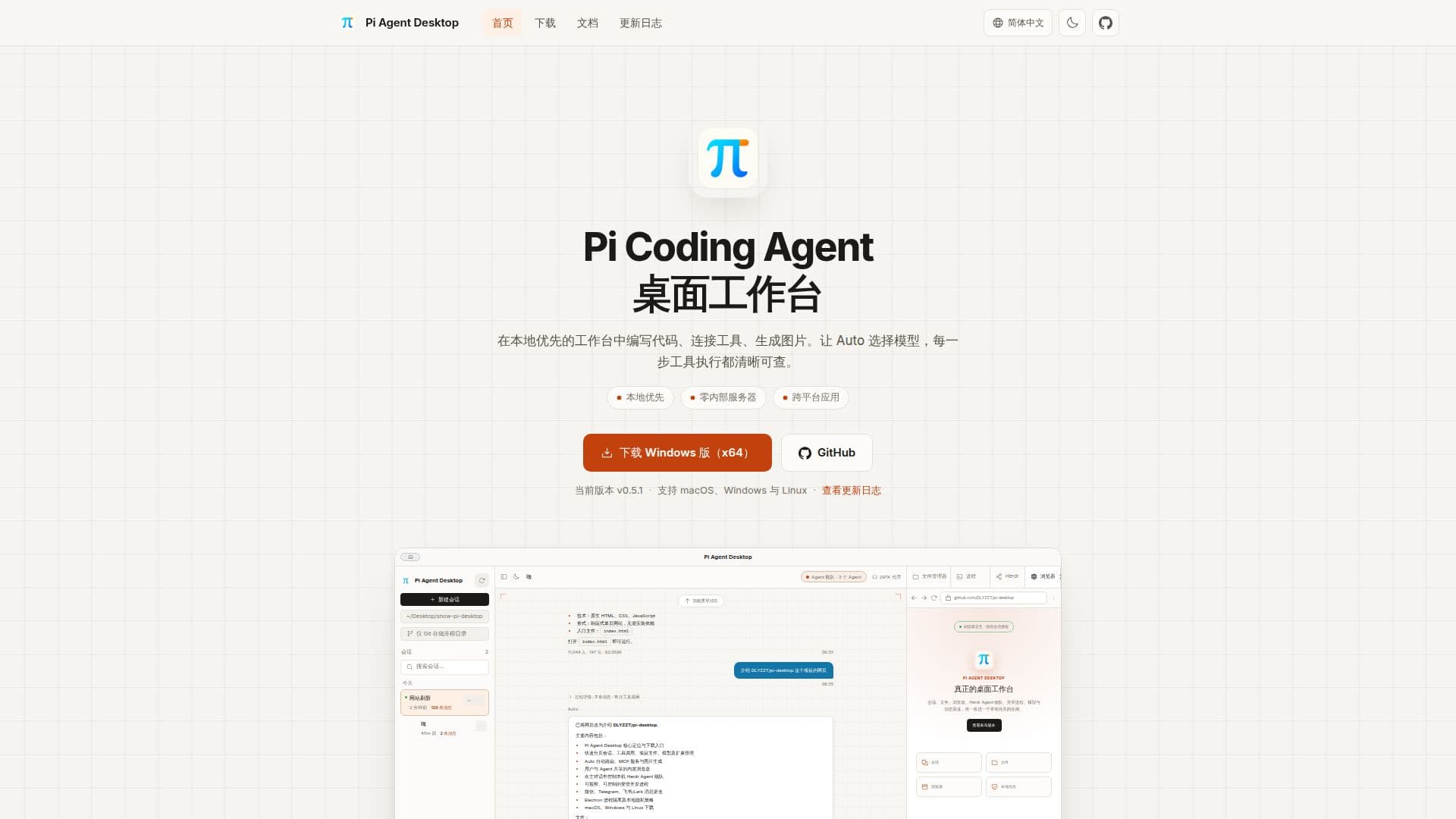
Pi Agent Desktop provides a comprehensive, local-first desktop environment for the Pi Coding Agent, allowing users to streamline their coding, tool integration, and image generation workflows. This application is built on Electron and supports macOS, Windows, and Linux, offering a consistent experience across different operating systems. It integrates the Pi Coding Agent 1.5.0 runtime, enabling powerful AI capabilities directly from the desktop.
Read More
The platform's core functionality revolves around enhancing interaction with AI agents. Users can configure fast and powerful models, with Auto-routing intelligently selecting the appropriate model based on task complexity or thought level. The MCP (Managed Process Control) service management allows connection to local and remote tools via stdio or Streamable HTTP, with options for OAuth login and resource previews. For creative tasks, the Codemode feature supports image generation, content classification, and binary judgment, with generated images persistently viewable across sessions.
Pi Agent Desktop offers a complete agent workspace, encompassing session management, file preview, and a shared browser. The integrated Chromium browser allows users and agents to interact with the same web pages, maintaining tabs, profiles, and login states. The Herdr Agent fleet management enables users to control local agent fleets, with an ANSI terminal for observation, troubleshooting, and explicit keyboard takeover. The application also provides robust file management, supporting Git branches, worktrees, code highlighting, and Markdown rendering.
Model and extension management are unified, allowing users to configure API keys, subscriptions, and advanced runtime settings. The platform supports cross-platform development tools, automatically discovering system tools and offering on-demand installation of Node.js, Python, Git, and other CLIs without modifying system PATH. Secure messaging channels for WeChat, Telegram, and Feishu/Lark ensure continuous conversation even when away from the computer. The architecture features three-process isolation for enhanced security, separating desktop capabilities, agent runtime, and UI. All user data remains local by default, emphasizing privacy and security.
- CategoryAI Agent Builders
- Pricing ModelNot specified
- DeploymentDesktop Application
- PlatformsmacOS, Windows, Linux
Pi Agent Desktop's Core Features
Local-first desktop workspace for Pi Coding Agent
Cross-platform support (macOS, Windows, Linux)
Auto model routing based on task complexity
MCP service management for local and remote tools
Image generation and decision models via Codemode
Tool permissions and execution history tracking
Integrated Chromium browser for shared user/agent interaction
Herdr Agent fleet management with ANSI terminal
Comprehensive session management with adjustable UI
Project-centric file experience with Git integration
Unified model and extension management
Cross-platform development tool discovery and installation
Secure messaging channels (WeChat, Telegram, Feishu/Lark)
Observable managed background processes
Three-process isolation architecture for security
How to use Pi Agent Desktop?
Download & Install: Obtain the appropriate installer for macOS, Windows, or Linux from the download page and follow the installation instructions.
Configure Models: Open Settings > Models, add a service provider, enter your API Key or log in via OAuth, and select the models you wish to use.
Start a Session: In the main interface, select a project directory, click "New Session," and ensure a model is selected in the input box.
Interact with Agent: Describe your task in the input box; the agent will use the configured models and tools to assist you.
Manage Tools & Permissions: Authorize tools in the session's tool menu and manage global or session-specific browser permissions in settings.
Monitor Processes: Use the "Processes" panel on the right to view, control, and export logs for managed background processes started by the agent.
Connect Messaging Channels: In Settings > Messaging Channels, connect your WeChat, Telegram, or Feishu/Lark accounts to continue conversations remotely.
Pi Agent Desktop's Use Cases
- Coding & Development
- Automated Task Execution
- Image Generation
- Collaborative Browsing
- Agent Fleet Management
- Background Process Management
- Remote Communication
- Model Configuration & Testing