
ToolPotion
AI Advisor
Submit a Tool (Free)

PhotoMemorial AI

PhotoMemorial AI helps users add a deceased loved one to existing family photos using AI. It combines two images—a base family photo and a portrait of the loved one—to create a believable memorial keepsake. The service offers private AI creation, credit-based usage, and options for monthly memberships or one-time credit top-ups for various photo and video tools.

Visit Website
Share
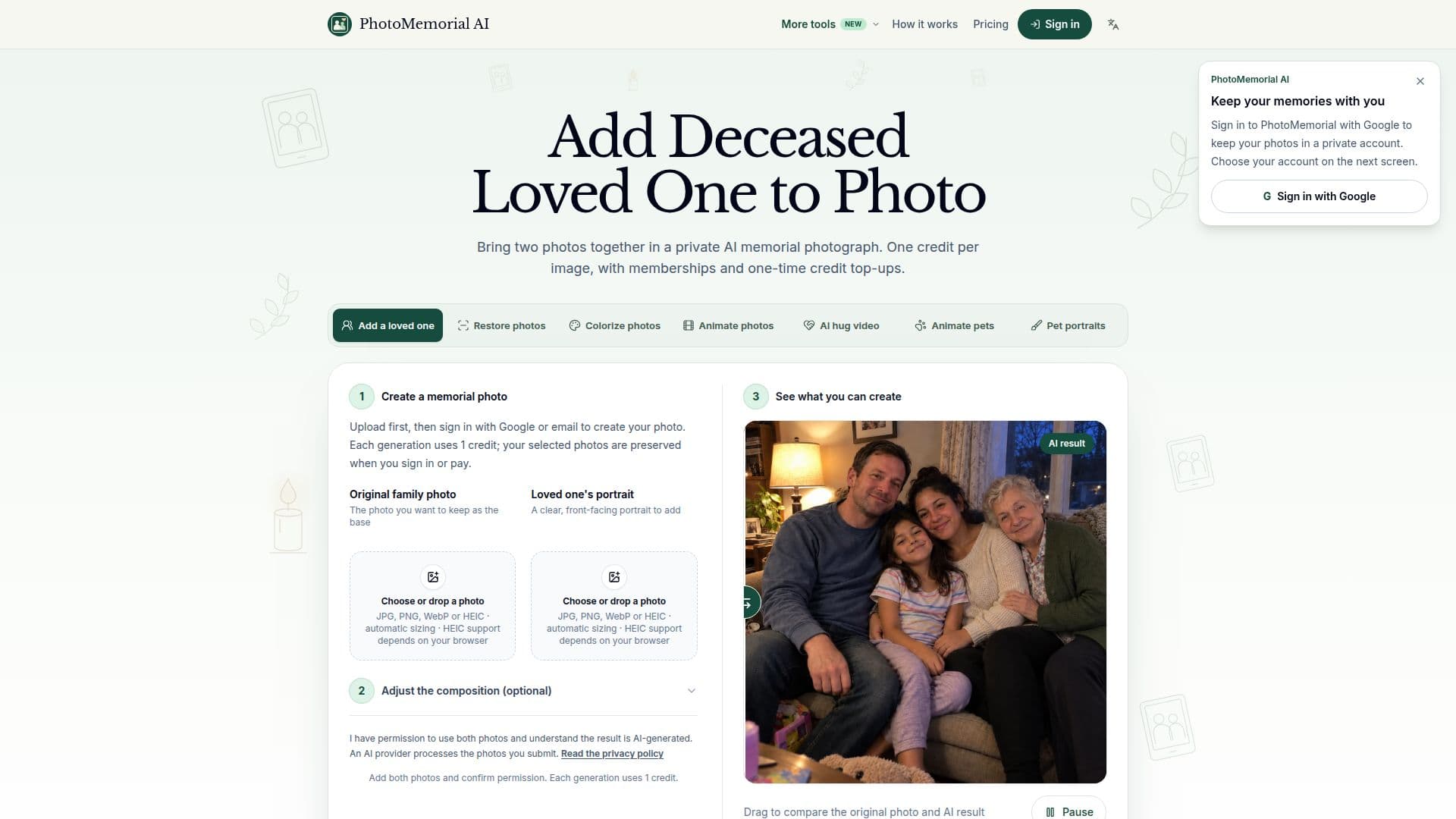
PhotoMemorial AI screenshot

PhotoMemorial AI is a dedicated online tool designed to create imagined memorial photographs by seamlessly integrating a deceased loved one into an existing family picture. The process involves uploading two images: a base family photograph and a clear portrait of the individual to be added. The AI then processes these inputs to generate a composite image that aims for consistent identity, lighting, perspective, skin tone, and grain, rather than a simple collage.

Read More

The platform emphasizes a private and careful workflow. User-uploaded images are not placed in public galleries or posted to social networks. While a third-party AI service processes the photos, the service ensures that images are not used for public display or automatic social publishing. Users retain control over their sensitive memories, with options to delete uploads and generated photos from their history.

Beyond adding loved ones to photos, PhotoMemorial AI offers additional features for preserving memories. These include restoring old, worn, or faded photographs, colorizing black-and-white images, and animating still portraits into short, silent videos with subtle movements like blinks or smiles. It also provides an "AI Hug Video" feature to create a short, imagined embrace from two separate photos, and options for pet memorial portraits and animations.

Usage is credit-based, with each new photo generation or AI refinement costing one credit. Credits can be acquired through monthly or yearly memberships, which offer varying credit allowances and access to different tools, or via one-time credit top-ups. Memberships start at $4.90 per month, and a one-time payment of $9.90 provides 20 credits. Downloading an existing, successfully generated image does not consume additional credits. If a generation fails, the credit is automatically returned.

The tool is designed for individuals and families seeking a respectful and personal way to create imagined keepsakes. It is important to note that the AI does not guarantee an exact likeness and may alter expressions or features; users are advised to review results carefully. PhotoMemorial AI is an independent photo tool and does not provide grief counseling, identity verification, or affiliation with funeral homes or social networks. It focuses solely on photo creation and preservation, offering a sensitive approach to digital memorialization.

  • CategoryAI Photo Editors
  • Pricing ModelFreemium
  • DeploymentCloud
  • PlatformsWeb

  • Add deceased loved one to photos using AI

  • Combine a base family photo with a portrait

  • Private AI creation and storage

  • Credit-based usage for generations and refinements

  • Monthly and yearly membership options

  • One-time credit top-ups available

  • Restore old and worn photographs

  • Colorize black-and-white photos

  • Animate still portraits into short videos

  • Create AI Hug Videos from two photos

  • Generate pet memorial portraits

  • Animate pet photos into short videos

  • Download existing results without additional credits

  • Automatic credit return for failed generations

  • User control over photo deletion and account closure

  1. Choose Photos: Select a base family photo and a clear, front-facing portrait of the loved one to add. Ensure both are JPG, PNG, or WebP files.

  2. Upload Images: Upload both selected photos to the PhotoMemorial AI platform.

  3. Sign In & Generate: Sign in with Google or email, choose a composition (e.g., side-by-side, close together), and confirm permissions. Each new generation uses one credit.

  4. Review & Refine: Examine the generated photo for likeness, lighting, and details. If desired, use refinement controls to describe specific changes, costing one additional credit per refinement.

  5. Download Keepsake: Once satisfied, download the completed photo. Re-downloading an existing paid result is free.

  • Family Memorial Keepsakes
  • Wedding Day Memories
  • Graduation Photo Inclusion
  • Family Reunion Photos
  • Everyday Moment Remembrances
  • Old Photo Restoration
  • Black-and-White Photo Colorization
  • Portrait Animation
  • AI Hug Video Creation
  • Pet Memorial Portraits

PhotoMemorial AI Reviews

Loading...

Popular AI Tools Like PhotoMemorial AI

AI Image Combiner is an online tool that merges two or more photos into a single frame, using AI composition to blend subjects, lighting, and styles into one natural-looking image.

AI Photo Editors
View Tool

Online tool that merges two or more photos into a single frame, using AI composition to blend subjects, lighting, and styles into one natural-looking image.AI Image Combiner is an online tool that merges two or more photos into a single frame, using AI composition to blend subjects, lighting, and styles into one natural-looking image.

AI Photo Editors
See the Top 250 AI Apps

Photo AI Studio is an AI-powered platform that transforms selfies into professional photos and videos. With over 150 styles, users can create headshots, portraits, and more in…

AI Headshot Generators

Ranked #17 for Generating YouTube thumbnails

View Tool

AI-powered platform that transforms selfies into professional photos and videos. With over 150 styles, users can create headshots, portraits, and more in…Photo AI Studio is an AI-powered platform that transforms selfies into professional photos and videos. With over 150 styles, users can create headshots, portraits, and more in…

AI Headshot Generators
Ranked #17 for Generating YouTube thumbnails

Snapshawt offers AI-powered face swapping and custom image generation. Transform photos, create realistic avatars, and bring imaginative visuals to life with simple prompts.…

AI Photo Editors
View Tool

Offers AI-powered face swapping and custom image generation. Transform photos, create realistic avatars, and bring imaginative visuals to life with simple prompts.…Snapshawt offers AI-powered face swapping and custom image generation. Transform photos, create realistic avatars, and bring imaginative visuals to life with simple prompts.…

AI Photo Editors
See the Top 250 AI Apps

AI Photo Editor Pro allows users to edit, enhance, and transform photos using natural-language prompts. It supports background changes, portrait edits, restoration, and image…

AI Photo Editors

Ranked #36 for Colorizing photos

View Tool

Allows users to edit, enhance, and transform photos using natural-language prompts. It supports background changes, portrait edits, restoration, and image…AI Photo Editor Pro allows users to edit, enhance, and transform photos using natural-language prompts. It supports background changes, portrait edits, restoration, and image…

AI Photo Editors
Ranked #36 for Colorizing photos

AI Photo Combiner merges two images into one realistic picture, seamlessly blending subjects into new scenes with matched lighting, shadows, and perspective. It offers a clean…

AI Photo Editors

Ranked #75 in Image Generation & Editing

View Tool

Merges two images into one realistic picture, seamlessly blending subjects into new scenes with matched lighting, shadows, and perspective. It offers a clean…AI Photo Combiner merges two images into one realistic picture, seamlessly blending subjects into new scenes with matched lighting, shadows, and perspective. It offers a clean…

AI Photo Editors
Ranked #75 in Image Generation & Editing

Photogenic AI offers a personal AI photostudio experience. Generate hundreds of unique photos with fine-tuned control. Upload existing images to replicate their style. This…

AI Headshot Generators
View Tool

Offers a personal AI photostudio experience. Generate hundreds of unique photos with fine-tuned control. Upload existing images to replicate their style. This…Photogenic AI offers a personal AI photostudio experience. Generate hundreds of unique photos with fine-tuned control. Upload existing images to replicate their style. This…

AI Headshot Generators
See the Top 250 AI Apps

BestPhoto.ai offers an AI-powered photo and video studio with over 40 tools for editing, generating, and animating images. Many features are free, and users can train the AI to…

AI Photo Editors

Ranked #105 for Removing objects from photos

View Tool

Offers an AI-powered photo and video studio with over 40 tools for editing, generating, and animating images. Many features are free, and users can train the AI to…BestPhoto.ai offers an AI-powered photo and video studio with over 40 tools for editing, generating, and animating images. Many features are free, and users can train the AI to…

AI Photo Editors
Ranked #105 for Removing objects from photos

Alive Photo transforms old, scratched, or faded photographs into short, moving videos with natural movement and expressions. Users can upload cherished prints, which are gently…

Image Generation & Editing

Ranked #74 in Image Generation & Editing

View Tool

Transforms old, scratched, or faded photographs into short, moving videos with natural movement and expressions. Users can upload cherished prints, which are gently…Alive Photo transforms old, scratched, or faded photographs into short, moving videos with natural movement and expressions. Users can upload cherished prints, which are gently…

Image Generation & Editing
Ranked #74 in Image Generation & Editing
1 of 8