Description
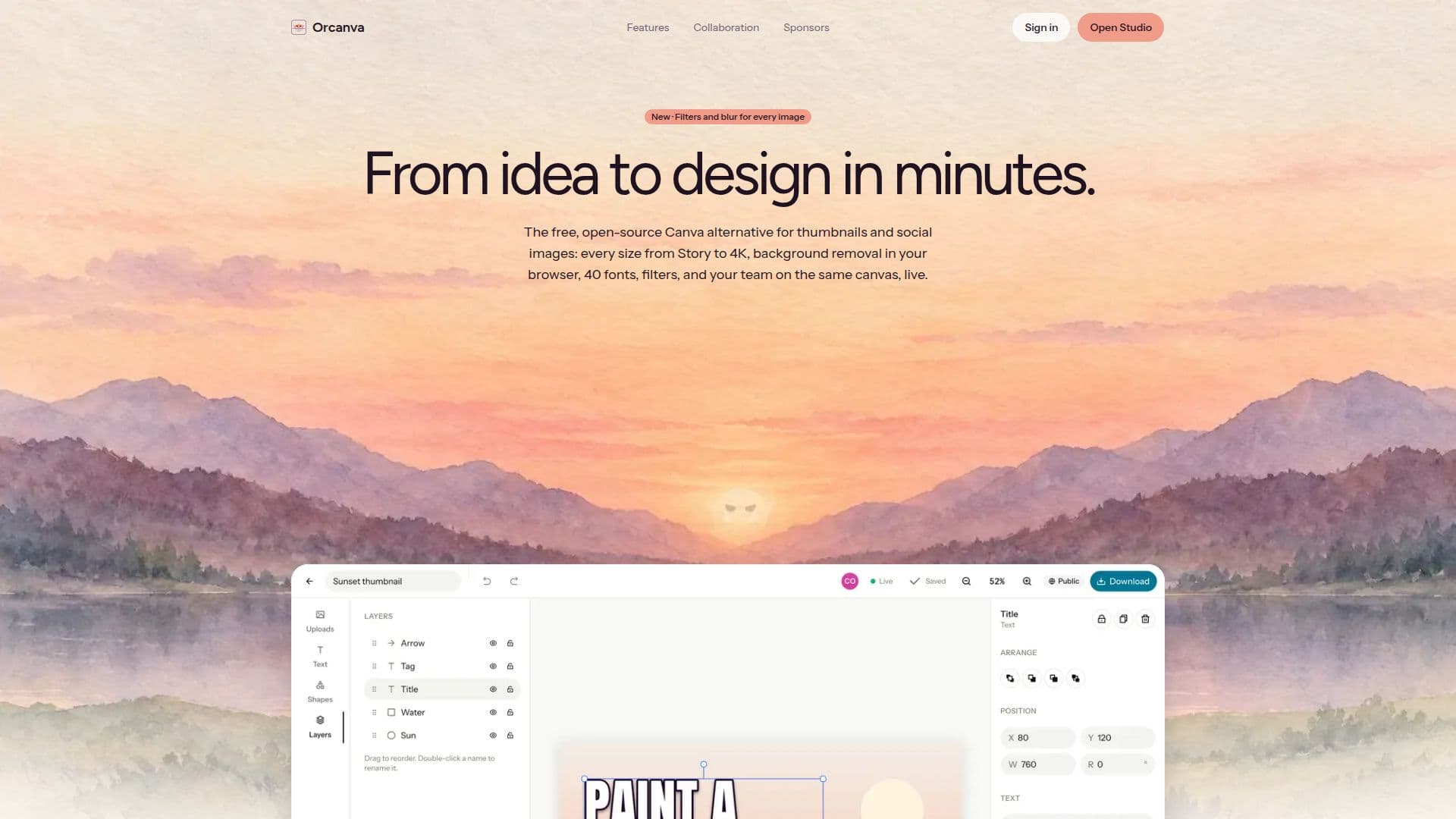
Orcanva provides a comprehensive and free design studio specifically tailored for creating high-quality thumbnails and social media images. As an open-source alternative, it empowers users to transform ideas into polished designs within minutes, without any cost or watermarks. The platform supports various canvas presets, from standard YouTube thumbnail and Instagram Story sizes to 4K resolution, alongside options for custom dimensions, ensuring flexibility for diverse content needs.
Read More
A standout feature is its free and unlimited in-browser background removal, powered by an open-source model. This capability eliminates the need for API keys or per-image costs, offering a seamless experience for isolating subjects in photos. Designers can enhance their visuals with 40 carefully selected Google Fonts, each offering outline, drop shadow, and highlight effects, all editable directly on the canvas. Additionally, Orcanva includes 11 photo filters and a suite of adjustments like brightness, shadows, warmth, grain, and blur, allowing for precise image manipulation.
The design interface features a layers panel, enabling users to stack and reorder shapes, lines, arrows, and gradients with ease. For collaborative projects, Orcanva supports live collaboration on shared designs. Users can make a design public, allowing anyone with the link to edit it in real-time, whether signed in or not. This functionality is ideal for teams working on social media campaigns or content creation.
Orcanva also addresses modern content requirements by allowing users to remove Content Credentials (C2PA) and "AI generated" tags from images. This process is free, lossless, and performed entirely in the browser, ensuring privacy as nothing is uploaded. Designs can be exported in PNG, JPG, or WebP formats at 1× or 2× resolution, with transparent background options. The tool is completely free, with an option to sign up via Google or email to save designs, and operates under the MIT license.
- CategoryAI Graphic Design Tools
- Pricing ModelFree
- DeploymentCloud
- PlatformsWeb
Orcanva's Core Features
Free and open-source design editor
Canvas presets for YouTube, Instagram Story, 4K, and custom sizes
Unlimited in-browser background removal
40 curated Google Fonts with outline, shadow, and highlight effects
11 photo filters and image adjustments (brightness, shadows, warmth, grain, blur)
Shapes, lines, arrows, gradients, and layers panel
Live collaboration on shared designs
PNG, JPG, and WebP export at 1× or 2× resolution
Transparent background export option
Removal of Content Credentials (C2PA) and "AI generated" tags
No watermarks on exported designs
Sign-up with Google or email to save designs
Resize canvas to other presets or custom sizes
Templates for various social media posts
How to use Orcanva?
Open Canvas: Start by selecting a preset size like YouTube thumbnail or Instagram Story, or define a custom size.
Add Media: Upload, drag, or paste a photo onto the canvas and use the one-click background removal feature.
Customize Text: Add text and choose from 40 curated fonts, applying outline, shadow, or highlight effects.
Apply Enhancements: Utilize 11 photo filters and adjust brightness, shadows, warmth, grain, or blur.
Arrange Elements: Add shapes, lines, arrows, and gradients, managing their order with the layers panel.
Collaborate (Optional): Make your design public to enable live collaboration with others via a shared link.
Export Design: Download your final image in PNG, JPG, or WebP format at 1× or 2× resolution, with transparent background if needed.
Orcanva's Use Cases
- YouTube Thumbnail Creation
- Instagram Story Design
- Social Media Post Graphics
- Background Removal
- Collaborative Design Projects
- Image Tag Removal
- Graphic Design for Content Creators
- Quick Visual Content Generation