
ToolPotion
AI Advisor
Submit a Tool (Free)

MyEnhancer

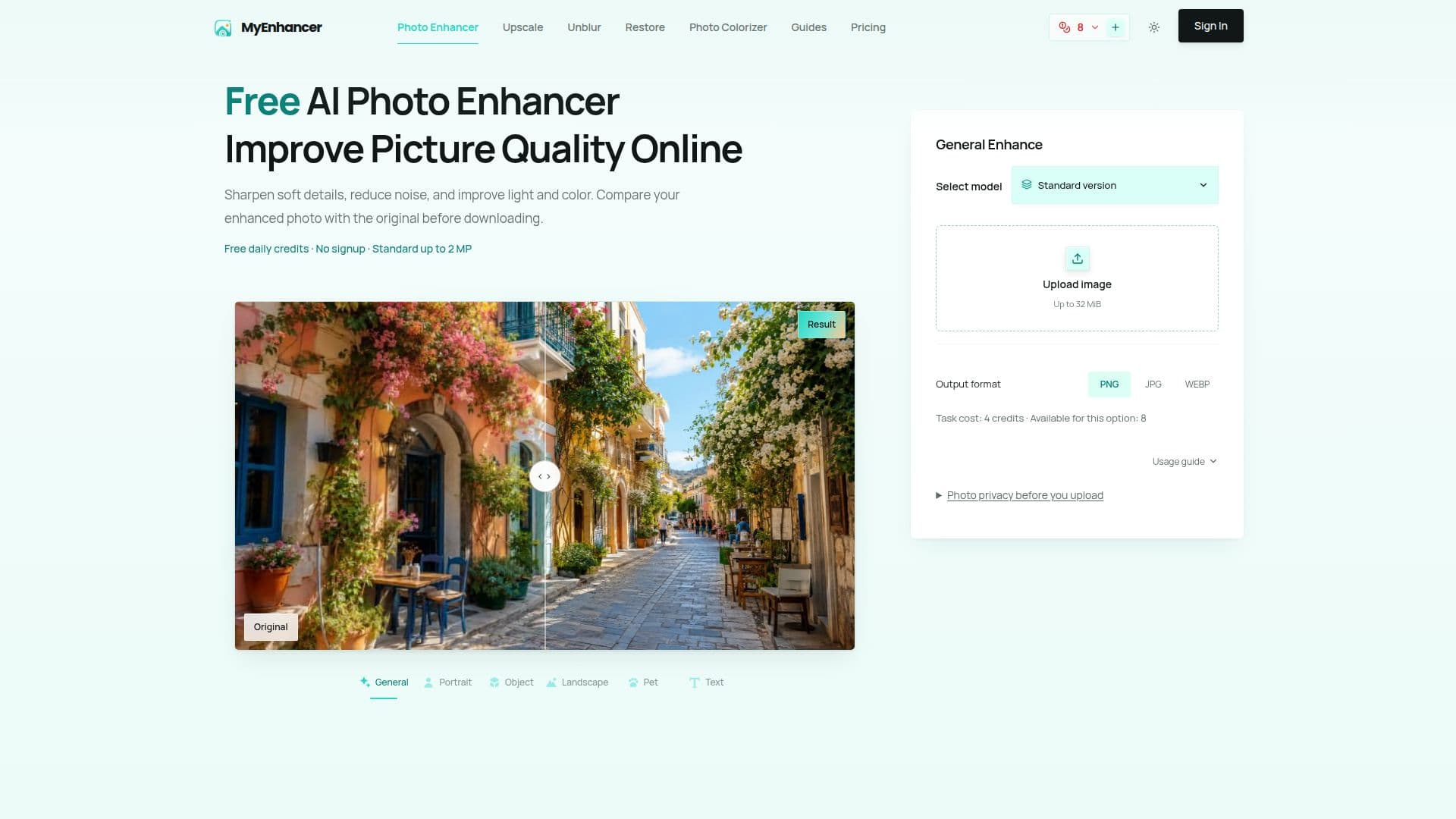
MyEnhancer is an online AI photo enhancer that improves image quality by sharpening details, reducing noise, and enhancing light and color. It offers daily free credits without requiring signup, allowing users to process photos and compare results before downloading. The platform also provides tools for upscaling, unblurring, old photo restoration, and colorization.

Visit Website
Share
MyEnhancer screenshot

MyEnhancer is an online AI photo enhancement tool designed to improve the visual quality of images. It addresses common photo issues such as soft details, visible noise, compression artifacts, and poor lighting or color balance. The platform utilizes AI to analyze and adjust clarity, exposure, contrast, and color balance, aiming for a cleaner and more natural-looking result without requiring manual editing of each setting.

Read More

Users can upload static images up to 32 MiB and 100 MP. The tool automatically resizes processing copies to fit specific version limits, such as 2 MP for Standard enhancement. After processing, users can compare the enhanced photo with the original side-by-side before choosing to download it in PNG, JPG, or WebP format. The service offers daily free credits for single-image Standard enhancements or 2x upscaling, including downloads, without the need for an account. Signing in allows users to utilize their daily allowance across all five Standard tools, while Pro and batch processing require purchased or subscription credits.

Beyond general enhancement, MyEnhancer provides several specialized tools. The Image Upscaler increases pixel dimensions by 2x or 4x, or to a target size, supporting up to 8K within 24 MP for Standard and up to 16K within 272 MP for Pro. The Unblur Image tool helps reduce mild blur, while Old Photo Restoration repairs supported scratches and surface wear, with an optional faded-color repair in the Pro version. Additionally, the Photo Colorizer adds natural-looking color to black-and-white portraits and family photos.

MyEnhancer emphasizes user privacy, stating that uploaded photos are used solely for processing and are not published to a public gallery. Tasks and results saved to an account are accessible only through that account, and guest preview access expires after 24 hours. The platform clearly displays the credit cost for each task, the current balance, and relevant limits before processing begins. In cases of technical failure, credits used for the task are automatically returned. While the AI aims for natural-looking results, users are advised to compare the enhanced image with the original, especially for fine details like faces and text, as AI may alter them.

  • CategoryAI Photo Editors
  • Pricing ModelFreemium
  • DeploymentCloud
  • PlatformsWeb

  • Sharpen soft details and improve clarity

  • Reduce visible noise and compression artifacts

  • Improve lighting and tonal balance

  • Enhance natural-looking color

  • Compare enhanced photo with original before download

  • Daily free credits for Standard enhancement without signup

  • Support for JPG, PNG, WebP, HEIC, AVIF, GIF, BMP, TIFF formats

  • Image Upscaler for increasing pixel dimensions (2x, 4x, or target size)

  • Unblur Image tool for reducing mild blur

  • Old Photo Restoration for repairing scratches and surface wear

  • Photo Colorizer for black-and-white images

  • Batch processing available with paid credits

  • Credit restoration for technical processing failures

  • Secure photo uploads; images not published publicly

  • Clear display of task credit cost before processing

  1. Upload Photo: Select a supported static image up to 32 MiB and 100 MP.

  2. Choose Tool & Settings: Select the desired enhancement tool (Enhance, Upscale, Unblur, Restore, Colorize) and confirm settings.

  3. Review Credit Cost: Check the exact credit cost for the task and your available balance.

  4. Process Image: Confirm to start processing the image.

  5. Compare Results: Review the enhanced photo side-by-side with the original.

  6. Download Output: Choose PNG, JPG, or WebP format and download the result.

  • Everyday Photo Improvement
  • Product & Social Content
  • Soft or Blurred Image Correction
  • Old Family Photo Restoration
  • Black-and-White Photo Colorization
  • Reducing Image Noise
  • Adjusting Lighting & Tone
  • Sharpening Details
  • Improving Color Balance

MyEnhancer Reviews

Loading...

Popular AI Tools Like MyEnhancer

AIEnhance.io offers an online AI photo enhancer that sharpens, denoises, and upscales images in seconds. Create a free account to access 20 credits and watermark-free results.…

AI Photo Editors

Ranked #54 for Restoring old photos

View Tool

Offers an online AI photo enhancer that sharpens, denoises, and upscales images in seconds. Create a free account to access 20 credits and watermark-free results.…AIEnhance.io offers an online AI photo enhancer that sharpens, denoises, and upscales images in seconds. Create a free account to access 20 credits and watermark-free results.…

AI Photo Editors
Ranked #54 for Restoring old photos

Photo Enhancer Free is an online AI tool that sharpens blurry photos, improves low-quality images, and brightens dark photos. Users get 10 free credits per day without needing to…

AI Photo Editors

Ranked #194 for Photographers

View Tool

Online AI tool that sharpens blurry photos, improves low-quality images, and brightens dark photos. Users get 10 free credits per day without needing to…Photo Enhancer Free is an online AI tool that sharpens blurry photos, improves low-quality images, and brightens dark photos. Users get 10 free credits per day without needing to…

AI Photo Editors
Ranked #194 for Photographers

Edit images online with AI. Remove backgrounds, erase objects, upscale, unblur, restore old photos, and colorize them. This free AI photo editor offers a full suite of tools with…

AI Photo Editors

Ranked #17 for Colorizing photos

View Tool

Edit images online with AI. Remove backgrounds, erase objects, upscale, unblur, restore old photos, and colorize them. This free AI photo editor offers a full suite of tools with…

AI Photo Editors
Ranked #17 for Colorizing photos

Free online AI toolkit to enhance, sharpen, deblur, restore, and upscale photos, with free daily credits and no login. Built for anyone improving image quality quickly.

AI Image Upscalers

Ranked #22 in AI Image Upscalers

View Tool

Free online AI toolkit to enhance, sharpen, deblur, restore, and upscale photos, with free daily credits and no login. Built for anyone improving image quality quickly.

AI Image Upscalers
Ranked #22 in AI Image Upscalers

Photo Enhancer is a browser-based platform that improves photo quality for sharing, online stores, and creative projects. It offers tools for soft focus, small resolution, aged…

AI Photo Editors

Ranked #80 for Restoring old photos

View Tool

Browser-based platform that improves photo quality for sharing, online stores, and creative projects. It offers tools for soft focus, small resolution, aged…Photo Enhancer is a browser-based platform that improves photo quality for sharing, online stores, and creative projects. It offers tools for soft focus, small resolution, aged…

AI Photo Editors
Ranked #80 for Restoring old photos

Restore Old Photos is an AI-powered tool designed to enhance faded, blurry, and aging pictures. It offers a simple workflow for general restoration and specialized pages for…

AI Photo Editors

Ranked #67 for Restoring old photos

View Tool

AI-powered tool designed to enhance faded, blurry, and aging pictures. It offers a simple workflow for general restoration and specialized pages for…Restore Old Photos is an AI-powered tool designed to enhance faded, blurry, and aging pictures. It offers a simple workflow for general restoration and specialized pages for…

AI Photo Editors
Ranked #67 for Restoring old photos

AIEnhancer

AI Apps

AIEnhancer is a free online AI photo enhancer that restores colors, sharpens details, removes noise and blur, and upscales low-resolution images to 4K, with tools for repairing…

AI Image Upscalers
View Tool

AI Apps

Free online AI photo enhancer that restores colors, sharpens details, removes noise and blur, and upscales low-resolution images to 4K, with tools for repairing…AIEnhancer is a free online AI photo enhancer that restores colors, sharpens details, removes noise and blur, and upscales low-resolution images to 4K, with tools for repairing…

AI Image Upscalers
See the Top 250 AI Apps

YouCam Enhance is an AI-powered tool designed to restore old photos online. It allows users to upload digital copies of their photos and automatically enhances them by fixing…

AI Photo Editors

Ranked #4 for Colorizing photos

View Tool

AI-powered tool designed to restore old photos online. It allows users to upload digital copies of their photos and automatically enhances them by fixing…YouCam Enhance is an AI-powered tool designed to restore old photos online. It allows users to upload digital copies of their photos and automatically enhances them by fixing…

AI Photo Editors
Ranked #4 for Colorizing photos
1 of 8