
ToolPotion
AI Advisor
Submit a Tool (Free)

MICT

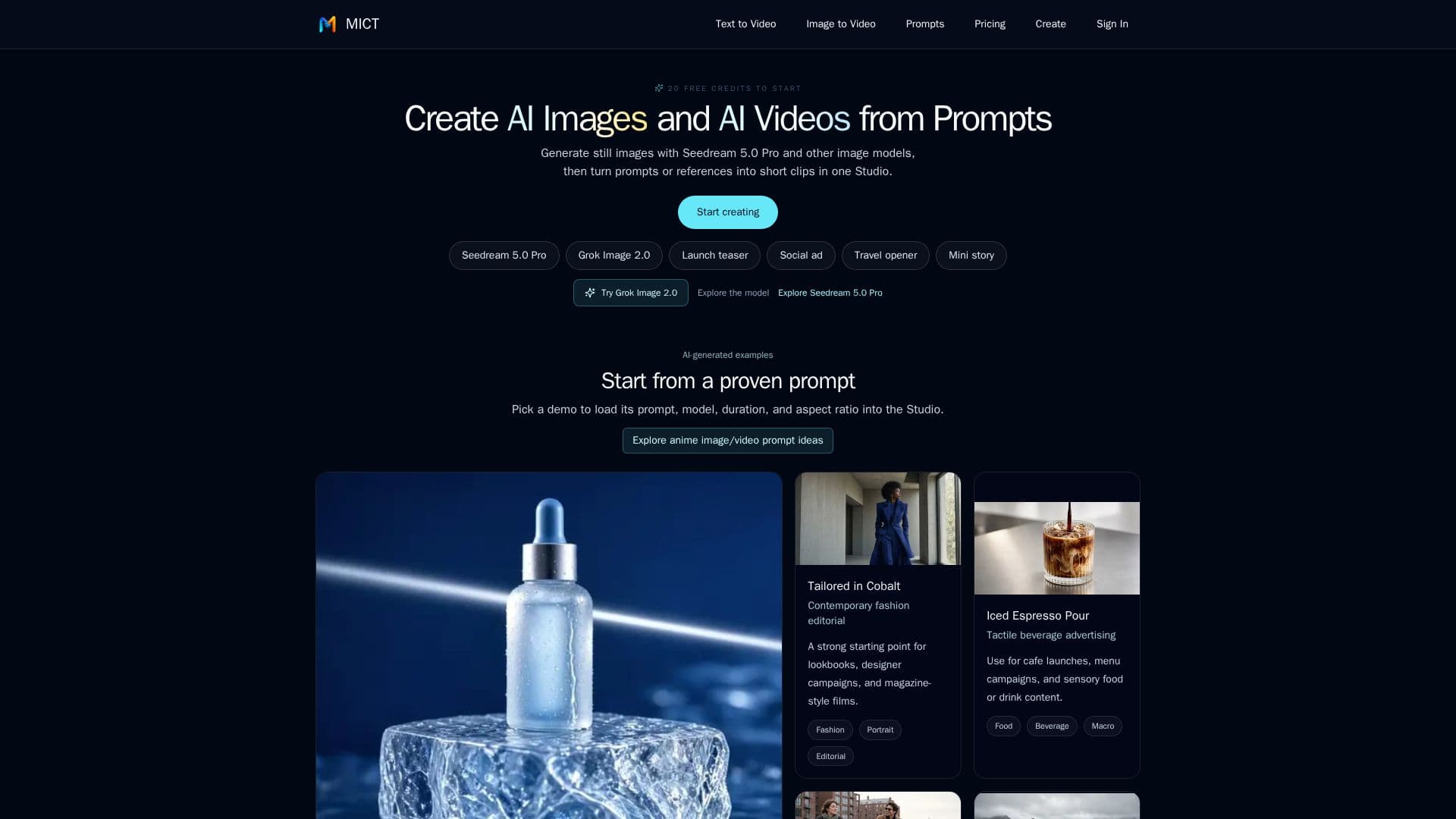
MICT is an AI video generator workspace that enables users to create short videos from text prompts or reference images. It integrates multiple AI video models like Grok Imagine, Wan, and Kling, allowing creators to compare outputs and generate clips in a single environment. The platform supports both text-to-video and image-to-video generation, offering adjustable settings for duration, aspect ratio, and quality.

Visit Website
Share
MICT screenshot
MICT screenshot

MICT is an AI video generator workspace designed to streamline the creation of short videos from either text prompts or existing images. It consolidates various AI video models, including HappyHorse 1.1, Grok Imagine, Grok Imagine 1.5 Preview, Wan 2.6, Wan 3.0, and Kling 3.0, into a single platform. This integration allows creators to compare the outputs of different models without the need to switch between multiple tools, enhancing efficiency for diverse creative workflows.

Read More

The platform supports two primary generation methods: text-to-video and image-to-video. Text-to-video is ideal for generating entirely new scenes from written descriptions, such as product ideas, campaign scripts, or creative prompts. Image-to-video, on the other hand, animates existing visuals like product photos, design mockups, character art, or brand visuals, ensuring the first frame remains consistent with the original image. Users can adjust video duration, aspect ratio, and quality, with estimated credit costs displayed before generation.

MICT is particularly beneficial for creators, marketers, founders, designers, and small teams who require rapid video concepts for various applications, including product launches, advertisements, social media posts, storyboards, and client previews. It offers a unified studio where users can select models, define prompts, set formats, and review generated clips. The platform also includes a continuity prompt builder and reference-led image-to-video generation to help reduce drift in character, product, scene, and action across multiple shots.

Pricing operates on a credit system, with 20 free credits provided upon signup. Different subscription plans, such as "Starter" and "Creator," offer monthly credit allowances tailored to varying usage volumes. The "Starter" plan provides 1000 monthly credits, while the "Creator" plan offers 3000 monthly credits for higher-volume workflows and more extensive model comparisons. Model costs vary based on settings like duration, resolution, and output count, with clear estimates provided in the Studio before submission. MICT also supports AI image generation with models like Seedream 5.0 Pro, allowing users to create still images and then animate them within the same workspace.

  • CategoryAI Video Generators
  • Pricing ModelFreemium
  • DeploymentCloud
  • PlatformsWeb

  • Text-to-video generation from written prompts

  • Image-to-video generation from reference images

  • Multi-model AI video workspace (Grok Imagine, Wan, Kling, HappyHorse)

  • Adjustable video duration, aspect ratio, and quality settings

  • Credit-based pricing with cost estimates before generation

  • 20 free credits upon signup for new users

  • Support for various video resolutions up to 1080p

  • Support for various image resolutions up to 4K

  • Continuity prompt builder for consistent shots

  • Reference-led image-to-video for character/product consistency

  • Generation history for reviewing past creations

  • AI image creation with models like Seedream 5.0 Pro

  • Demo prompts and settings for quick starts

  • Native audio generation with Grok Imagine models

  • Dedicated workflows for marketing video concepts

  1. Choose Generation Mode: Select either text-to-video for new concepts or image-to-video for animating existing visuals.

  2. Write Prompt or Upload Image: Describe your scene with a written prompt or upload a reference image for animation.

  3. Select AI Model: Choose from available models like Grok Imagine, Wan, or Kling, noting their specific settings and credit costs.

  4. Set Format and Settings: Adjust parameters such as duration, aspect ratio, quality, and resolution.

  5. Review Credit Cost: Check the estimated credit cost displayed in the Studio before proceeding with generation.

  6. Generate and Refine: Create your video, then review the output and refine your prompt or settings for subsequent attempts.

  7. Download Result: Download the best generated clip for use in ads, social posts, storyboards, or client previews.

  • Launch Teasers
  • Social Ads
  • Storyboards
  • Product Videos
  • Character Animation
  • Creative Experiments
  • Creator Briefs
  • Continuity Shots

MICT Reviews

Loading...

Popular AI Tools Like MICT

Epochal

AI Apps

Epochal is an AI video generation tool that transforms text descriptions or images into videos. It offers text-to-video and image-to-video capabilities, allowing users to create…

AI Video Generators
View Tool

AI Apps

AI video generation tool that transforms text descriptions or images into videos. It offers text-to-video and image-to-video capabilities, allowing users to create…Epochal is an AI video generation tool that transforms text descriptions or images into videos. It offers text-to-video and image-to-video capabilities, allowing users to create…

AI Video Generators
See the Top 250 AI Apps

VideoAI

AI Apps

VideoAI is an AI video generator that turns text and images into videos using leading models such as Kling, Wan, Seedance, and Veo. It also offers image tools and AI music…

AI Video GeneratorsMedia & Entertainment

Ranked #109 for Writing video scripts

View Tool

AI Apps

AI video generator that turns text and images into videos using leading models such as Kling, Wan, Seedance, and Veo. It also offers image tools and AI music…VideoAI is an AI video generator that turns text and images into videos using leading models such as Kling, Wan, Seedance, and Veo. It also offers image tools and AI music…

AI Video GeneratorsMedia & Entertainment
Ranked #109 for Writing video scripts

Kling AI Video Generator allows users to create short videos using text prompts or images. It supports various video resolutions and offers features like text overlays and video…

AI Video Generators
View Tool

Allows users to create short videos using text prompts or images. It supports various video resolutions and offers features like text overlays and video…Kling AI Video Generator allows users to create short videos using text prompts or images. It supports various video resolutions and offers features like text overlays and video…

AI Video Generators
See the Top 250 AI Apps

OpenGen is an AI video generator that transforms text prompts into cinematic scenes and animates still images. It integrates leading AI models like Veo 3.1, Kling, and Seedance,…

AI Video GeneratorsMedia & Entertainment
View Tool

AI video generator that transforms text prompts into cinematic scenes and animates still images. It integrates leading AI models like Veo 3.1, Kling, and Seedance,…OpenGen is an AI video generator that transforms text prompts into cinematic scenes and animates still images. It integrates leading AI models like Veo 3.1, Kling, and Seedance,…

AI Video GeneratorsMedia & Entertainment
See the Top 250 AI Apps

Grok Imagine 1.5 is an AI video generator that transforms a single image into a 1-15 second video. It supports various resolutions and aspect ratios, making it ideal for product…

AI Video Generators
View Tool

AI video generator that transforms a single image into a 1-15 second video. It supports various resolutions and aspect ratios, making it ideal for product…Grok Imagine 1.5 is an AI video generator that transforms a single image into a 1-15 second video. It supports various resolutions and aspect ratios, making it ideal for product…

AI Video Generators
See the Top 250 AI Apps

An all-in-one AI video and image generation platform that turns text prompts into HD videos using 30+ leading models like Sora 2, Veo 3.1, and Kling, plus image, speech, and music…

AI Video GeneratorsMarketing & Creative Agencies
View Tool

An all-in-one AI video and image generation platform that turns text prompts into HD videos using 30+ leading models like Sora 2, Veo 3.1, and Kling, plus image, speech, and music…

AI Video GeneratorsMarketing & Creative Agencies
See the Top 250 AI Apps

Free Image to Video AI is a multi-model video generator that allows users to create videos from text, images, or keyframes. It combines various AI video models into one workspace,…

AI Video Generators
View Tool

Multi-model video generator that allows users to create videos from text, images, or keyframes. It combines various AI video models into one workspace,…Free Image to Video AI is a multi-model video generator that allows users to create videos from text, images, or keyframes. It combines various AI video models into one workspace,…

AI Video Generators
See the Top 250 AI Apps

Kuca

AI Apps

Kuca is a multi-model AI video maker that unifies leading models like Veo, Kling, Seedance, and Hailuo in one workspace for text-to-video, image-to-video, and reference workflows,…

AI Video GeneratorsMarketing & Creative Agencies
View Tool

AI Apps

Multi-model AI video maker that unifies leading models like Veo, Kling, Seedance, and Hailuo in one workspace for text-to-video, image-to-video, and reference workflows,…Kuca is a multi-model AI video maker that unifies leading models like Veo, Kling, Seedance, and Hailuo in one workspace for text-to-video, image-to-video, and reference workflows,…

AI Video GeneratorsMarketing & Creative Agencies
See the Top 250 AI Apps
1 of 8