Description
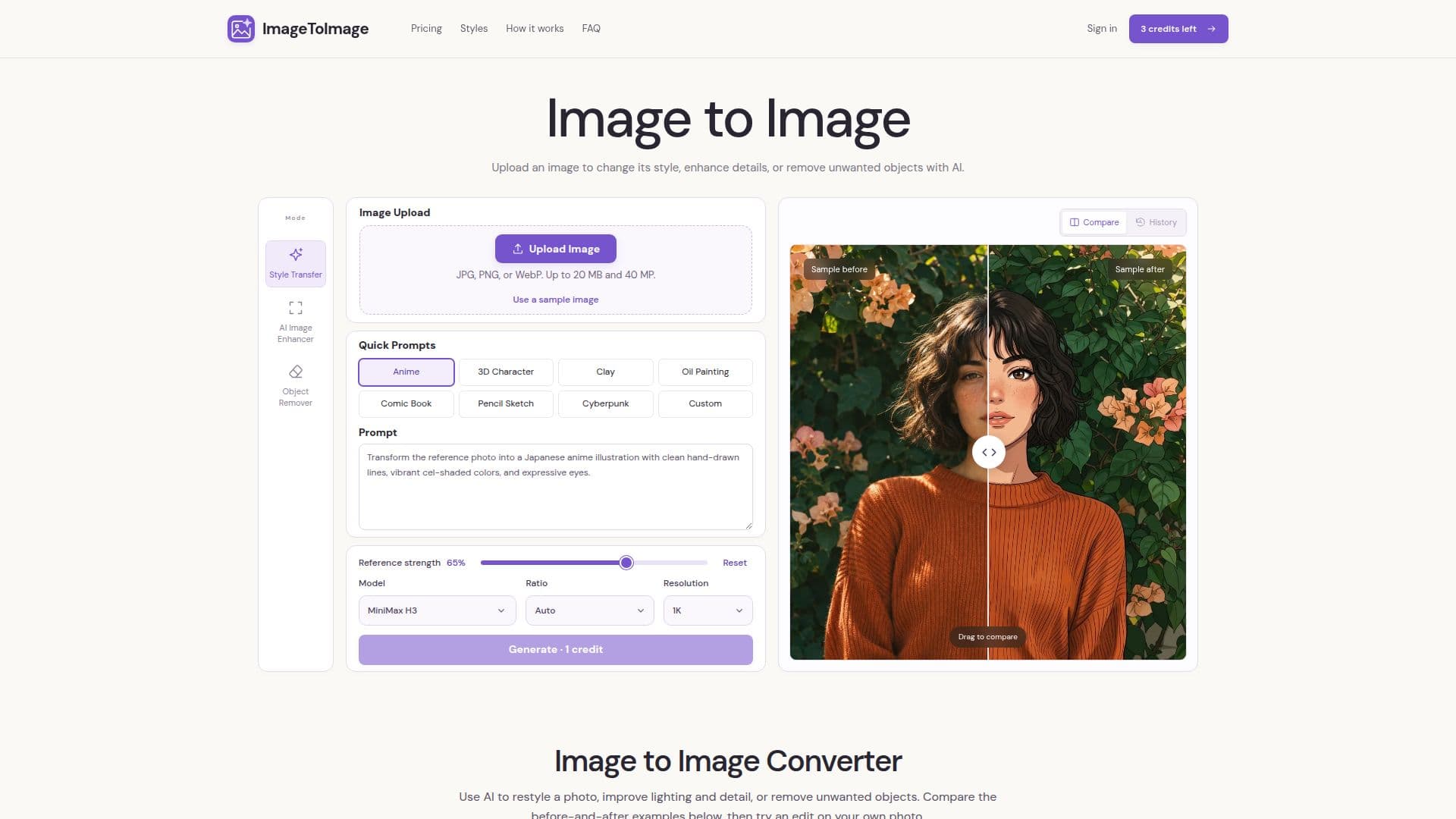
ImageToImages provides a free AI image-to-image converter designed to help users edit and transform their photos with ease. The platform allows for three primary types of edits: style transfer, image enhancement, and object removal. Users can upload their own images and apply various artistic styles such as anime, pencil sketch, oil painting, 3D character, or clay. This feature is ideal for giving portraits or illustrations a fresh, artistic look.
Read More
The AI Image Enhancer offers tools to improve the quality of photos, including auto-enhancement for balanced light and contrast, unblurring to clarify soft edges, denoising to reduce grain, and specific presets for portrait refinement, low light correction, and old photo repair. For those needing to clean up their images, the Object Remover can erase unwanted elements like objects, people, text, logos, wires, background clutter, and shadows, seamlessly filling the gaps with appropriate context.
ImageToImages operates on a credit-based system. Guests receive 3 free credits upon their first visit, which never expire. Additional credits can be purchased through one-time packs, ranging from 30 credits for $4.90 to 1,000 credits for $49.90. The cost per image generation varies depending on the selected AI model (MiniMax H3, Nano Banana 2.1, GPT Image 2.5 Flare) and output resolution (1K, 2K, or 4K). Users can preview the credit cost before submitting a generation request.
The platform supports JPG, PNG, and WebP image uploads up to 20 MB and 40 megapixels. Users can choose an aspect ratio and reference strength to guide the AI on how closely to follow the original photo's subject and framing. All generated downloads, whether with free or purchased credits, are watermark-free. Users can try the editor as a guest or sign in with Google or an email code to link their balance and history across devices. The service emphasizes privacy, stating that uploaded photos and generated results are saved in a private workspace tied to the user's account or guest browser cookie.
- CategoryAI Photo Editors
- Pricing ModelFreemium
- DeploymentCloud
- PlatformsWeb
ImageToImages's Core Features
AI Image-to-Image Conversion
Style Transfer (Comic, Pencil Sketch, Anime, Oil Painting, 3D Character, Clay)
AI Image Enhancer (Auto Enhance, Unblur, Denoise, Portrait, Low Light, Old Photo)
Object Remover (objects, people, text/logos, wires, clutter, shadows)
Guest Access with Free Credits
One-Time Credit Packs
No Sign-Up Required for Guest Use
Credits Never Expire
Multiple AI Models (MiniMax H3, Nano Banana 2.1, GPT Image 2.5 Flare)
Adjustable Output Resolutions (1K, 2K, 4K)
Watermark-Free Downloads
Support for JPG, PNG, WebP formats
Uploads up to 20 MB and 40 Megapixels
Adjustable Reference Strength
Image Comparison Tool
How to use ImageToImages?
Upload Image: Upload a JPG, PNG, or WebP image up to 20 MB and 40 megapixels, or use a sample image.
Choose Edit Type: Select Style Transfer, AI Image Enhancer, or Object Remover, then choose a preset or describe the desired change.
Set Generation Settings: Adjust the model, aspect ratio, and output resolution (1K, 2K, or 4K).
Generate Image: Click 'Generate' to process the image; the credit cost will be displayed beforehand.
Compare and Download: Use the 'Compare' feature to review the edited image against the original, then 'Download' to save it.
ImageToImages's Use Cases
- Artistic Photo Transformation
- Image Quality Enhancement
- Object and People Removal
- Product Photography Editing
- Portrait Retouching
- Old Photo Restoration
- Background Cleanup
- Creative Content Generation