Description
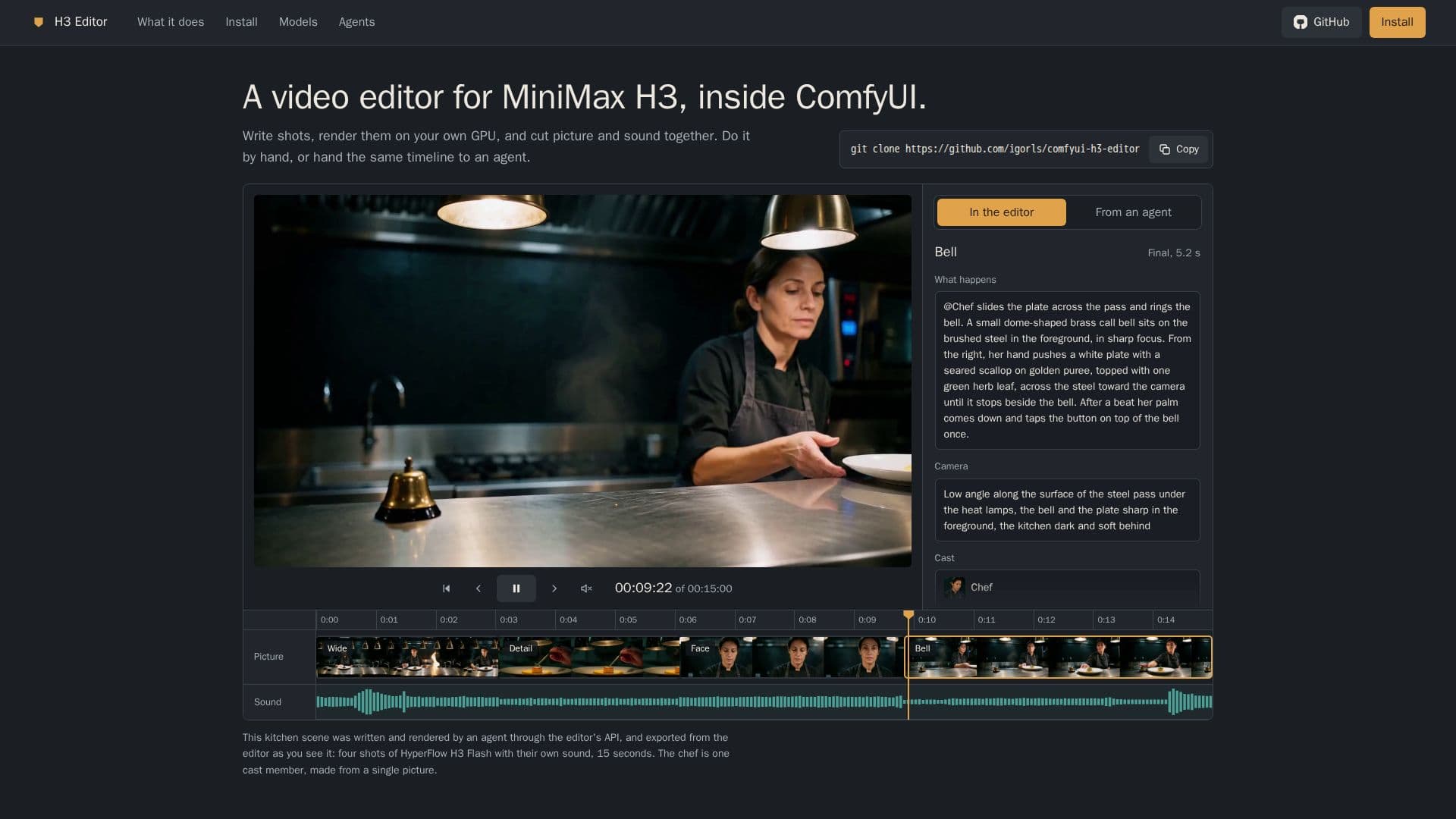
H3 Editor is a comprehensive timeline video editor built specifically for MiniMax H3, operating seamlessly within the ComfyUI environment. This tool empowers users to create videos by writing descriptive shots rather than complex graphs, simplifying the video production workflow. It automatically constructs and queues ComfyUI graphs, rendering clips with synchronized visuals and sound as it samples.
Read More
The editor provides robust capabilities for maintaining consistency across characters and locations. Users can add pictures to a cast and reference them within shots using `@Name`, ensuring consistent appearances. It also supports adding voices for characters or narrators, allowing for generated audio tracks.
Editing features mirror those found in traditional video editors, including trimming, splitting, moving clips, adjusting speed, and adding transitions. Users can manage multiple takes, organize clips into bins, import their own footage and images, and export final videos. A key efficiency feature is that moving a rendered clip never triggers a re-render.
H3 Editor facilitates an iterative workflow, enabling users to quickly draft small, fast renders before refining them into high-resolution finals, up to 1920 pixels, with realism LoRAs for natural skin tones. It supports custom models and LoRAs, with six H3 models built-in and compatibility for any other H3 checkpoint, allowing per-project or per-clip settings for steps, sampler, and scheduler.
For enhanced creative control, clips can be generated to recorded voice tracks, ensuring precise synchronization between visuals and approved narration. The editor also supports advanced linking operations like `extend forward`, `bridge`, and `merge` to create seamless transitions between shots. Furthermore, H3 Editor is designed for automation, with every action accessible via HTTP calls, allowing agents to manage the entire video creation workflow, even collaborating with human users on the same project.
- CategoryAI Video Editors
- Pricing ModelFree
- DeploymentSelf-hosted
- PlatformsComfyUI
H3 Editor's Core Features
Timeline Video Editing for MiniMax H3
ComfyUI Integration
Shot-based Video Creation (write shots, not graphs)
GPU-Accelerated Rendering
Picture and Sound Synchronization
Agent-Driven Video Production (HTTP API)
Consistent Character and Location Management
Voice and Narrator Support
Trim, Split, Move, and Speed Adjust Clips
Add Transitions Between Clips
Manage Multiple Takes and Bins
Import Custom Footage and Pictures
Draft and Final Rendering (up to 1920 pixels)
Support for Custom H3 Models and LoRAs
Generate Video to Recorded Voice Tracks
How to use H3 Editor?
Install H3 Editor: Clone the GitHub repository into ComfyUI's custom_nodes folder and install requirements.
Download Models: Acquire necessary MiniMax H3 models (approx. 54 GB) and optional files as specified.
Open Editor: Launch H3 Editor from the ComfyUI sidebar to start a new project.
Create Clips: Choose a format (16:9, 9:16, 1:1), add a new clip, write the action in "What happens", and render a draft.
Review and Refine: Play the draft, adjust text if needed, and re-render to create new takes. Use "Extend forward" or add more clips.
Render Finals: Select desired takes and press "Render final" for high-resolution output.
Export Video: Export the finished video, which will be saved in ComfyUI's output folder.
H3 Editor's Use Cases
- Video Content Creation
- Automated Video Production
- Character Animation
- Voice-Synchronized Video
- Rapid Prototyping
- Custom Model Integration
- Seamless Scene Transitions