Description
Vibe Shift acts as your personal tone dial for Slack, empowering you to communicate with precision and confidence. This AI-powered application rewrites your Slack messages in a variety of tones, including professional, casual, friendly, concise, cheerful, and encouraging. If you've ever found yourself repeatedly editing a message before sending, Vibe Shift is designed for you.
Read More
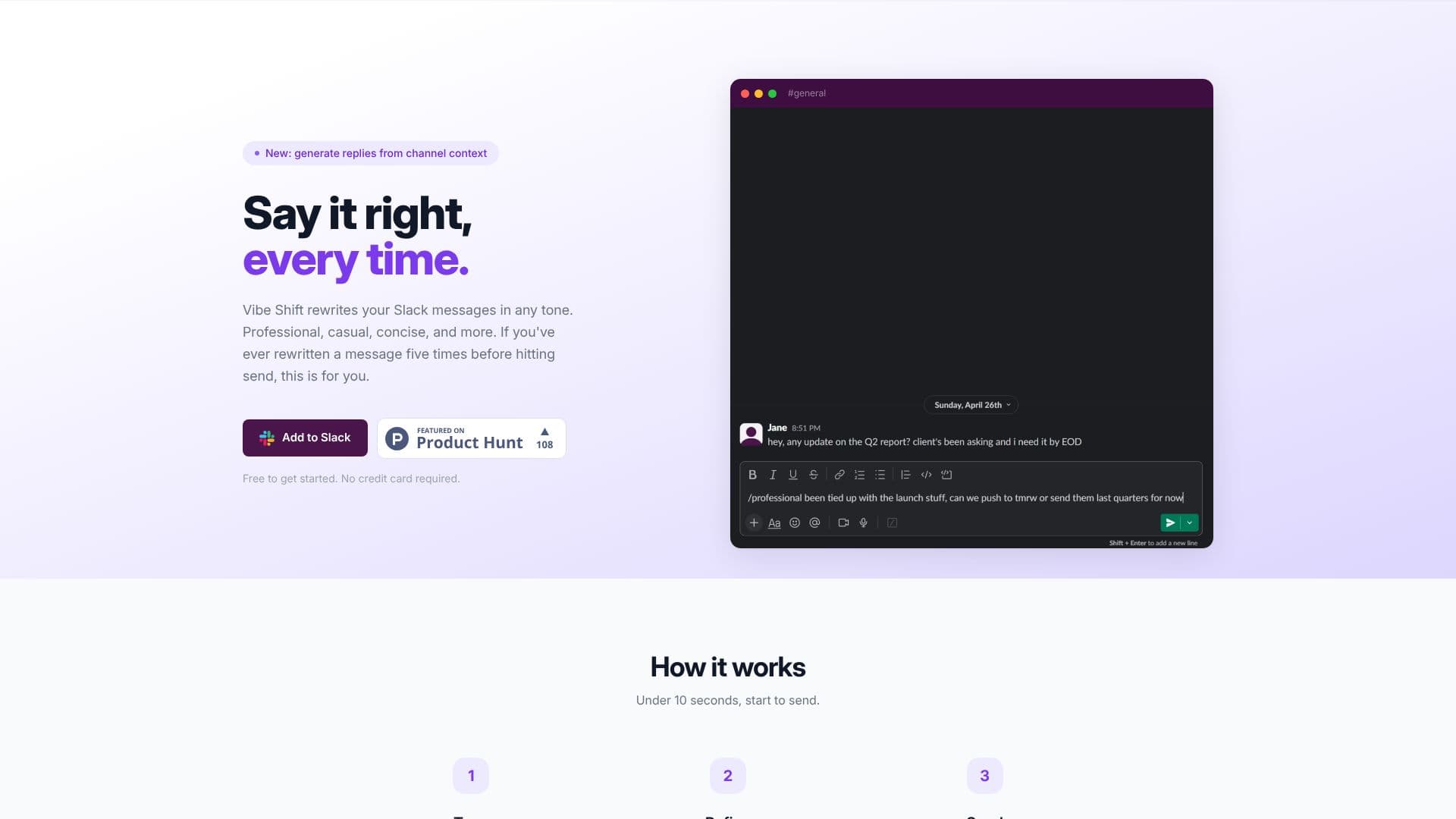
The core functionality is remarkably simple. Using a slash command like `/professional` followed by your message, Vibe Shift instantly generates a rewritten version. You can then refine this output further by regenerating it in the same tone or switching to a different one until it perfectly matches your intent. Once satisfied, you can send the message directly from Slack, ensuring it lands exactly as you intended.
Beyond simple rewrites, Vibe Shift introduces a powerful `/reply` command. By dropping `/reply` in any channel, the app analyzes recent conversation history and drafts a context-aware response in your chosen tone. This eliminates the need for manual copy-pasting and ensures your replies are always relevant and appropriately toned.
Vibe Shift is built for seamless integration into team workflows. It operates entirely within Slack, meaning no app switching or complex setup is required. Your privacy is a priority; messages are processed for the rewrite and then immediately discarded, never stored or used for training. The app is available across desktop and mobile Slack clients, working in channels, DMs, and threads.
Pricing is designed to be accessible, with a free tier for getting started. Paid plans offer increased rewrite limits, priority support, and advanced features like custom writing rules, allowing you to set personal preferences that apply to every rewrite. This ensures your unique voice and style are maintained consistently across all your communications.
- CategoryAI Writing Assistants
- Pricing ModelFreemium
- DeploymentCloud
- PlatformsSlack (Desktop, Mobile)
Vibe Shift's Core Features
Rewrites Slack messages in various tones
Offers professional, casual, friendly, concise, cheerful, and encouraging tones
Generates context-aware replies using the /reply command
Analyzes channel conversation history for reply generation
Allows message regeneration and tone switching
Supports custom writing rules for personalized style
Operates directly within Slack, no app switching needed
Works on desktop and mobile Slack clients
Processes messages privately, discarding them after rewrite
Supports writing and translation in any language
Provides instant results within seconds
Offers a free tier for initial use
How to use Vibe Shift?
Type: Use a slash command like /professional and type your message.
Refine: Regenerate in the same tone or switch to a different one.
Reply: Use /reply in any channel to draft a context-aware response.
Send: Post your message knowing it lands exactly as intended.
Vibe Shift's Use Cases
- Professional Communication
- Casual Team Chat
- Concise Messaging
- Contextual Replies
- Language Refinement
- Tone Adjustment
- Encouraging Feedback
- Cheerful Interactions