
ToolPotion
AI Advisor
Submit a Tool (Free)

Splece

AI AppsAI Video Editors#218Freemium · Mac, Windows, Linux, iPhone, iPad

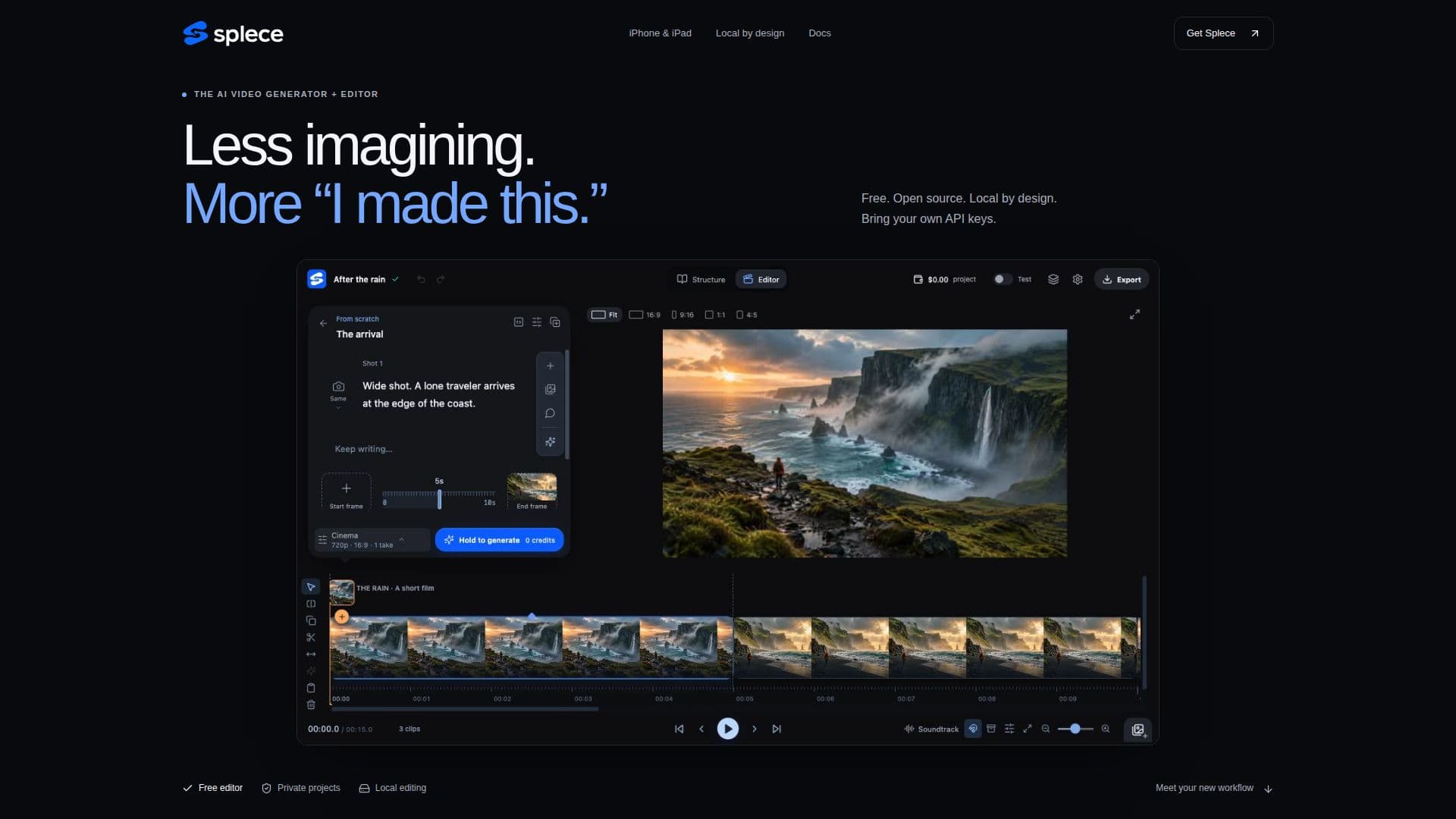
Splece is a free, local AI video studio designed for generating and editing video content. It allows users to create scenes, compare different AI-generated takes, and refine their projects directly on a canvas. Users bring their own API keys for AI providers, ensuring privacy and control over their media and edits, which remain on their local machine.

Visit Website
Share
Splece screenshot
Splece screenshot

Splece offers a free, local video studio specifically built for AI generation and editing. This platform empowers users to create and refine video content by integrating AI capabilities directly into their workflow. A core principle of Splece is user control and privacy: all media and edits are stored in a project folder on the user's local computer, eliminating the need for project uploads.

Read More

The studio operates on an intuitive canvas where users can start with a scene, write prompts, incorporate characters, references, and camera directions. This approach allows for the reuse of details, reducing repetitive prompting. A key feature is the ability to generate multiple takes using different models and compare results side-by-side, with prompts and model settings always accessible for refinement.

Splece supports a comprehensive editing workflow, enabling users to trim moments, refine ranges, arrange clips, and shape sound, moving from AI generation to final cut within a single workspace. It connects the local project folder to a browser-based editor, ensuring that local editing and export are possible without uploading projects to the cloud.

For AI generation, Splece requires users to bring their own API keys for supported providers like Venice and fal.ai, with DeepSeek available for smart writing. This model means users pay their chosen providers directly for AI usage, while the Splece editor and local export functionalities remain free. Generated media is saved back to the local project, maintaining data privacy.

Splece is available as an open-source desktop beta for Mac, Windows, and Linux, with its original code licensed under Apache 2.0 and available on GitHub. A preview release is also available for iPhone and iPad, allowing mobile users to storyboard, direct takes, and edit on their devices. The platform is designed for a simple installation, including the app runtime and video tools, and emphasizes that a powerful graphics card is not strictly necessary as connected providers handle the AI models.

  • CategoryAI Video Editors
  • Pricing ModelFreemium
  • DeploymentDesktop Application
  • PlatformsMac, Windows, Linux, iPhone, iPad

  • Free AI video editor

  • Local project storage and editing

  • Bring your own AI provider keys

  • Intuitive canvas for scene creation

  • Compare multiple AI-generated takes

  • Refine prompts and model settings

  • Comprehensive video editing tools

  • Local export without project upload

  • Open-source desktop application (Apache 2.0)

  • Supports Mac, Windows, and Linux

  • iPhone and iPad preview available

  • Connects to Venice and fal.ai providers

  • DeepSeek integration for smart writing

  • Offline editing mode for existing media

  • Portable project checkpoints

  1. Download and Install: Choose your operating system (Mac, Windows, Linux) and download the Splece desktop beta.

  2. Start Splece: Launch the application on your computer and open your local workspace.

  3. Connect API Keys: Integrate your own API keys for supported AI providers like Venice, fal.ai, or DeepSeek to enable AI generation.

  4. Create a Scene: Use the intuitive canvas to write prompts, add characters, references, and camera directions for your video.

  5. Generate and Compare Takes: Utilize connected AI models to generate multiple takes and compare results to find your preferred output.

  6. Edit Your Film: Trim, refine, arrange clips, and shape sound within the workspace to finalize your video.

  7. Export Locally: Export your finished video directly from your computer without uploading projects.

  8. Explore Offline Mode: Edit existing media on your computer or use sample footage without needing an internet connection or AI keys.

  • AI Video Generation
  • Video Editing and Refinement
  • Creative Experimentation
  • Local Video Production
  • Prompt Engineering for Video
  • Mobile Video Storyboarding

Splece Reviews

Loading...

Popular AI Tools Like Splece

VEED is an AI-powered video creation platform designed for marketers and solopreneurs. It streamlines the workflow from idea generation to final video production, offering tools…

AI Video Editors

Ranked #2 for Removing background noise

View Tool

AI-powered video creation platform designed for marketers and solopreneurs. It streamlines the workflow from idea generation to final video production, offering tools…VEED is an AI-powered video creation platform designed for marketers and solopreneurs. It streamlines the workflow from idea generation to final video production, offering tools…

FeaturedAI Video Editors
Ranked #2 for Removing background noise

Rushilo

AI Apps

Rushilo is a desktop video editor for Mac and Windows that integrates with Claude Code or Codex. It allows users to edit videos using their own AI accounts, offering features like…

AI Video Editors
View Tool

AI Apps

Desktop video editor for Mac and Windows that integrates with Claude Code or Codex. It allows users to edit videos using their own AI accounts, offering features like…Rushilo is a desktop video editor for Mac and Windows that integrates with Claude Code or Codex. It allows users to edit videos using their own AI accounts, offering features like…

AI Video Editors
See the Top 250 AI Apps

VideoEditAI.app is an all-in-one, multi-model AI platform for video editing, video generation, and image creation, bringing Runway Aleph, Kling O1, Veo, Seedance, and Nano Banana…

AI Video EditorsMarketing & Creative Agencies

Ranked #237 in AI Video Editors

View Tool

All-in-one, multi-model AI platform for video editing, video generation, and image creation, bringing Runway Aleph, Kling O1, Veo, Seedance, and Nano Banana…VideoEditAI.app is an all-in-one, multi-model AI platform for video editing, video generation, and image creation, bringing Runway Aleph, Kling O1, Veo, Seedance, and Nano Banana…

AI Video EditorsMarketing & Creative Agencies
Ranked #237 in AI Video Editors

Takehound

AI Apps

Takehound is an AI video editor that automates the editing process for talking videos. It learns your editing style, cuts pauses and filler words, and places key lines on screen,…

AI Video Editors
View Tool

AI Apps

AI video editor that automates the editing process for talking videos. It learns your editing style, cuts pauses and filler words, and places key lines on screen,…Takehound is an AI video editor that automates the editing process for talking videos. It learns your editing style, cuts pauses and filler words, and places key lines on screen,…

AI Video Editors
See the Top 250 AI Apps

InVideo AI

AI Apps

InVideo AI is a multimodel workspace for creating AI videos, images, voice, and music. With over 250 models, it allows users to compare outputs and manage production in one…

AI Video Generators

Ranked #45 for Writing video scripts

View Tool

AI Apps

Multimodel workspace for creating AI videos, images, voice, and music. With over 250 models, it allows users to compare outputs and manage production in one…InVideo AI is a multimodel workspace for creating AI videos, images, voice, and music. With over 250 models, it allows users to compare outputs and manage production in one…

AI Video Generators
Ranked #45 for Writing video scripts

SparkVid

AI Apps

SparkVid is an online AI video maker that transforms ideas into stunning videos. It offers models like Seedance, Kling, and Veo, allowing users to create cinematic content…

AI Video GeneratorsMarketing & Creative Agencies
View Tool

AI Apps

Online AI video maker that transforms ideas into stunning videos. It offers models like Seedance, Kling, and Veo, allowing users to create cinematic content…SparkVid is an online AI video maker that transforms ideas into stunning videos. It offers models like Seedance, Kling, and Veo, allowing users to create cinematic content…

AI Video GeneratorsMarketing & Creative Agencies
See the Top 250 AI Apps

Klox AI

AI Apps

Klox AI is a video creation tool that allows users to transform ideas into videos. It provides features like script creation, storyboard development, and video clip generation…

AI Video Generators
View Tool

AI Apps

Video creation tool that allows users to transform ideas into videos. It provides features like script creation, storyboard development, and video clip generation…Klox AI is a video creation tool that allows users to transform ideas into videos. It provides features like script creation, storyboard development, and video clip generation…

AI Video Generators
See the Top 250 AI Apps

Topview

AI Apps

Topview's AI Video Agent creates short films, marketing videos, and ads from scripts or product URLs. It plans and generates every scene on a single canvas, making video…

AI Video GeneratorsRetail & Consumer Goods

Ranked #50 for Writing video scripts

View Tool

AI Apps

AI Video Agent creates short films, marketing videos, and ads from scripts or product URLs. It plans and generates every scene on a single canvas, making video…Topview's AI Video Agent creates short films, marketing videos, and ads from scripts or product URLs. It plans and generates every scene on a single canvas, making video…

AI Video GeneratorsRetail & Consumer Goods
Ranked #50 for Writing video scripts
1 of 8