ToolPotion
AI Advisor
Submit a Tool (Free)

ScreenMake

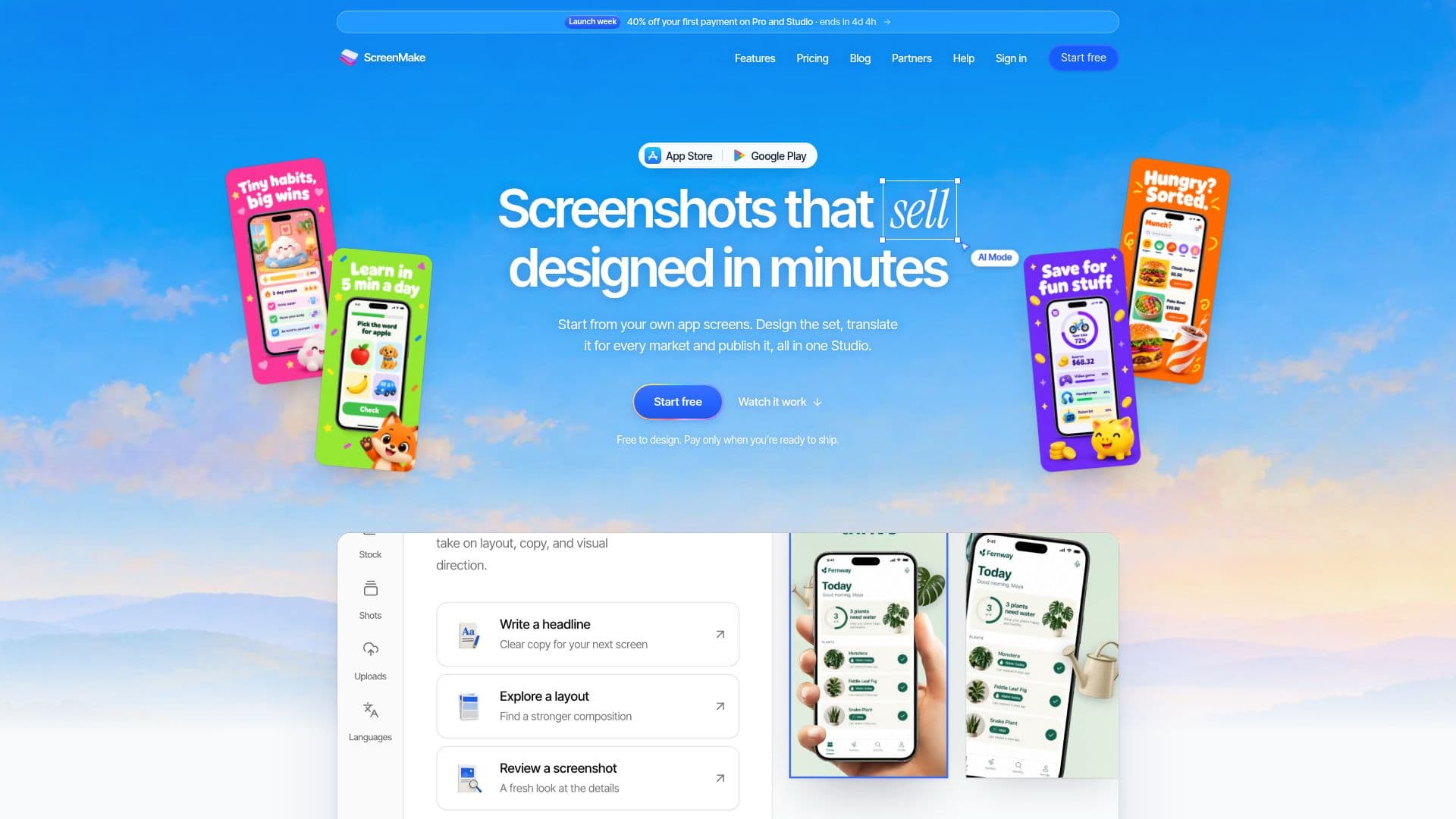
ScreenMake helps users design App Store and Google Play screenshots quickly and efficiently. It allows starting from existing app screens, restyling entire sets with simple descriptions, and translating content into 39 languages. The platform supports one-click publishing to App Store Connect, making it ideal for developers and studios to create compelling app listings.

Visit Website
Share
ScreenMake screenshot

ScreenMake is a comprehensive platform designed to streamline the creation of App Store and Google Play screenshots. It empowers users to design visually appealing and effective screenshot sets that enhance app visibility and sales. The tool is particularly beneficial for developers and studios who need to produce high-quality marketing assets without extensive design experience.

Read More

The core functionality revolves around its intuitive design studio. Users can begin by uploading captures of their own app screens. From there, ScreenMake's Quick Draft feature can automatically transform these captures into a professionally designed set. For further customization, AI Mode allows users to describe desired changes in plain language, and the platform generates the design accordingly. Crucially, every layer remains editable by hand, offering full control to those who prefer fine-tuning.

ScreenMake addresses the repetitive tasks involved in screenshot design. Instead of manually cutting screens into device mockups, laying out headlines, backgrounds, and artwork, and then resizing for various store requirements, users can achieve these tasks with minimal effort. The platform integrates a vast library of elements, including 34,000 icons, 3D objects, stickers, badges, shapes, and a wide array of device mockups (flat, hand-held, 3D frames for phones, tablets, and watches). It also provides stock photo search, gradients, and animated shaders. If a specific element isn't available, AI Mode can generate it based on a description.

Localization is a key strength of ScreenMake. It supports translation into 39 App Store languages, from Català to Tiếng Việt, with a single click. Each translated line remains editable, allowing for precise adjustments. Furthermore, the platform can redraw the app screen inside the phone mockup to match the new language, ensuring a fully localized experience. Right-to-left languages like Arabic and Hebrew are also handled, with layouts mirroring automatically.

ScreenMake offers a flexible pricing model, allowing users to design their entire set for free. Free accounts include a few AI credits to experiment with AI tools, but exports will carry a ScreenMake watermark. Paid plans remove this watermark, provide more AI credits, and enable one-click publishing to App Store Connect. The platform ensures secure connection to App Store accounts using an App Store Connect key with an App Manager role, limiting permissions to listing updates only. This key is encrypted and can be revoked at any time. While one-click publishing is for the App Store, Google Play users can easily upload the exported files.

  • CategoryAI UI & UX Design Tools
  • Pricing ModelFreemium
  • DeploymentCloud
  • PlatformsWeb

  • Design App Store and Google Play screenshots

  • Start from your own app screens

  • Restyle entire screenshot sets with AI Mode

  • Translate screenshots into 39 languages

  • Publish directly to App Store Connect

  • Quick Draft for automatic design generation

  • Manual editing for full design control

  • Supports all App Store and Google Play sizes for phones, tablets, and more

  • Carry iPhone sets over to iPad without redesigning

  • Secure App Store account connection with App Manager role

  • AI credits for AI Mode, Quick Draft, AI images, mockups, and AI translation

  • Extensive library of 34,000 elements including icons, 3D objects, and device mockups

  • AI-powered image and mockup generation

  • Editable translated text for every language

  • Localized app screen captures for different markets

  1. Add App Screens: Upload captures of your own app to the platform.

  2. Generate Quick Draft: Use Quick Draft to automatically turn your screens into a designed set.

  3. Design with AI Mode: Describe desired changes in plain words and let AI Mode design them on your canvas.

  4. Customize Manually: Edit any layer by hand for full control over the design.

  5. Translate Content: Translate the entire set into 39 languages with a single click, then fine-tune any line.

  6. Export Screenshots: Download store-ready images for every screen, device, and language.

  7. Publish to App Store: Use one-click publishing to send your screenshots directly to App Store Connect.

  8. Upload to Google Play: Export files and upload them manually to Google Play.

  • App Store Screenshot Design
  • Google Play Screenshot Creation
  • Multi-Language App Localization
  • Rapid Screenshot Prototyping
  • Non-Designer Screenshot Production
  • Efficient Design Iteration
  • App Marketing Asset Generation
  • Cross-Platform Screenshot Adaptation

ScreenMake Reviews

Loading...

Popular AI Tools Like ScreenMake

Sleek

AI Apps

Sleek is an AI mobile app designer that turns an idea or reference image into complete iOS and Android app screens, which you can edit visually and export to Figma or React/HTML…

AI UI & UX Design Tools

Ranked #34 in AI UI & UX Design Tools

View Tool

AI Apps

AI mobile app designer that turns an idea or reference image into complete iOS and Android app screens, which you can edit visually and export to Figma or React/HTML…Sleek is an AI mobile app designer that turns an idea or reference image into complete iOS and Android app screens, which you can edit visually and export to Figma or React/HTML…

AI UI & UX Design Tools
Ranked #34 in AI UI & UX Design Tools

AppGrowthKit is an AI-driven tool for creating App Store and Google Play screenshots. It offers features like AI layout planning, localization, and store-ready exports, making it…

Listing & Store Optimization
View Tool

AI-driven tool for creating App Store and Google Play screenshots. It offers features like AI layout planning, localization, and store-ready exports, making it…AppGrowthKit is an AI-driven tool for creating App Store and Google Play screenshots. It offers features like AI layout planning, localization, and store-ready exports, making it…

Listing & Store Optimization
See the Top 250 AI Apps

UXMagic

AI Apps

UXMagic is an AI UI generator that turns text, sketches, screenshots, or URLs into Figma-ready UI designs and exportable HTML/React code. Built for designers, product managers,…

AI UI & UX Design Tools

Ranked #35 in AI UI & UX Design Tools

View Tool

AI Apps

AI UI generator that turns text, sketches, screenshots, or URLs into Figma-ready UI designs and exportable HTML/React code. Built for designers, product managers,…UXMagic is an AI UI generator that turns text, sketches, screenshots, or URLs into Figma-ready UI designs and exportable HTML/React code. Built for designers, product managers,…

AI UI & UX Design Tools
Ranked #35 in AI UI & UX Design Tools

Uizard

AI Apps

Uizard is an AI-powered UI/UX design tool that turns text prompts, screenshots, and hand-drawn sketches into editable mockups and multi-screen prototypes, built to be as easy to…

AI UI & UX Design Tools

Ranked #6 in AI UI & UX Design Tools

View Tool

AI Apps

AI-powered UI/UX design tool that turns text prompts, screenshots, and hand-drawn sketches into editable mockups and multi-screen prototypes, built to be as easy to…Uizard is an AI-powered UI/UX design tool that turns text prompts, screenshots, and hand-drawn sketches into editable mockups and multi-screen prototypes, built to be as easy to…

FeaturedAI UI & UX Design Tools
Ranked #6 in AI UI & UX Design Tools

App Store Screenshots is a free, open-source skill for AI coding agents like Claude Code, Codex, and Cursor. It helps developers generate production-ready App Store and Google…

AI Graphic Design Tools
View Tool

Free, open-source skill for AI coding agents like Claude Code, Codex, and Cursor. It helps developers generate production-ready App Store and Google…App Store Screenshots is a free, open-source skill for AI coding agents like Claude Code, Codex, and Cursor. It helps developers generate production-ready App Store and Google…

AI Graphic Design Tools
See the Top 250 AI Apps

Figma Draw is an AI-powered design tool that helps users create layouts, graphics, and interactive prototypes quickly. It integrates with Figma Make, allowing for seamless design…

AI UI & UX Design ToolsMarketing & Creative Agencies
View Tool

AI-powered design tool that helps users create layouts, graphics, and interactive prototypes quickly. It integrates with Figma Make, allowing for seamless design…Figma Draw is an AI-powered design tool that helps users create layouts, graphics, and interactive prototypes quickly. It integrates with Figma Make, allowing for seamless design…

AI UI & UX Design ToolsMarketing & Creative Agencies
See the Top 250 AI Apps

AppScreenStudio is a tool for creating professional app store screenshots for iOS and Android. It offers free templates and device frames, with premium options available in the…

AI Graphic Design Tools
View Tool

Tool for creating professional app store screenshots for iOS and Android. It offers free templates and device frames, with premium options available in the…AppScreenStudio is a tool for creating professional app store screenshots for iOS and Android. It offers free templates and device frames, with premium options available in the…

AI Graphic Design Tools
See the Top 250 AI Apps

Banani

AI Apps

Banani is an AI UI design tool that generates editable, multi-screen UI prototypes from text prompts, images, or Figma links, and exports designs to Figma, HTML/CSS, or images.

AI UI & UX Design Tools

Ranked #12 in AI UI & UX Design Tools

View Tool

AI Apps

AI UI design tool that generates editable, multi-screen UI prototypes from text prompts, images, or Figma links, and exports designs to Figma, HTML/CSS, or images.Banani is an AI UI design tool that generates editable, multi-screen UI prototypes from text prompts, images, or Figma links, and exports designs to Figma, HTML/CSS, or images.

FeaturedAI UI & UX Design Tools
Ranked #12 in AI UI & UX Design Tools
1 of 8