ToolPotion
AI Advisor
Submit a Tool (Free)

PromptTray

AI AppsPrompt Engineering Tools#79Freemium · Chrome Extension

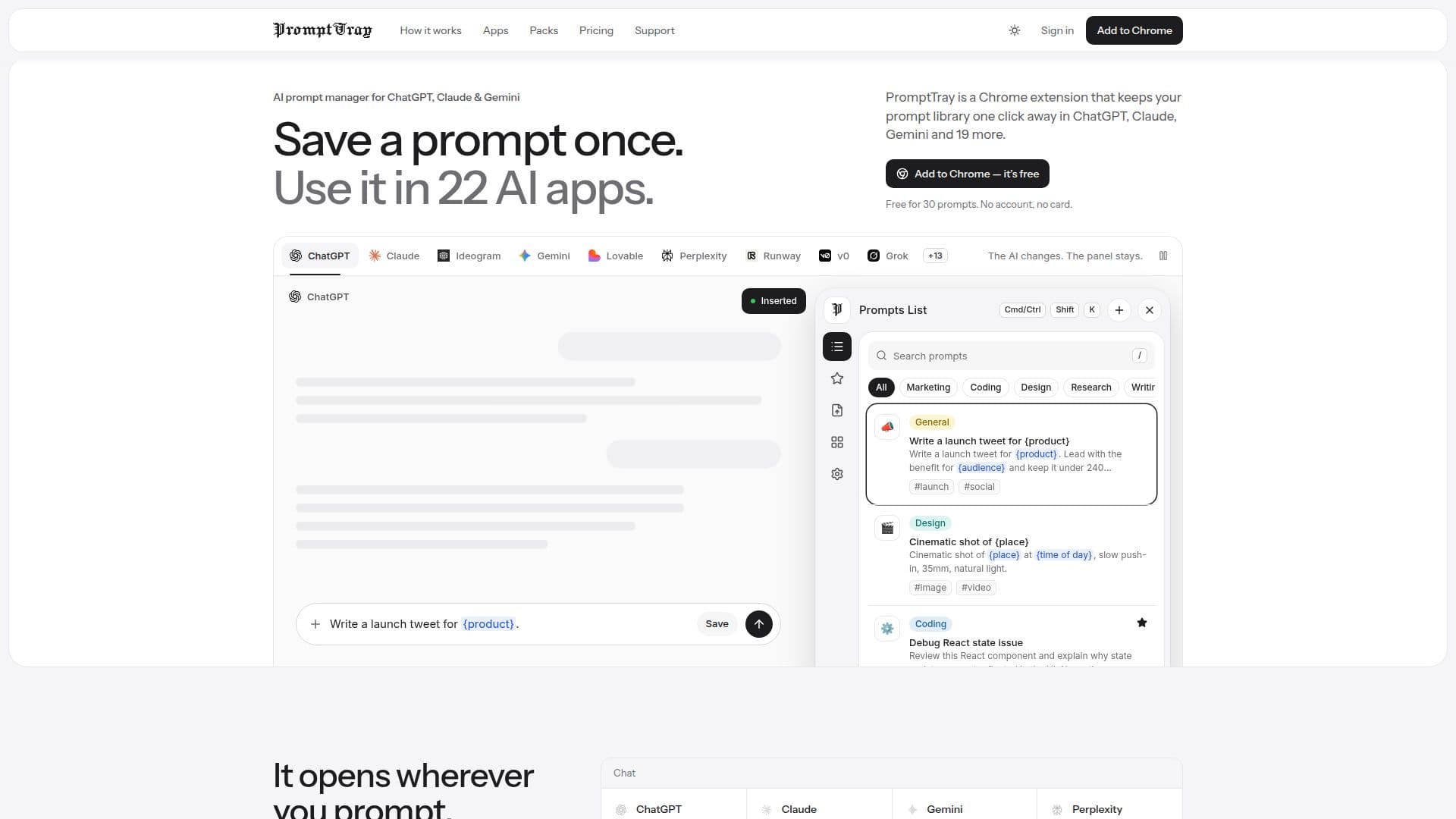
PromptTray is a Chrome extension that serves as a multi-platform AI prompt manager. It allows users to save, organize, and reuse prompts instantly across 22 different AI applications, including ChatGPT, Claude, Gemini, and Perplexity. The extension integrates directly into chat interfaces, enabling one-click saving and quick insertion of prompts without switching tabs or copying text.

Visit Website
Share
PromptTray screenshot

PromptTray is a versatile Chrome extension designed to streamline the workflow of users interacting with multiple AI applications. It functions as a centralized prompt library, allowing individuals to save, categorize, and quickly access their frequently used prompts directly within the AI chat interface. This eliminates the need to switch between applications or copy-paste prompts from external documents like Notion or Google Docs, significantly enhancing efficiency.

Read More

The extension integrates seamlessly with 22 popular AI tools, covering various domains such as chat, image generation, video, music, and app builders. Supported platforms include ChatGPT, Claude, Gemini, Perplexity, Grok, AI Studio, DeepSeek, Copilot, Meta AI, Mistral, Ideogram, Krea, Higgsfield, Leonardo, Runway, Kling, Suno, Magnific, Lovable, v0, Bolt, and Replit. Users can save a prompt with a single click from the message box, and the first line of text automatically becomes the prompt's title. Optional categories, tags, and emojis help in further organization.

PromptTray offers robust prompt management features, including the ability to use variables within prompts. Users can enclose changeable elements in curly braces, and PromptTray will prompt for these values before inserting the prompt, making templates highly adaptable. The Import Hub allows users to bring in existing prompts from text pasted from documents or files like .md, .txt, .json, or .csv, automatically splitting them into individual prompts and flagging duplicates. Conversely, the entire prompt library can be exported as a JSON file for backup or transfer.

The service offers a free tier that includes storage for 30 prompts, 5 categories, and 5 AI improvements per month, along with sync across devices and variable support. For more extensive use, a Premium plan is available, offering unlimited prompts and categories, 100 AI improvements per month, presets for variables, and version history. PromptTray prioritizes user privacy, storing prompts locally in the browser without an account, and only collecting email, saved prompts, categories, and settings with an account for sync and backup purposes. It explicitly states that it does not sell personal data or share prompts with advertisers or data brokers.

  • CategoryPrompt Engineering Tools
  • Pricing ModelFreemium
  • DeploymentCloud
  • PlatformsChrome Extension

  • Chrome Extension for AI Prompt Management

  • Integrates with 22 AI Applications

  • One-Click Prompt Saving from Chat Box

  • Quick Prompt Insertion via Shortcut (Ctrl Shift K)

  • Prompt Library with Categories, Tags, and Favorites

  • Variable Support for Dynamic Prompts

  • Import Hub for Existing Prompts (text, .md, .txt, .json, .csv)

  • Export Entire Prompt Library as JSON

  • AI Improvements for Prompt Refinement

  • Version History for Prompts (Premium)

  • Sync Prompts Across Devices

  • Starter Packs with 40 Reusable Prompts

  • Privacy-Focused Data Handling

  • Free Tier Available

  • Premium Plan with Advanced Features

  1. Install Extension: Add PromptTray from the Chrome Web Store to your browser.

  2. Open AI Tool: Navigate to any supported AI application like ChatGPT or Claude.

  3. Save Prompts: Type a prompt in the message box and click the 'Save' button that appears.

  4. Organize Prompts: Use the PromptTray sidebar to categorize, tag, and manage your saved prompts.

  5. Insert Prompts: Press Ctrl Shift K to open Spotlight search, type a few letters, and press Enter to insert a prompt.

  6. Use Variables: Fill in the blanks for prompts with curly braces before insertion.

  7. Import Existing Prompts: Use the Import Hub to paste text or upload files (.md, .txt, .json, .csv) to add multiple prompts.

  • Content Creation
  • Code Development
  • Research & Analysis
  • Sales & Marketing
  • Customer Support
  • HR & Recruitment
  • Product & UX Design
  • General Productivity

PromptTray Reviews

Loading...

Popular AI Tools Like PromptTray

Promptly AI is a browser extension and API playground designed to enhance AI interactions. It helps users craft better prompts, provides access to a curated library of prompt…

Prompt Engineering Tools

Ranked #26 in Prompt Engineering Tools

View Tool

Browser extension and API playground designed to enhance AI interactions. It helps users craft better prompts, provides access to a curated library of prompt…Promptly AI is a browser extension and API playground designed to enhance AI interactions. It helps users craft better prompts, provides access to a curated library of prompt…

Prompt Engineering Tools
Ranked #26 in Prompt Engineering Tools

PromptFolder is an AI prompt manager for building, saving, and discovering prompts to use with ChatGPT, Midjourney, and other AI-powered tools.

Prompt Engineering Tools

Ranked #52 in Prompt Engineering Tools

View Tool

AI prompt manager for building, saving, and discovering prompts to use with ChatGPT, Midjourney, and other AI-powered tools.PromptFolder is an AI prompt manager for building, saving, and discovering prompts to use with ChatGPT, Midjourney, and other AI-powered tools.

FeaturedPrompt Engineering Tools
Ranked #52 in Prompt Engineering Tools

AI Prompt Genius is a browser extension that helps users discover, share, and use the best ChatGPT prompts. It allows customization with themes and syncs across devices for free,…

Prompt Engineering Tools

Ranked #61 in Prompt Engineering Tools

View Tool

Browser extension that helps users discover, share, and use the best ChatGPT prompts. It allows customization with themes and syncs across devices for free,…AI Prompt Genius is a browser extension that helps users discover, share, and use the best ChatGPT prompts. It allows customization with themes and syncs across devices for free,…

Prompt Engineering Tools
Ranked #61 in Prompt Engineering Tools

SpacePrompts is an AI prompt manager that allows users to save, organize, and enhance AI prompts across platforms like ChatGPT and Claude. It offers features like version control,…

Prompt Engineering Tools

Ranked #13 in Prompt Engineering Tools

View Tool

AI prompt manager that allows users to save, organize, and enhance AI prompts across platforms like ChatGPT and Claude. It offers features like version control,…SpacePrompts is an AI prompt manager that allows users to save, organize, and enhance AI prompts across platforms like ChatGPT and Claude. It offers features like version control,…

Prompt Engineering Tools
Ranked #13 in Prompt Engineering Tools

PromptForge

Browser Plugins

PromptForge is a Chrome extension that integrates with AI chat platforms like ChatGPT, Gemini, and Claude. It allows users to save, create, and run prompts with a single click,…

Prompt Engineering Tools
View Tool

Browser Plugins

Chrome extension that integrates with AI chat platforms like ChatGPT, Gemini, and Claude. It allows users to save, create, and run prompts with a single click,…PromptForge is a Chrome extension that integrates with AI chat platforms like ChatGPT, Gemini, and Claude. It allows users to save, create, and run prompts with a single click,…

Prompt Engineering Tools
See the Top 250 Browser Plugins

PromptDrive

Browser Plugins

PromptDrive is a free Chrome extension designed to streamline your workflow by saving, organizing, and sharing prompts for AI tools like ChatGPT, Gemini, and Midjourney. It offers…

Prompt Engineering Tools
View Tool

Browser Plugins

Free Chrome extension designed to streamline your workflow by saving, organizing, and sharing prompts for AI tools like ChatGPT, Gemini, and Midjourney. It offers…PromptDrive is a free Chrome extension designed to streamline your workflow by saving, organizing, and sharing prompts for AI tools like ChatGPT, Gemini, and Midjourney. It offers…

Prompt Engineering Tools
See the Top 250 Browser Plugins

Page to Prompt is a Chrome extension designed to streamline the process of generating AI prompts from web content. It allows users to send highlighted text, entire page content,…

Prompt Engineering Tools

Ranked #28 in Prompt Engineering Tools

View Tool

Chrome extension designed to streamline the process of generating AI prompts from web content. It allows users to send highlighted text, entire page content,…Page to Prompt is a Chrome extension designed to streamline the process of generating AI prompts from web content. It allows users to send highlighted text, entire page content,…

Prompt Engineering Tools
Ranked #28 in Prompt Engineering Tools

Recallery

AI Apps

Recallery is a Chrome extension that enhances AI chat platforms like ChatGPT, Claude, Gemini, and Grok. It allows users to save and run prompt chains, organize chats into folders,…

Prompt Engineering Tools

Ranked #234 in Productivity

View Tool

AI Apps

Chrome extension that enhances AI chat platforms like ChatGPT, Claude, Gemini, and Grok. It allows users to save and run prompt chains, organize chats into folders,…Recallery is a Chrome extension that enhances AI chat platforms like ChatGPT, Claude, Gemini, and Grok. It allows users to save and run prompt chains, organize chats into folders,…

Prompt Engineering Tools
Ranked #234 in Productivity
1 of 8