Description
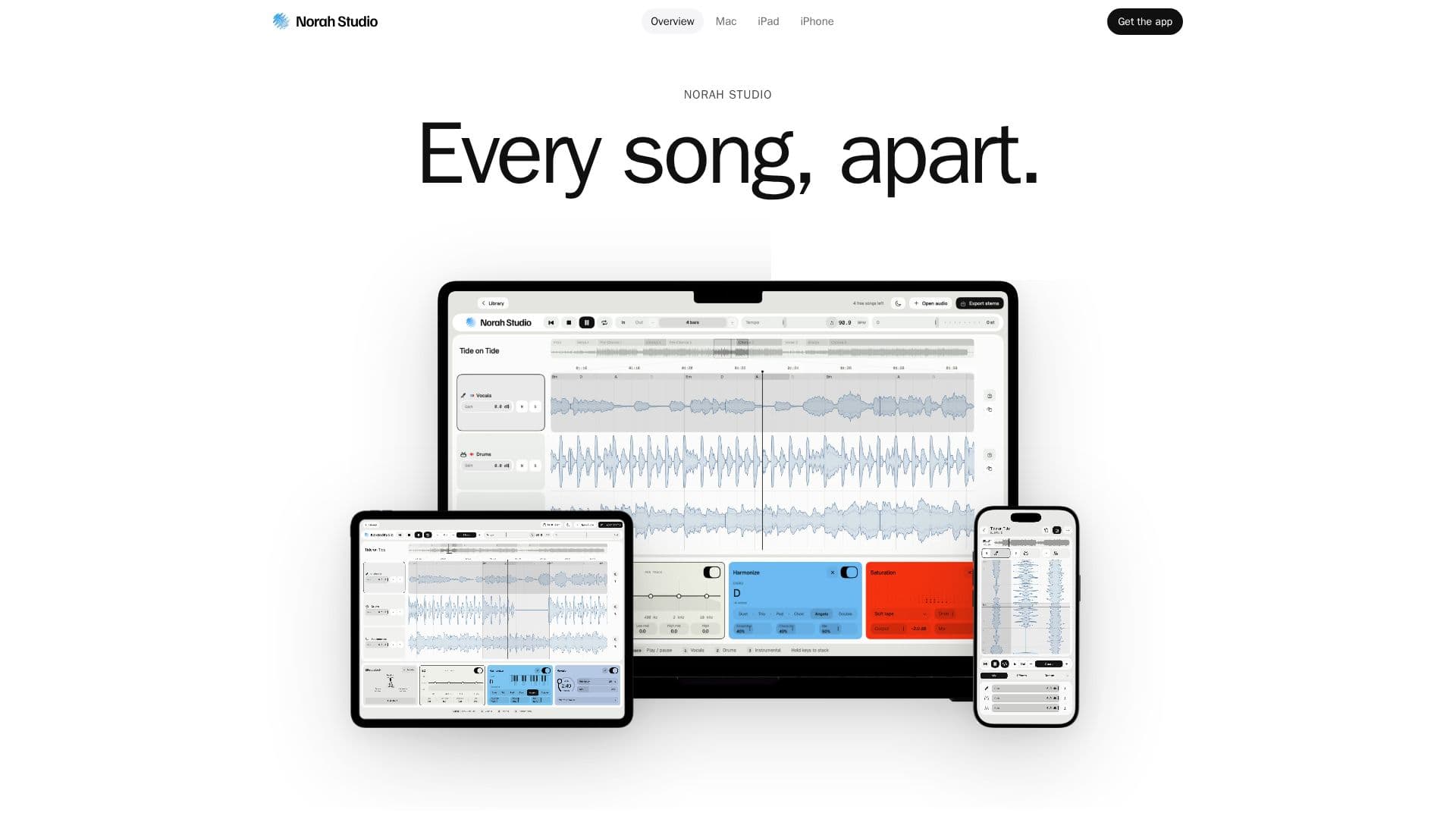
Norah Studio is a dedicated music separation application designed for Apple devices, including Mac, iPad, and iPhone. It empowers users to dissect any audio file into its core components: vocals, drums, and instrumental tracks. This capability transforms how musicians, producers, and learners interact with existing songs, offering a versatile platform for practice, remixing, and analysis.
Read More
The application operates entirely on-device, meaning all separation processes occur offline without requiring an internet connection, uploads, or user accounts. This ensures maximum privacy and efficiency, as the AI models are embedded within the app itself. Users can open various audio formats, including MP3, M4A, AAC, WAV, AIFF, FLAC, and CAF, up to ten minutes in length. It's important to note that Norah Studio cannot open songs from streaming services due to their proprietary file locking.
Beyond basic separation, Norah Studio provides a comprehensive suite of tools for manipulating and enhancing audio. Users can loop specific sections by bars, adjust the tempo without altering the pitch, and change the key to match their vocal range or instrument. The app also estimates chords, tempo, and key, displaying them for easy reference during practice sessions. While these are estimates, they are designed to be accurate enough for practical use.
Each separated lane (vocals, drums, instrumental) features its own effect stack, offering 24 effects and 4 visualizers, along with an EQ. Unique effects are tailored for specific lanes, such as rhythm effects for drums and instrumental, and voice effects for vocals. Advanced features include Melody Synth, which plays the vocal melody with a choice of 19 instruments, and Harmonize, which adds a choir that follows the song's chords.
Norah Studio supports exporting the three separated stems with applied effects, as well as the vocal melody as a MIDI file, ready for use in other digital audio workstations (DAWs). The app offers a consistent experience across Mac, iPad, and iPhone, with native interfaces optimized for each device, including keyboard and mouse support on Mac, touch controls on iPad, and a one-handed interface on iPhone. A single purchase of the Pro version covers all devices linked to the same Apple Account.
Privacy is a core tenet of Norah Studio, with a strict "0 bytes" policy meaning no data leaves the user's device. There are no accounts, servers, or analytics involved, reinforcing its commitment to user data protection.
- CategoryAI Audio Editors
- Pricing ModelFreemium
- DeploymentCloud
- PlatformsmacOS, iPadOS, iOS
Norah Studio's Core Features
Separate songs into vocals, drums, and instrumental tracks
On-device processing for offline use
Loop by bars with named sections
Independent tempo and key adjustment
Chords displayed above vocal lane
24 effects and 4 visualizers per lane
EQ on every lane with customizable order
Melody Synth with 19 instrument sounds for vocal melody
Harmonize feature for adding choir vocals
Export individual stems with effects
Export vocal melody as MIDI file
MIDI Learn for external controller mapping
Library for reopening recent songs with settings
Support for various audio file formats (MP3, M4A, WAV, AIFF, FLAC, CAF)
Share as story video (iPhone only)
How to use Norah Studio?
Open a Song: Launch Norah Studio and select an audio file from your device. The app will immediately begin separating it into three tracks.
Adjust & Loop: Use the bar grid and named sections to create loops. Adjust tempo and key independently to suit your practice needs.
Add Effects: Apply 24 different effects and 4 visualizers to individual vocal, drum, or instrumental lanes, customizing the order as desired.
Enhance Melody: Utilize Melody Synth to replay the vocal melody with 19 instruments or Harmonize to add a choir that follows the chords.
Export Stems: Save the separated tracks with applied effects as individual stems, or export the vocal melody as a MIDI file for further production.
Share Story (iPhone): On iPhone, turn your song with live effects into a 9:16 story video for social media, choosing a background and length.
Norah Studio's Use Cases
- Music Practice
- Backing Track Creation
- Drum Loop Extraction
- Vocal Isolation
- Remixing & Production
- Karaoke Creation
- Melody Study
- Chord Analysis
- Social Media Content