Description
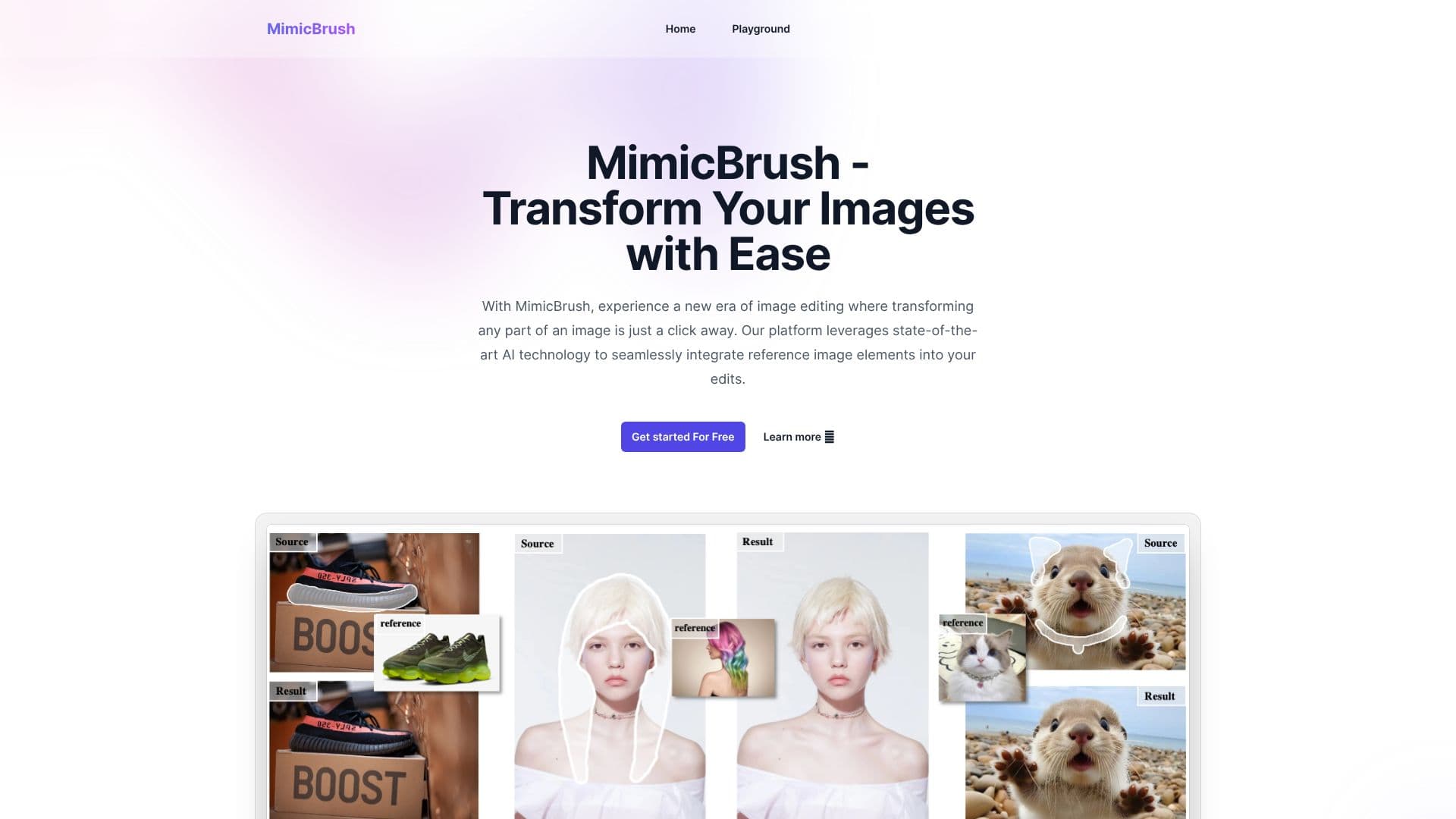
MimicBrush introduces a novel approach to image editing through its advanced AI technology, enabling users to seamlessly integrate elements from reference images into their source images. This innovative platform transforms any part of an image with just a click, ushering in a new era of creative control and realistic modifications.
Read More
At its core, MimicBrush employs a unique imitative editing technique. Users can select a specific area of an image, such as clothing or a background, and then provide a reference image. The AI automatically recognizes and mimics the style, textures, and details of the reference image, applying them to the selected area of the source image. This process ensures high-quality, realistic results while preserving the original shape of objects.
One of MimicBrush's key strengths is its automated processing, which eliminates the need for professional editing skills. The tool is designed for simplicity and efficiency, making it accessible to beginners and experienced users alike. Furthermore, MimicBrush excels at localized modifications, allowing for precise edits to specific parts of an image without affecting the entire composition. This is particularly beneficial for detailed retouching and targeted enhancements.
The platform also features robust texture transfer capabilities, enabling users to apply complex patterns and textures from a reference image to their source image while maintaining the integrity of the original object's form. MimicBrush can also serve as a powerful post-processing tool, enhancing the quality and consistency of images generated by other AI tools or editing methods.
MimicBrush is designed for versatility and accessibility, being compatible across various devices, from desktops to mobile phones. This ensures a seamless image editing experience regardless of location or preferred device. The platform is suitable for a wide range of applications, from personal creative projects to professional design and photography workflows, offering a game-changer for achieving stunning, professional-level results with ease.
- CategoryAI Photo Editors
- Pricing ModelFree
- DeploymentCloud
- PlatformsDesktop, Mobile
MimicBrush's Core Features
Imitative editing technique for realistic image modifications
AI-powered integration of reference image elements
Localized modifications to specific image areas
Automated processing requiring no professional skills
Texture transfer while preserving original object shapes
Post-processing refinement for enhanced image quality
User-friendly interface for intuitive editing
Compatibility across desktops and mobile devices
Adaptable to various image styles
Suitable for both personal and commercial projects
How to use MimicBrush?
Select Editing Area: Mark the desired area of your source image with a white mask.
Provide Reference Image: Upload a reference image containing the visual elements you want to mimic.
Experience Seamless Editing: MimicBrush's AI will automatically transform the selected area based on the reference.
Explore and Experiment: Try different reference images and editing areas to discover new creative possibilities.
Access Across Devices: Use MimicBrush on desktops or mobile phones for a consistent editing experience.
MimicBrush's Use Cases
- Clothing Style Transfer
- Background Modification
- Texture Application
- AI Image Enhancement
- Creative Design Projects
- Photographic Retouching