
ToolPotion
AI Advisor
Submit a Tool (Free)

Kepler Studio

Kepler Studio is a professional multitrack video and audio editing platform accessible directly in your desktop browser. It integrates advanced AI capabilities to extend shots, create dynamic transitions, transform scenes, and generate various media elements. The platform offers free core editing functionalities, with paid AI operations utilizing a credit system, making powerful tools available for creative projects.

Visit Website
Share
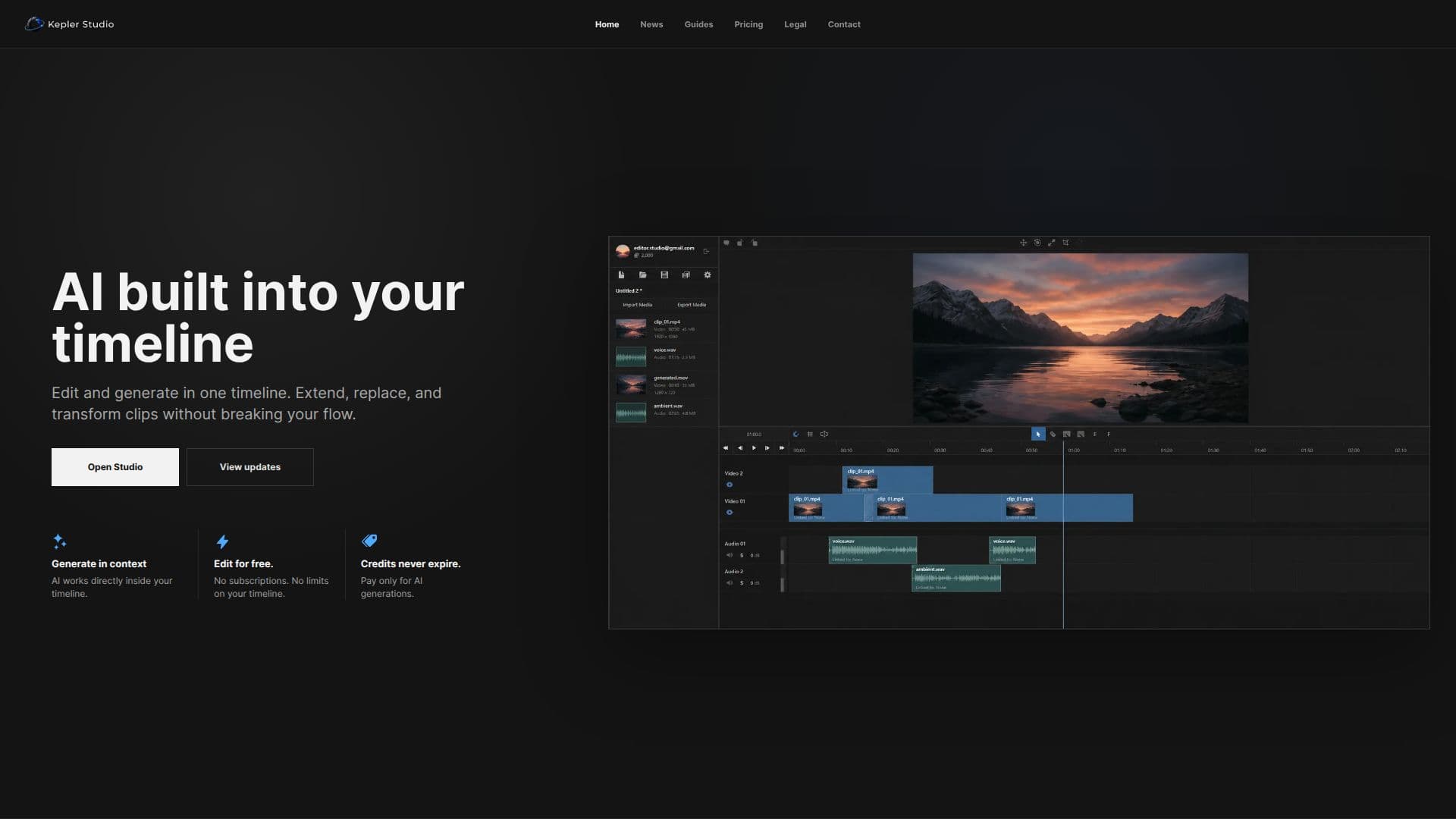
Kepler Studio screenshot

Kepler Studio provides a comprehensive suite for professional multitrack video and audio editing, all within a desktop browser environment. This platform is designed to streamline creative workflows by embedding AI-native tools directly into the timeline, allowing users to extend, replace, and transform clips without interrupting their editing flow.

Read More

Key AI features include video extension, morph transitions, video region generation, video retake, motion control, and slow motion. For audio, Kepler Studio offers automatic subtitles, AI sound effect generation, AI voiceover generation, AI music generation, audio stem separation, speech cleanup, and lip synchronization. The platform also supports video frame rate conversion and advanced image capabilities like AI image generation and editing, along with background removal and replacement for both images and videos.

The core timeline editing functionalities are available for free. For more advanced AI operations and media processing actions, Kepler Studio utilizes a credit-based system. Users can purchase Kepler credits, which are consumed when initiating paid AI generation tasks for video, images, voiceovers, backgrounds, sound, and related timeline workflows. The exact credit cost for each action is transparently displayed before it begins, varying based on the selected feature, model, duration, quality, and generation settings. Additionally, optional cloud storage is available as a paid service to increase account storage limits for uploaded media, generated files, project previews, and exports.

Kepler Studio is ideal for video and audio professionals, content creators, and anyone looking to leverage AI for enhanced media production. Its integrated approach means users don't need to switch between different applications for editing and AI generation, fostering a more efficient and creative process. The platform's guides offer practical workflows for editing, generation, model selection, and project handoff, ensuring users can maximize its capabilities.

  • CategoryAI Video Editors
  • Pricing ModelFreemium
  • DeploymentCloud
  • PlatformsDesktop Browser

  • Multitrack video editing

  • Multitrack audio editing

  • AI video extension

  • AI morph transitions

  • AI video region generation

  • AI video retake

  • AI motion control

  • AI slow motion

  • Automatic subtitles

  • AI sound effect generation

  • AI voiceover generation

  • AI music generation

  • Audio stem separation

  • Speech cleanup

  • Lip synchronization

  • Video frame rate conversion

  • AI image generation and editing

  • Image and video background removal and replacement

  1. Access Studio: Open Kepler Studio in your desktop browser.

  2. Import Media: Upload your video and audio files to the platform.

  3. Edit Timeline: Utilize the free core editing tools for multitrack arrangement.

  4. Apply AI Features: Select AI tools like video extension or morph transitions directly in the timeline.

  5. Generate Content: Use AI for subtitles, sound effects, voiceovers, or music generation.

  6. Manage Credits: Purchase Kepler credits for paid AI operations; costs are shown before each action.

  7. Export Project: Render and export your final video and audio creations.

  • Video Content Creation
  • Audio Production
  • Social Media Marketing
  • Educational Content
  • Filmmaking & Post-Production
  • Music Video Editing
  • Podcast & Voiceover Work

Kepler Studio Reviews

Loading...

Popular AI Tools Like Kepler Studio

CapCut AI Video Editor offers smart online video editing with advanced AI tools for creating trending content. It features AI design, a video studio, image and video generators,…

AI Video Editors

Ranked #1 in AI Short Video Makers

View Tool

Offers smart online video editing with advanced AI tools for creating trending content. It features AI design, a video studio, image and video generators,…CapCut AI Video Editor offers smart online video editing with advanced AI tools for creating trending content. It features AI design, a video studio, image and video generators,…

FeaturedAI Video Editors
Ranked #1 in AI Short Video Makers

Wondershare Filmora is a comprehensive video editing software for desktop and mobile. It offers intuitive tools, AI-powered features, and creative effects to help users create…

AI Video Editors

Ranked #4 for Enhancing video quality

View Tool

Comprehensive video editing software for desktop and mobile. It offers intuitive tools, AI-powered features, and creative effects to help users create…Wondershare Filmora is a comprehensive video editing software for desktop and mobile. It offers intuitive tools, AI-powered features, and creative effects to help users create…

FeaturedAI Video Editors
Ranked #4 for Enhancing video quality

BaoCut

AI Apps

BaoCut is an AI video editing tool that allows users to transcribe, subtitle, translate, dub, cut, and animate videos. It supports macOS and Windows, providing a seamless editing…

AI Video Editors

Ranked #80 in AI Subtitles & Dubbing

View Tool

AI Apps

AI video editing tool that allows users to transcribe, subtitle, translate, dub, cut, and animate videos. It supports macOS and Windows, providing a seamless editing…BaoCut is an AI video editing tool that allows users to transcribe, subtitle, translate, dub, cut, and animate videos. It supports macOS and Windows, providing a seamless editing…

AI Video Editors
Ranked #80 in AI Subtitles & Dubbing

Arsaze

AI Apps

Arsaze is an AI-native video editor designed for both agents and humans. It offers a real multi-track timeline, allowing users to edit manually or with AI assistance. The platform…

AI Video Editors

Ranked #193 in AI Video Editors

View Tool

AI Apps

AI-native video editor designed for both agents and humans. It offers a real multi-track timeline, allowing users to edit manually or with AI assistance. The platform…Arsaze is an AI-native video editor designed for both agents and humans. It offers a real multi-track timeline, allowing users to edit manually or with AI assistance. The platform…

AI Video Editors
Ranked #193 in AI Video Editors

Reclip

AI Apps

Reclip is an AI-powered video creator toolkit that allows users to automatically clip highlights, add voiceovers, remove captions, and download videos all in one platform,…

AI Video Editors

Ranked #109 in AI Video Editors

View Tool

AI Apps

AI-powered video creator toolkit that allows users to automatically clip highlights, add voiceovers, remove captions, and download videos all in one platform,…Reclip is an AI-powered video creator toolkit that allows users to automatically clip highlights, add voiceovers, remove captions, and download videos all in one platform,…

AI Video Editors
Ranked #109 in AI Video Editors

Vyra is an AI-powered video editor that transforms raw footage into polished videos quickly. It understands your content and provides full control over the editing process, making…

AI Video Editors

Ranked #122 in AI Video Editors

View Tool

AI-powered video editor that transforms raw footage into polished videos quickly. It understands your content and provides full control over the editing process, making…Vyra is an AI-powered video editor that transforms raw footage into polished videos quickly. It understands your content and provides full control over the editing process, making…

AI Video Editors
Ranked #122 in AI Video Editors

Clipchamp

AI Apps

Create videos with royalty-free music and stock footage, use video templates, and export in up to 4K video resolution. Get started in-browser or download the Windows app for easy…

AI Video Editors

Ranked #16 for Removing background noise

View Tool

AI Apps

Create videos with royalty-free music and stock footage, use video templates, and export in up to 4K video resolution. Get started in-browser or download the Windows app for easy…

AI Video Editors
Ranked #16 for Removing background noise

Adobe Premiere is professional video editing software that allows users to edit, trim, and enhance videos with precision. It features AI workflows for faster project completion…

AI Video Editors

Ranked #5 in AI Video Editors

View Tool

Professional video editing software that allows users to edit, trim, and enhance videos with precision. It features AI workflows for faster project completion…Adobe Premiere is professional video editing software that allows users to edit, trim, and enhance videos with precision. It features AI workflows for faster project completion…

AI Video Editors
Ranked #5 in AI Video Editors
1 of 8