
Description
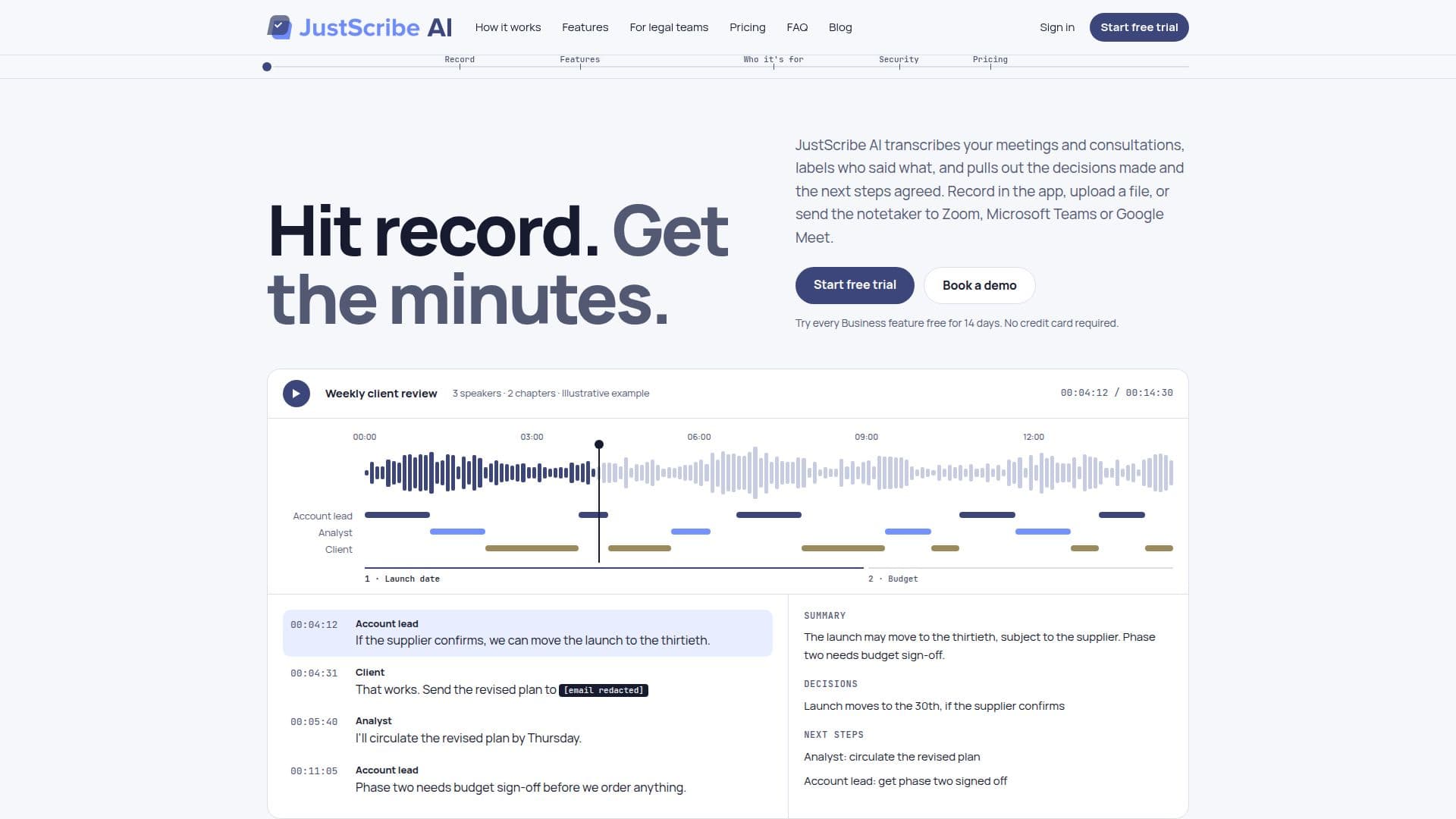
JustScribe AI offers a comprehensive solution for transforming spoken meetings and consultations into actionable records. The platform accurately transcribes audio, identifies individual speakers, and automatically extracts crucial information such as decisions made and agreed-upon next steps. This functionality supports a range of input methods, allowing users to record directly within the app, upload existing audio or video files (MP3, MP4, WAV, M4A), or deploy a dedicated notetaker to live Zoom, Microsoft Teams, and Google Meet sessions.
Read More
Upon completion of a meeting, JustScribe AI delivers a timestamped transcript and a concise summary. These outputs are designed for easy sharing and can be downloaded as text on any plan, with Pro and higher tiers offering Word and PDF export options. The service enhances usability by organizing longer meetings into chapters based on topic, enabling users to quickly navigate to relevant sections. Advanced features available on Business and Legal plans include live transcription, which builds the transcript in real-time, and custom vocabulary to ensure accurate transcription of industry-specific terms, names, and phrases.
Security and privacy are core tenets of JustScribe AI. All recordings and transcripts are encrypted both in transit and at rest, and the platform adheres to a strict zero-training policy, meaning user data is never utilized to train AI models. It is built with GDPR, PDPA, and CCPA compliance in mind, offering a redaction feature to automatically remove sensitive personal details like email addresses and phone numbers from transcripts. This commitment to data protection makes it suitable for legal teams, client services, consultants, and operations teams who handle confidential information.
JustScribe AI caters to diverse professional needs, from legal consultations and internal team meetings to client calls and project status updates. It helps ensure that all participants, including those who couldn't attend, have access to a clear, searchable record of discussions, decisions, and assigned actions. The platform offers various plans, including a free trial with Business features, a free tier with limited minutes, and paid subscriptions (Pro, Business, Legal) that scale with usage and unlock additional capabilities. Hour packs are also available for users needing extra minutes without a subscription.
- CategoryAI Meeting Assistants
- Pricing ModelFreemium
- DeploymentCloud
- PlatformsWeb
JustScribe AI's Core Features
Meeting transcription for Zoom, Microsoft Teams, Google Meet
Speaker identification and labeling
Automatic extraction of decisions and next steps
Timestamped transcripts
Meeting summaries
In-app recording capability
Audio/video file upload (MP3, MP4, WAV, M4A)
Searchable meeting records
Chapter marking for long meetings
Redaction of sensitive information (email addresses, phone numbers)
Custom vocabulary for accurate transcription of specific terms
Live transcription during meetings
Text export of transcripts
Word and PDF export of transcripts and summaries
Encrypted data in transit and at rest
Zero-training policy for AI models
How to use JustScribe AI?
Initiate Recording: Record directly in the JustScribe AI app, upload an audio/video file, or send the notetaker to a Zoom, Microsoft Teams, or Google Meet meeting.
Transcribe and Summarize: JustScribe AI processes the audio to generate a timestamped transcript with speaker labels and a summary of decisions and next steps.
Review and Edit: Read the transcript and summary, with chapters marked for easy navigation. On Business and Legal plans, enable verbatim transcription or customize speaker names.
Manage Sensitive Data: Turn on redaction to automatically remove personal details from transcripts, ensuring privacy and compliance.
Share and Export: Download the record as text, or as a Word or PDF file (Pro and above), and share it with team members or clients.
Utilize Advanced Features: For Business and Legal plans, use live transcription, custom vocabulary, and team management tools.
JustScribe AI's Use Cases
- Legal Client Consultations
- Internal Team Meetings
- Client Services Calls
- Consulting Workshops
- Project Status Updates
- Interviews and Research
- Academic Discussions