Description
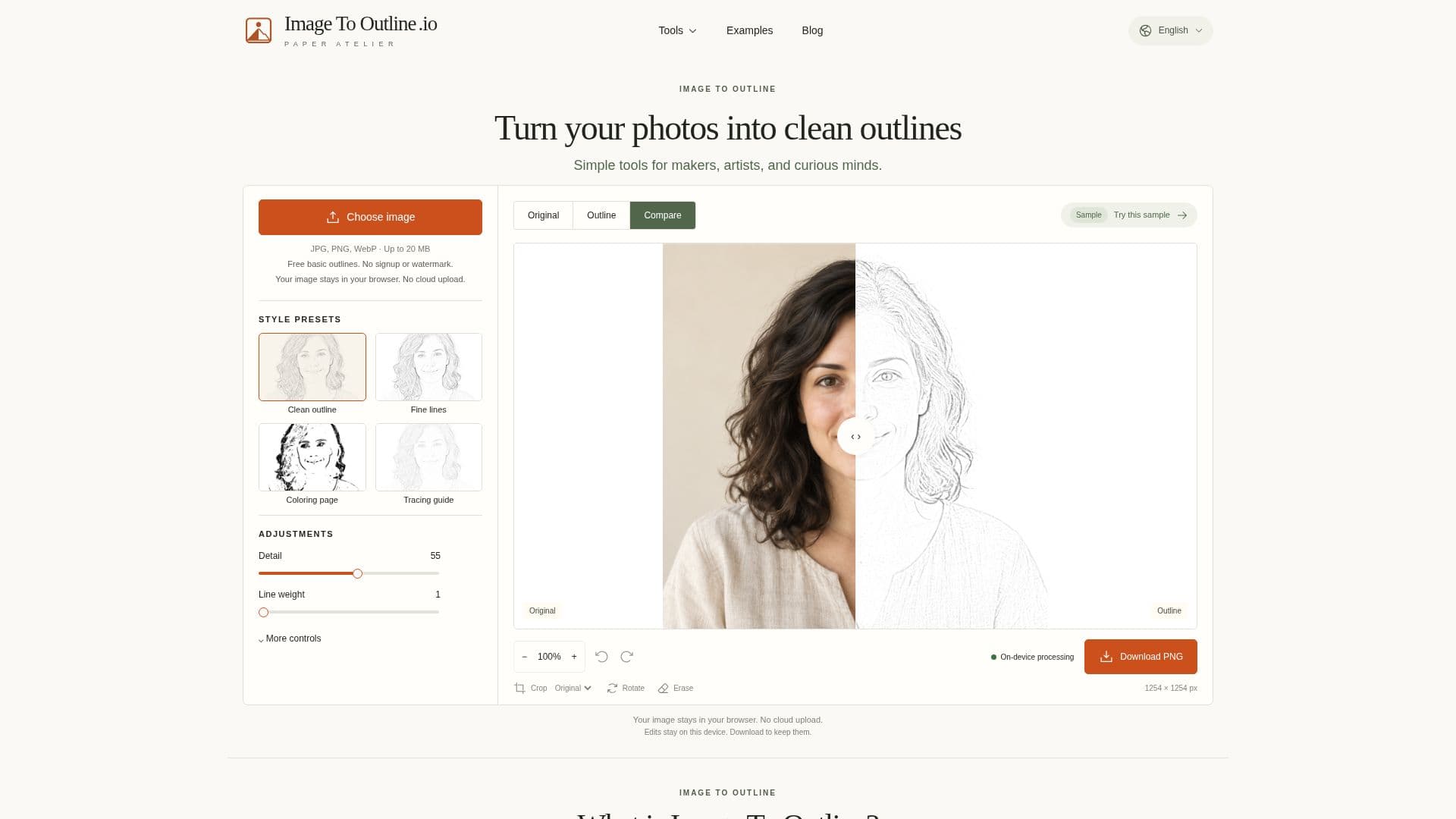
Image To Outline is a versatile, browser-based application designed to transform ordinary photographs into clean, adjustable raster line art. This tool empowers artists, makers, and creative individuals to convert images into various formats, including drawing references, coloring pages, or tracing guides. Its core functionality revolves around on-device processing, meaning all image conversions happen locally within the user's browser, ensuring that photos never leave the device and are not uploaded to any cloud server, thereby prioritizing user privacy and data security.
Read More
The application offers a straightforward workflow. Users begin by choosing a JPG, PNG, or WebP image, with recommendations for clear photos exhibiting good contrast for optimal results. Once an image is selected, the intuitive interface allows for extensive customization. Users can select from various presets and then fine-tune parameters such as detail, line weight, color, and transparency. A key feature is the ability to erase distracting marks, enabling users to refine their line art to perfection.
Image To Outline supports multiple export options. Users can download their creations as transparent PNG files, which are ideal for digital use, or as printable A4 or US Letter PDF files, perfect for physical projects like coloring books or tracing exercises. All basic outlines are available for free, without requiring any signup or adding watermarks, making it highly accessible.
Beyond general line art, Image To Outline provides specialized tools for specific needs. The "Portrait Outline" feature is tailored for converting face or upper-body photographs into outlines, offering settings that favor facial and hair detail. Similarly, the "Photo to Coloring Page" tool creates bold lines suitable for coloring, while "Photo to Tracing Guide" generates light, low-opacity references for drawing. An "Add Outline to PNG" feature allows users to add a border around the visible pixels of a transparent PNG, further expanding its utility for graphic projects. The tool emphasizes user control, allowing adjustments to crop, rotation, and manual cleanup, ensuring the final output aligns with the user's creative vision.
- CategoryAI Photo Editors
- Pricing ModelFree
- DeploymentBrowser extension
- PlatformsWeb
Image To Outline's Core Features
Convert photos to adjustable raster line art
Browser-based processing (no cloud upload)
Adjust detail and line weight
Refine line color and transparency
Erase distracting marks for cleanup
Download as transparent PNG files
Download as printable A4 or US Letter PDF files
Free basic outlines without signup or watermark
Portrait outline tool for faces and upper-body photos
Photo to coloring page conversion
Photo to tracing guide creation
Add outline to transparent PNGs
Local conversion preserves source geometry
Crop and rotation controls
How to use Image To Outline?
Choose Image: Select a JPG, PNG, or WebP photo from your device, ideally with good contrast.
Adjust Lines: Pick a preset, then fine-tune detail, line weight, color, and transparency.
Refine Output: Use the erase tool to remove unwanted marks and clean up your line art.
Download Result: Save your creation as a transparent PNG or a printable A4/US Letter PDF.
Image To Outline's Use Cases
- Create Drawing References
- Generate Coloring Pages
- Produce Tracing Guides
- Portrait Outlines
- Graphic Design Projects
- Personalized Art Projects
- Educational Materials