Description
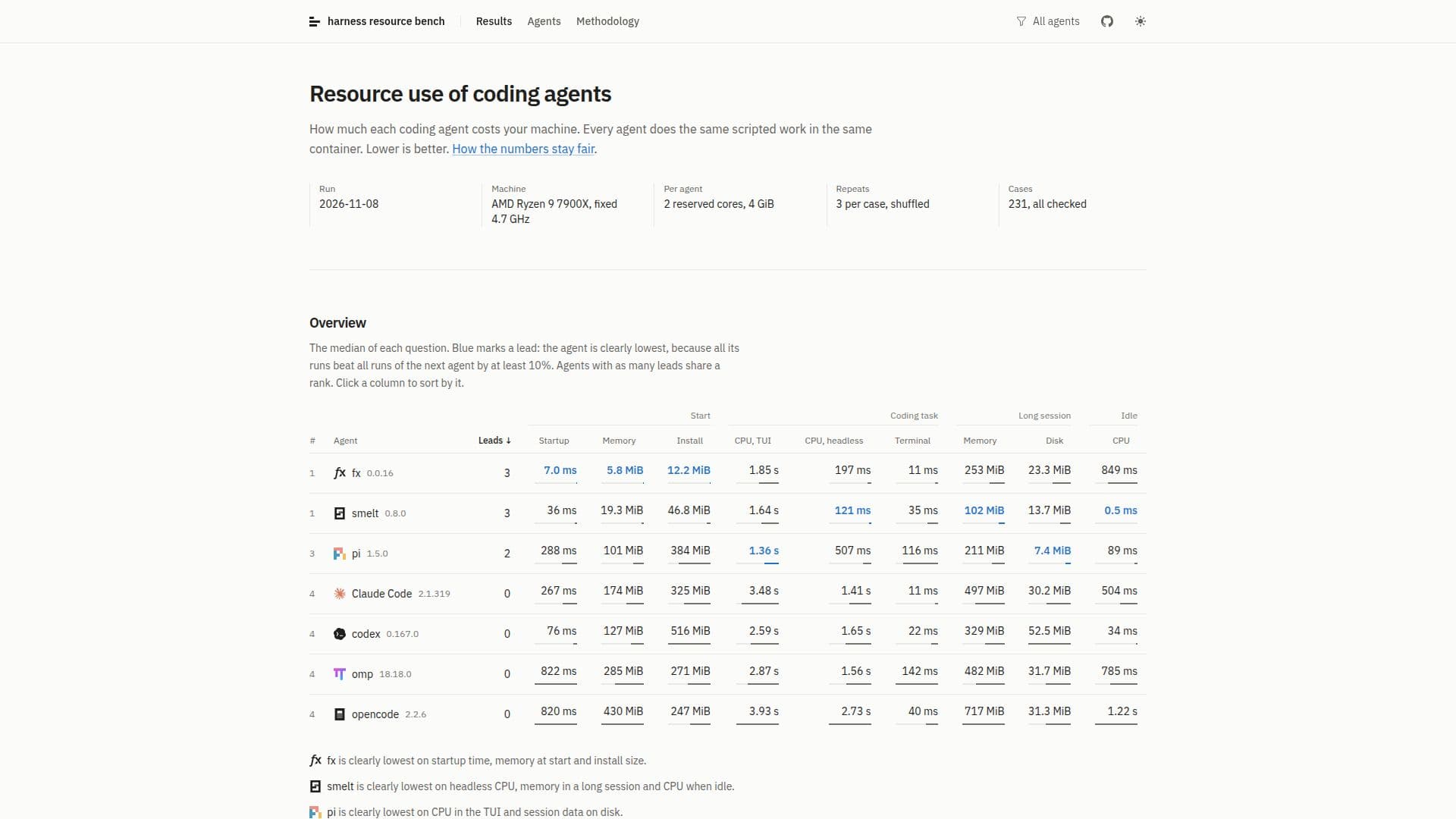
Harness Resource Bench is a specialized platform designed to meticulously measure and compare the resource consumption of different coding agents. It provides a comprehensive overview of how much each agent impacts a machine's performance and resources, focusing on critical metrics such as startup time, memory usage, CPU time, session data, and installation size.
Read More
The methodology involves running each coding agent through the same scripted workload within an identical container environment. This ensures fairness and consistency in the measurements, allowing for direct comparisons between agents like fx, smelt, pi, Claude Code, codex, omp, and opencode. The platform aims to identify which agents are most efficient, with lower numbers indicating better performance.
Key areas of measurement include startup performance, detailing how fast an agent launches and its initial memory and disk requirements. It also examines memory at start (after the first request with a cold file cache) and install size, breaking down disk space by file type. For instance, it notes that pi's install size includes Node.js, which is essential for its operation.
For coding tasks, the bench measures CPU time during a task involving 24 tool calls, with the model streaming 120 tokens per second. It differentiates between headless CPU usage (without the TUI), additional CPU time with the TUI, and the minimal time required by the terminal (tmux). Long session analysis covers memory and CPU time per turn over 64 turns, where agents compact their history near context limits. It also tracks session data on disk, including transcripts, history, databases, and logs.
Furthermore, Harness Resource Bench assesses resource use during new sessions (16 sessions in one process to measure memory left behind by finished sessions) and idle states, recording CPU time and memory while an open session is left alone after a task. It even breaks down idle memory into code, mapped files, heap, and data to provide a granular understanding of resource allocation. The data is presented as medians of multiple runs, with whiskers and bands indicating the range, providing a robust and reliable comparison for developers and users.
- CategoryAI DevOps & Cloud Tools
- DeploymentCloud
- PlatformsWeb
Harness Resource Bench's Core Features
Comprehensive resource measurement for coding agents
Evaluates startup time, memory, CPU time, session data, and install size
Compares agents like fx, smelt, pi, Claude Code, codex, omp, opencode
Standardized scripted workloads in consistent container environments
Detailed breakdown of startup performance (time, memory, disk)
Analysis of CPU time during coding tasks (headless, TUI, terminal)
Measurement of memory and CPU time in long sessions (64 turns)
Tracking of session data stored on disk (transcripts, history, logs)
Assessment of memory footprint for new sessions
Monitoring of CPU time and memory usage during idle states
Granular breakdown of idle memory into code, heap, and data
Median values and ranges for all measurements
Comparison of agent features and their resource cost implications
Data collected on AMD Ryzen 9 7900X machine with fixed resources
How to use Harness Resource Bench?
Access Benchmarks: Navigate to the Harness Resource Bench website to view the latest resource usage data.
Review Agent Overview: Examine the median resource use for various coding agents across different metrics.
Sort Data: Click on any column header to sort the data by specific metrics like startup time or CPU usage.
Compare Agents: Analyze individual agent performance, noting which agents lead in specific categories (e.g., fx for startup time).
Understand Metrics: Explore detailed explanations for each measurement category, such as 'Start', 'A coding task', 'A long session', and 'Idle'.
Consult Why Sections: Read the 'Why' sections for insights into the underlying reasons for observed resource behaviors of each agent.
Harness Resource Bench's Use Cases
- Coding Agent Selection
- Performance Optimization
- Resource Planning
- Comparative Analysis
- Developer Tool Evaluation