ToolPotion
AI Advisor
Submit a Tool (Free)

Caret

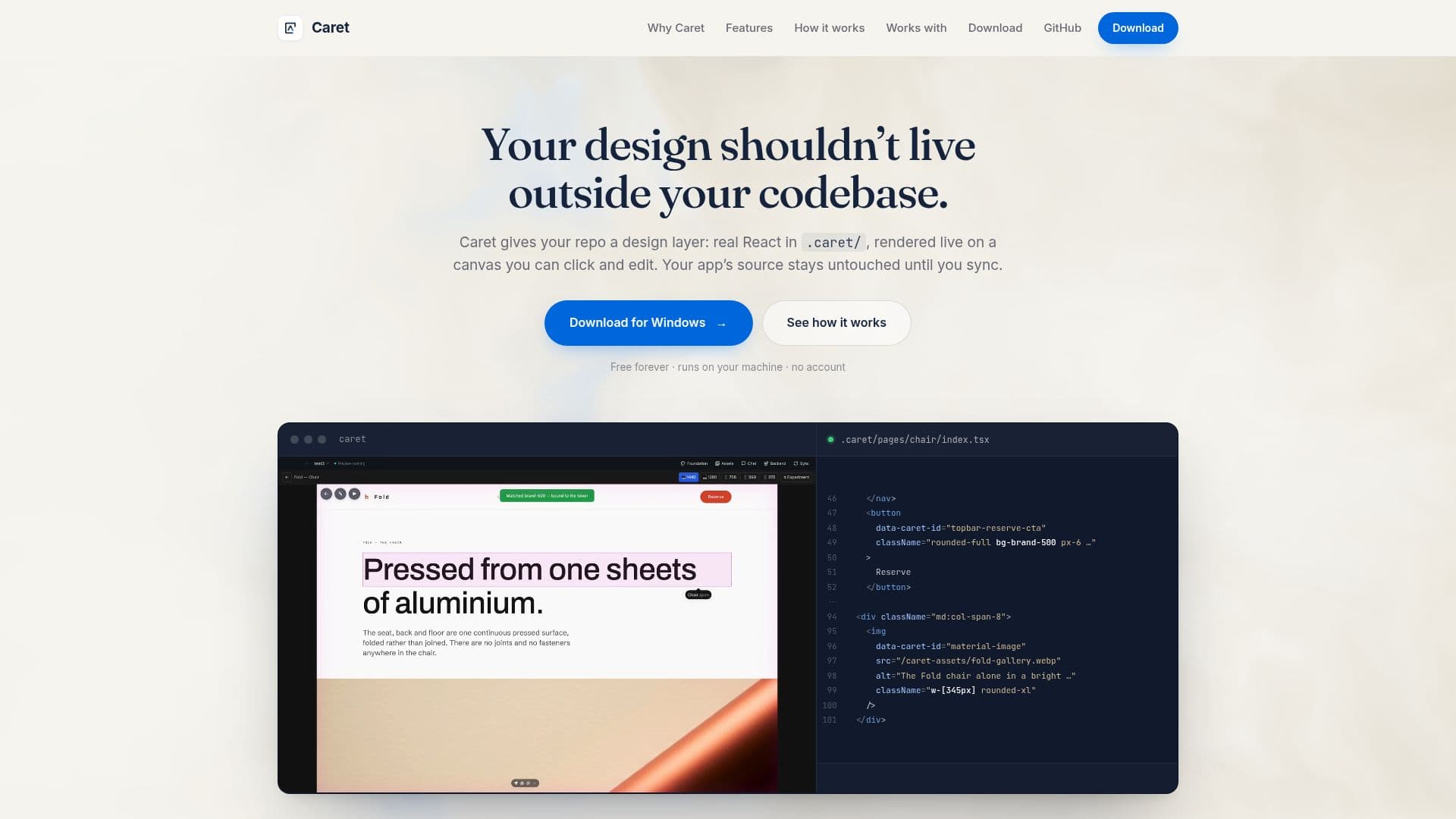
Caret is a free, open-source desktop application that integrates design directly into your code repository. It allows developers to edit React components visually on a live canvas, with changes written directly into source files. This approach ensures design decisions are version-controlled by Git and synced into your application, eliminating discrepancies between mockups and builds.

Visit Website
Share
Caret screenshot
Caret screenshot

Caret provides a unique design layer that lives directly within your code repository, offering a free and open-source solution for developers. Unlike traditional design tools that separate design files from the codebase, Caret keeps your design as real React components in a `.caret/` directory. This means your design is versioned by Git, reviewable in pull requests, and synced into your application only when you choose.

Read More

The tool addresses common pain points in the design-to-code workflow, such as design mockups drifting out of sync with the actual build, repetitive fixes being overwritten by generated changes, and the difficulty of describing visual changes with words. With Caret, your design is the code itself, ensuring consistency and persistence.

Key capabilities include direct editing on a live canvas, where users can right-click and modify text, colors, or images, with changes immediately reflected in the `.tsx` files. It intelligently uses your existing design tokens, writing token references instead of raw hex codes, which simplifies brand color updates. For more complex changes, users can paint over a section of the page and describe the desired outcome, allowing an AI agent to target exact elements.

Caret also supports generating multiple design versions side-by-side for exploration and creating assets like vector logos, photographs, and animated backgrounds that adhere to your token system for consistent styling. It provides a comprehensive view of your product, rendering the active page as live, interactive React, while other pages remain fast thumbnails. Viewport presets allow for checking responsiveness across different screen sizes.

The application runs locally on your machine and requires no account, ensuring your code and designs remain private. It integrates with AI coding agents like Claude Code and Cursor by keeping design tokens current in their respective rules files (`CLAUDE.md`, `.cursor/rules`, `AGENTS.md`) and enabling agents to perform the design-to-app sync via a local MCP server. Caret supports various application frameworks like Next, Remix, Vue, Svelte, and Rails, as the design layer is always React, and sync translates it to your chosen stack.

Caret is designed to complement existing AI tools and workflows, rather than replace them. It works alongside tools like Anthropic's frontend-design skill and Figma MCP, providing the crucial persistence layer that keeps design decisions grounded in your repository. It's available for macOS, Windows, and Linux, requiring Node.js for the live canvas.

  • CategoryAI Coding Assistants
  • Pricing ModelFree
  • DeploymentLocal
  • PlatformsmacOS, Windows, Linux

  • Design layer in your repo as real React

  • Live canvas for visual editing

  • Directly edit text, colors, and images on page

  • Writes changes into source files (.tsx)

  • Uses design tokens for consistent styling

  • AI agent integration for complex changes

  • Generates multiple design versions side-by-side

  • Creates assets (vector logos, photos, animated backgrounds)

  • Full product view with live interactive pages and thumbnails

  • Viewport presets for responsive design checks

  • Runs locally on your machine

  • No account required

  • Integrates with Claude Code via MCP

  • Integrates with Cursor via MCP

  • Keeps design tokens updated in agent rule files

  1. Install Caret: Download and install the desktop application for macOS, Windows, or Linux.

  2. Open Project: Open an existing project folder in Caret to create the `.caret/` design layer.

  3. Edit Visually: Right-click on elements like text, colors, or images on the live canvas to make direct changes.

  4. Use AI Agent: For complex adjustments, paint over a page region and describe the desired change to your connected AI agent.

  5. Manage Tokens: Caret automatically manages and updates your design tokens in agent-specific rule files.

  6. Sync Design: When ready, initiate a sync to apply design changes from the `.caret/` folder to your main application code using your AI agent.

  • Maintaining Design-Code Sync
  • Visual UI Editing for Developers
  • Version-Controlled Design
  • AI-Assisted Design Refinement
  • Consistent Design System Application
  • Rapid Design Prototyping
  • Automated Asset Creation
  • Cross-Framework Design Sync

Caret Reviews

Loading...

Popular AI Tools Like Caret

Varelyo

AI Apps

Varelyo is an AI design tool for React codebases that transforms prompts or Figma designs into working React UI. It reuses components, grows your design system, and integrates…

AI Coding Assistants

Ranked #93 in AI UI & UX Design Tools

View Tool

AI Apps

AI design tool for React codebases that transforms prompts or Figma designs into working React UI. It reuses components, grows your design system, and integrates…Varelyo is an AI design tool for React codebases that transforms prompts or Figma designs into working React UI. It reuses components, grows your design system, and integrates…

AI Coding Assistants
Ranked #93 in AI UI & UX Design Tools

Locofy.ai transforms Figma and Penpot designs into production-ready frontend code. It streamlines the design-to-code process, supporting popular frameworks like React, React…

AI UI & UX Design Tools

Ranked #21 in AI UI & UX Design Tools

View Tool

Transforms Figma and Penpot designs into production-ready frontend code. It streamlines the design-to-code process, supporting popular frameworks like React, React…Locofy.ai transforms Figma and Penpot designs into production-ready frontend code. It streamlines the design-to-code process, supporting popular frameworks like React, React…

AI UI & UX Design Tools
Ranked #21 in AI UI & UX Design Tools

Modeinspect is a design tool that integrates directly with your codebase, allowing designers to work on live products without handoffs. It bridges the gap between design and code,…

AI UI & UX Design Tools

Ranked #81 in AI UI & UX Design Tools

View Tool

Design tool that integrates directly with your codebase, allowing designers to work on live products without handoffs. It bridges the gap between design and code,…Modeinspect is a design tool that integrates directly with your codebase, allowing designers to work on live products without handoffs. It bridges the gap between design and code,…

AI UI & UX Design Tools
Ranked #81 in AI UI & UX Design Tools

Wonder

AI Apps

Wonders is a design tool that integrates AI to generate designs, make precise edits, and work with code context on the same canvas, enabling faster production and seamless…

AI UI & UX Design Tools

Ranked #46 in AI UI & UX Design Tools

View Tool

AI Apps

Wonders is a design tool that integrates AI to generate designs, make precise edits, and work with code context on the same canvas, enabling faster production and seamless…

AI UI & UX Design Tools
Ranked #46 in AI UI & UX Design Tools

CodeRocket

AI Apps

CodeRocket is a design-system builder for React and Vue. It turns a short brand description into a set of colors, typography and spacing, then applies those tokens across 48…

AI App Builders

Ranked #140 for Building landing pages

View Tool

AI Apps

Design-system builder for React and Vue. It turns a short brand description into a set of colors, typography and spacing, then applies those tokens across 48…CodeRocket is a design-system builder for React and Vue. It turns a short brand description into a set of colors, typography and spacing, then applies those tokens across 48…

AI App Builders
Ranked #140 for Building landing pages

PulseDev

AI Apps

PulseDev is a desktop application that allows developers to point at elements on their site, describe issues, and approve fixes. It integrates with coding agents like Claude Code…

AI Coding Assistants

Ranked #244 in AI Code Review & Testing

View Tool

AI Apps

Desktop application that allows developers to point at elements on their site, describe issues, and approve fixes. It integrates with coding agents like Claude Code…PulseDev is a desktop application that allows developers to point at elements on their site, describe issues, and approve fixes. It integrates with coding agents like Claude Code…

AI Coding Assistants
Ranked #244 in AI Code Review & Testing

HeroUI Pro

AI Apps

HeroUI Pro offers premium UI components, templates, and AI tooling for React and React Native. It streamlines design-to-code synchronization, ensuring a polished look and…

AI App Builders
View Tool

AI Apps

Offers premium UI components, templates, and AI tooling for React and React Native. It streamlines design-to-code synchronization, ensuring a polished look and…HeroUI Pro offers premium UI components, templates, and AI tooling for React and React Native. It streamlines design-to-code synchronization, ensuring a polished look and…

AI App Builders
See the Top 250 AI Apps

FlowGen

AI Apps

FlowGen transforms plain-English prompts into live, editable React screens. It allows users to export real component code, making it easy to ship interfaces without design skills.…

AI App Builders

Ranked #71 in AI UI & UX Design Tools

View Tool

AI Apps

Transforms plain-English prompts into live, editable React screens. It allows users to export real component code, making it easy to ship interfaces without design skills.…FlowGen transforms plain-English prompts into live, editable React screens. It allows users to export real component code, making it easy to ship interfaces without design skills.…

AI App Builders
Ranked #71 in AI UI & UX Design Tools
1 of 8