Description
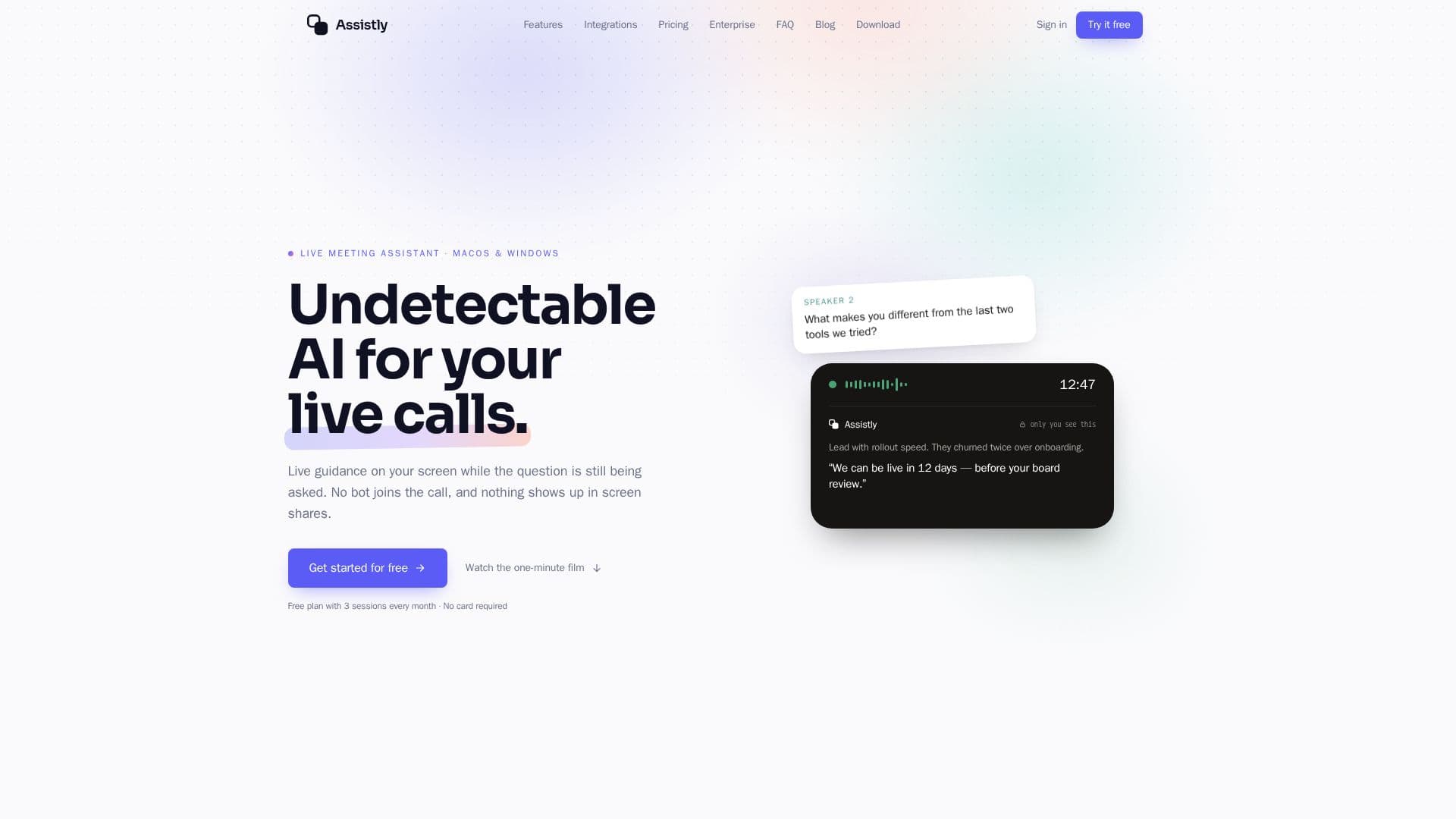
Assistly is a live meeting assistant designed for macOS and Windows, enhancing your live conversations with real-time guidance. Unlike traditional meeting bots, Assistly operates as a desktop overlay from your computer's audio, meaning it never joins the call, appears in participant lists, or announces itself. This allows it to work seamlessly alongside popular platforms like Zoom, Google Meet, Microsoft Teams, Webex, Slack huddles, and even ordinary phone calls, requiring no integration or bot invitation.
Read More
The tool provides answers and insights on your screen the moment a question is asked, or even as you think out loud, with auto-assist enabled by default. This guidance is displayed in a private overlay that is excluded from screen capture at the OS level, ensuring it never appears in screen shares or recordings. Assistly captures the call's full audio, not just your microphone, and separates individual voices to track multiple speakers, maintaining context even in busy group discussions.
Users can build a personalized persona using their CV, notes, and documents, allowing Assistly to tailor responses to their background, role, and speaking style, making the guidance sound natural and personalized. It supports dozens of languages, detecting the spoken language without setup and providing guidance in English, which is particularly helpful for non-native English speakers in professional settings. After each session, Assistly automatically generates an organized summary with key points and a clear list of action items, saved to your notes and synced to a session timeline.
Assistly also offers robust integration capabilities. It can connect with Google Calendar for read-only access, displaying upcoming meetings and enabling one-tap joining. For team collaboration, it integrates with Slack, posting session recaps, summaries, and action items to chosen channels. Enterprise plans extend this with shared team workspaces, shared projects, roles and permissions, single sign-on, and workspace-wide retention controls. Furthermore, Assistly runs an MCP server, allowing connection to AI tools like Claude, ChatGPT, Cursor, and Codex for read-only access to past calls, transcripts, and action items, enabling users to query their meeting history from within these external applications. Data security is paramount, with audio streams securely processed in the cloud, and users retaining control over data retention and deletion.
- CategoryAI Meeting Assistants
- Pricing ModelFreemium
- DeploymentDesktop App, Browser
- PlatformsmacOS, Windows, Web (mobile)
Assistly's Core Features
Real-time live meeting assistance
Desktop overlay for macOS and Windows
No bot joins the call or appears in participant lists
Works with Zoom, Meet, Teams, Webex, Slack huddles, and phone calls
Private overlay excluded from screen shares and recordings
Captures full call audio and tracks multiple speakers
Detects and understands dozens of languages
Personalized guidance based on user persona (CV, notes, docs)
Automatic session summaries with action items
Google Calendar integration for meeting scheduling and context
Slack integration for posting recaps and querying meetings
MCP server for connecting to Claude, ChatGPT, and other AI clients
Shared team workspaces and projects (Enterprise)
Single sign-on and retention controls (Enterprise)
Data encryption in transit and at rest
How to use Assistly?
Install Assistly: Download and install the native app on your macOS or Windows computer.
Create Account: Sign up for a free account to get started with 3 sessions per month.
Connect Integrations: Optionally connect Google Calendar for meeting context or Slack for team collaboration.
Start a Session: Open Assistly before or during a call; it automatically listens to your computer's audio.
Receive Real-time Guidance: See answers and insights appear on your screen as questions are asked.
Review Session Recap: After the call, access an organized summary with action items in your notes.
Query Past Meetings: Use connected AI tools like ChatGPT or Slack to ask questions about your recorded sessions.
Assistly's Use Cases
- Live Meeting Assistance
- Meeting Note-Taking
- Multilingual Communication
- Personalized Sales Pitches
- Team Collaboration & Knowledge Sharing
- Onboarding New Team Members
- Project Management
- Compliance & Record Keeping
- Interview Preparation
- Customer Support Calls