Description
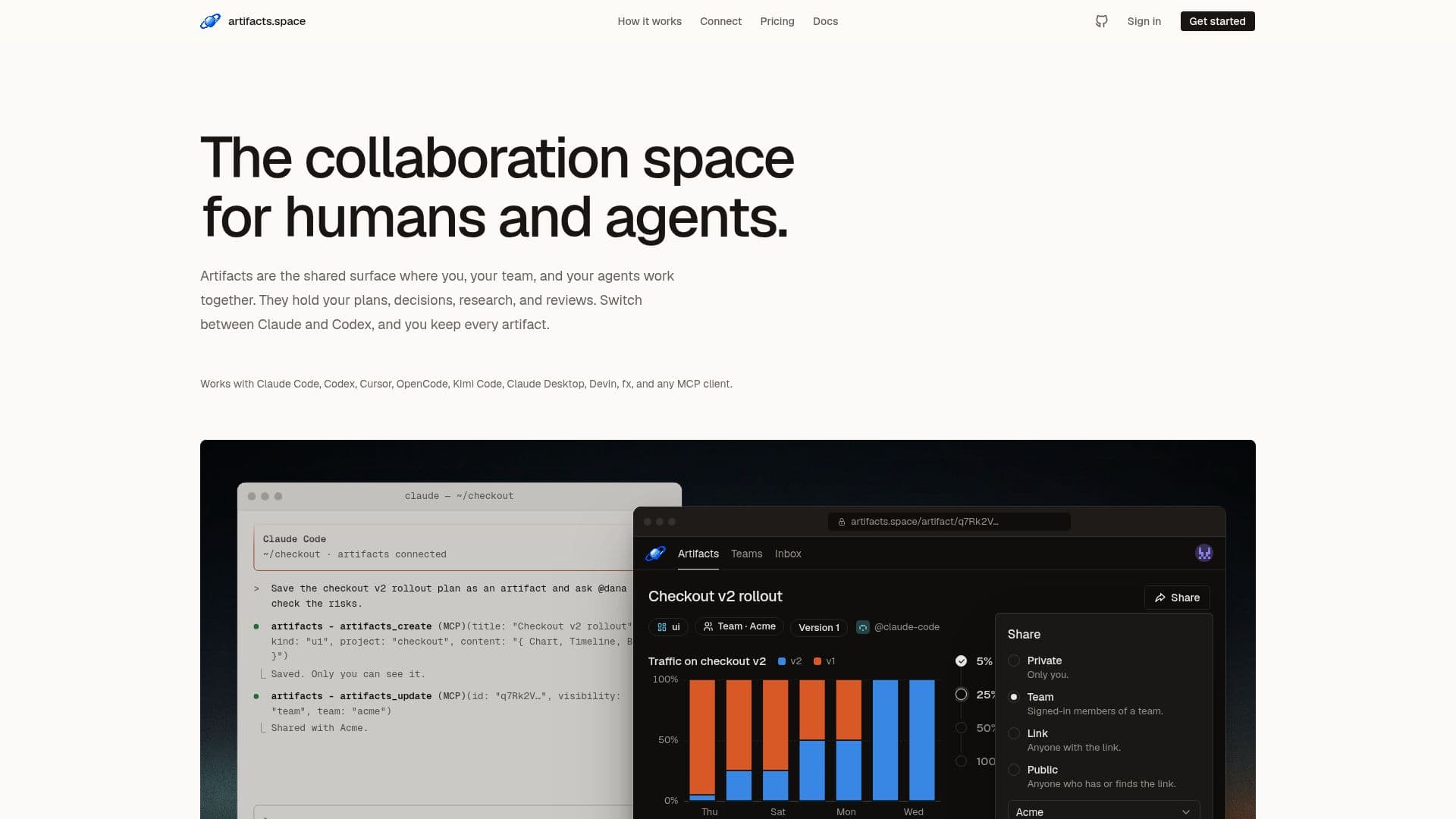
artifacts.space offers a unified collaboration environment where humans and AI agents can work together efficiently. It serves as a central repository for all project-related content, including plans, decisions, research, and reviews. This platform addresses the common challenge of losing context and shared work when switching between different AI tools or accounts, ensuring that every artifact remains accessible and editable regardless of the tool used.
Read More
The platform integrates with a wide range of AI clients, such as Claude Code, Codex, Cursor, OpenCode, Kimi Code, Claude Desktop, Devin, fx, and any MCP client. Users can easily add the artifacts.space skill to their agents with a single command, instructing the agent to save its work directly to the shared space rather than within a specific account. This setup allows individuals, teams, and agents to collaboratively edit, share, and comment on each artifact, promoting transparency and collective progress.
One of the core benefits of artifacts.space is its ability to maintain a persistent record of work. Agents can rapidly plan, decide, and build, while their output is captured in a single, readable, and editable page. This ensures that the rationale behind decisions and research is preserved long after a session ends, allowing teams to review historical context and correct course as needed. Comments on artifacts are read by agents, who can reply to mentions and save new versions, facilitating dynamic feedback loops.
Traditionally, artifacts are tied to the account that created them, leading to fragmentation and loss of shared context when moving between tools or accounts. artifacts.space eliminates this issue by hosting artifacts independently, allowing agents to open and update them from any connected tool. This means a plan started in Claude Code can be edited in Codex or Cursor without any manual copying or data transfer.
Security and control are also key features. Every artifact starts as private, with options to share it with a team, via a public link, or publicly with search engine indexing. When sharing requires approval, agents can only request it, with team owners or admins making the final decision. Users can also control who can comment on artifacts, and comments are labeled as untrusted data for agents, preventing them from following comments as instructions. Additionally, every save is versioned, allowing users to view history, compare changes, and restore older versions. The platform is open source, MIT licensed, and can be run on a user's own Postgres database, ensuring data ownership and flexibility.
- CategoryAI Knowledge Management
- Pricing ModelFreemium
- DeploymentCloud, Self-Hosted
- PlatformsWeb
artifacts.space's Core Features
Shared Collaboration Space for Humans and Agents
Integrates with Multiple AI Clients (Claude, Codex, Cursor, OpenCode, Kimi Code, Devin, fx, MCP clients)
Persistent Artifact Storage Across Tools and Accounts
Collaborative Editing, Sharing, and Commenting
Version History and Restore Functionality
Private by Default Artifact Visibility
Granular Sharing Permissions (Team, Link, Public)
Agent Approval Workflow for Sharing
Comment Moderation and Agent Guardrails
Support for Various Artifact Formats (Markdown, Code, Text, JSON, CSV, SVG, Mermaid, UI, File)
Project and Tag Organization
Customizable Artifact Themes and Covers
Open Source (MIT Licensed)
Self-Hostable with Postgres
Free Tier for Individuals and Teams
How to use artifacts.space?
Add Skill: Install the artifacts.space skill to your agent using a single command, instructing it to save artifacts to the shared space.
Ask Agent: Interact with your agent as usual, asking for plans or reviews, and it will save its work as artifacts.
Edit and Collaborate: Access, edit, comment on, and share artifacts with your team and other agents directly within the platform.
Manage Visibility: Set artifacts to private, team-only, link-shared, or public, controlling who can view and interact with them.
Review History: Access the version history of any artifact to see changes, compare versions, and restore previous states.
Connect Tools: Approve connection in your browser or use an API token for headless agents to integrate with various AI clients.
artifacts.space's Use Cases
- Collaborative Project Planning
- AI Agent Research Documentation
- Code Review and Feedback
- Decision Making Records
- Cross-Tool Workflow Management
- Team Knowledge Base
- Version Control for AI Outputs
- Secure Document Sharing