
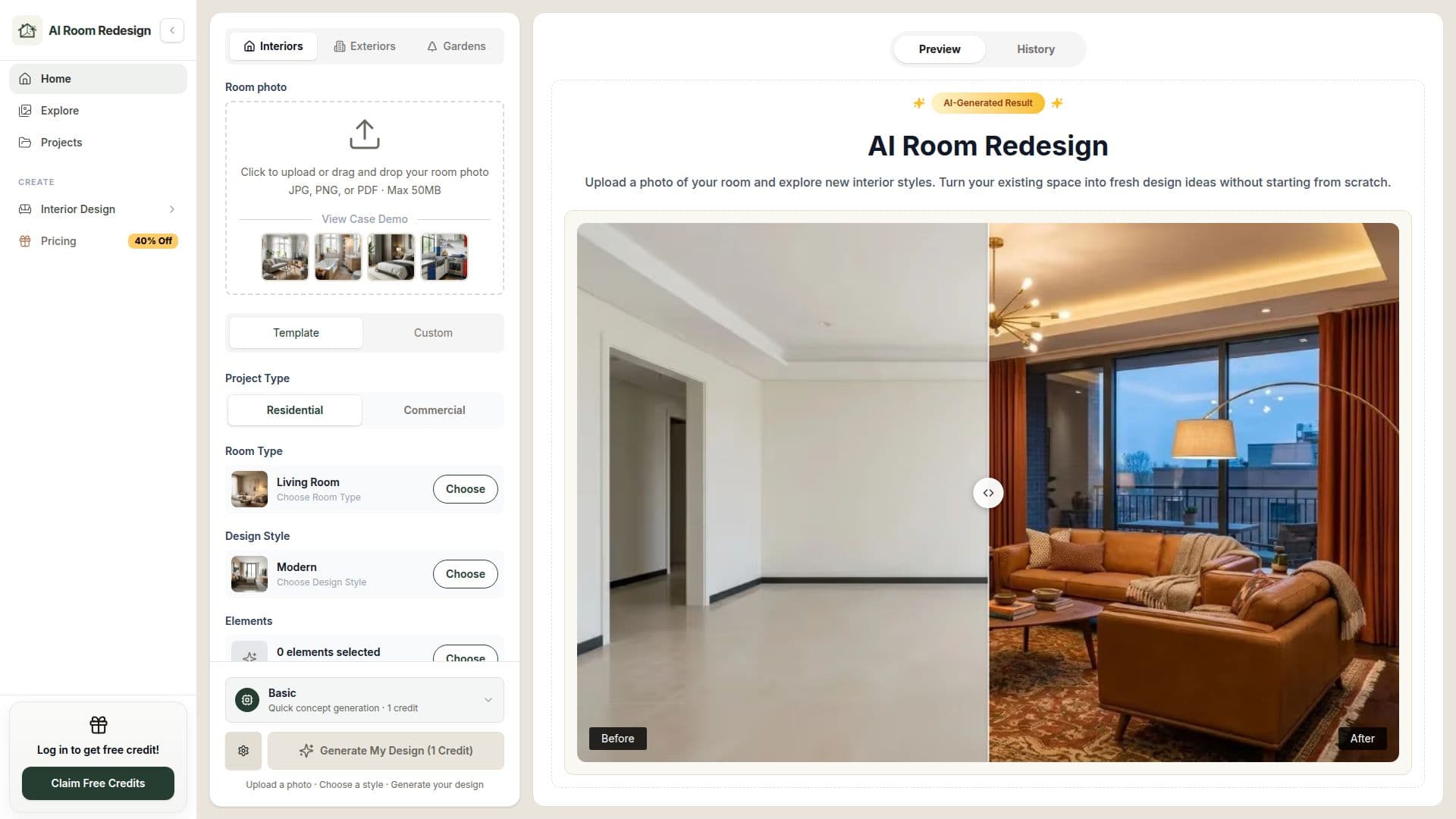
Description
AI Room Redesign is an online platform that enables users to transform their living spaces, exteriors, and gardens using artificial intelligence. By simply uploading a photo of a room, users can explore a wide array of interior design styles, generate new concepts, and visualize potential makeovers. This tool is designed to simplify the design exploration process, allowing individuals to experiment with different looks before committing to purchases or renovations.
Read More
The platform supports various room types, including bedrooms, living rooms, bathrooms, and even classrooms, as well as exterior and garden areas. Users can choose from a selection of design styles, apply lighting adjustments, and add optional elements to tailor the generated concepts. The process is straightforward: upload a photo, select a desired style, generate the design, and then download or compare the results. This iterative approach helps users gain visual inspiration faster and make more informed decisions about their home decor.
AI Room Redesign offers flexible pricing options, including one-time credit packs and monthly subscription plans. New users can start with free credits to test the service without requiring a credit card. Credit packs allow users to pay once for a set number of generations, with credits that never expire. Subscription plans provide a monthly allocation of credits, often at a discounted rate when billed annually, and can include additional features like 4K quality export, floor planners, DXF export, and commercial usage rights. The tool also offers an optional "keep existing furniture" toggle, though it emphasizes that outputs are visual concepts and not construction-ready plans.
While AI Room Redesign is excellent for generating mood boards and design directions, it's important to note its limitations. The outputs are visual concepts and not certified measurements or architectural drawings suitable for construction planning. Users should always confirm dimensions, structural requirements, and code compliance with professionals before undertaking any renovations. The platform aims to make design exploration easier and more accessible for homeowners, renters, and DIY enthusiasts looking to refresh their spaces.
- CategoryAI Interior & Architecture Design
- Pricing ModelFreemium
- DeploymentCloud
- PlatformsWeb
AI Room Redesign's Core Features
Upload Room Photo: Transform existing room, exterior, or garden photos.
Explore Interior Styles: Apply various design styles to generate new concepts.
Generate Design Concepts: Create alternative interior, exterior, and garden designs.
Multiple Room Types: Redesign bedrooms, living rooms, bathrooms, and more.
Exterior and Garden Ideas: Visualize changes for outdoor spaces.
Design Style Selection: Choose from preset design styles.
Lighting Adjustments: Modify lighting moods in generated designs.
Optional Elements: Add or remove elements to customize designs.
Download and Compare: Save generated designs for comparison.
Free Credits to Start: Begin exploring designs without a credit card.
One-Time Credit Packs: Purchase credits that never expire.
Monthly Subscription Plans: Access recurring credits and advanced features.
4K Quality Export: Available with certain subscription tiers.
Floor Planners: Included in higher-tier subscription plans.
DXF Export: Offered with specific subscription plans.
No Watermark Downloads: Available for subscribers.
Commercial Usage Rights: Granted with professional plans.
Keep Existing Furniture Toggle: Optionally preserve current furniture layout.
AI Ceiling Design: Explore ceiling color, trim, and lighting ideas.
How to use AI Room Redesign?
Upload Photo: Upload a JPG, PNG, or PDF image of your room, exterior, or garden.
Choose Style: Select a design style, room type, and adjust lighting or optional elements.
Generate Design: Click to generate new design concepts based on your selections.
Explore and Compare: Review the generated previews and compare different styles.
Download Results: Save your favorite designs to share or use for planning.
AI Room Redesign's Use Cases
- Home Makeover Planning
- Interior Design Exploration
- Exterior and Garden Design
- Furniture and Decor Previews
- Rental Property Refresh
- Ceiling Design Ideas
- Real Estate Staging
- Small Space Optimization