ToolPotion
AI Advisor
Submit a Tool (Free)

toolshed

toolshed is an open-source command-line interface and TUI for managing MCP servers for Claude Code and Codex. It allows users to add npm or Python packages, CLIs, or remote URLs as tools, ensuring they work before agents use them. It securely stores API tokens in the macOS Keychain or Linux Secret Service, facilitating easy installation and sharing of toolboxes across teams.

Visit Website
Share
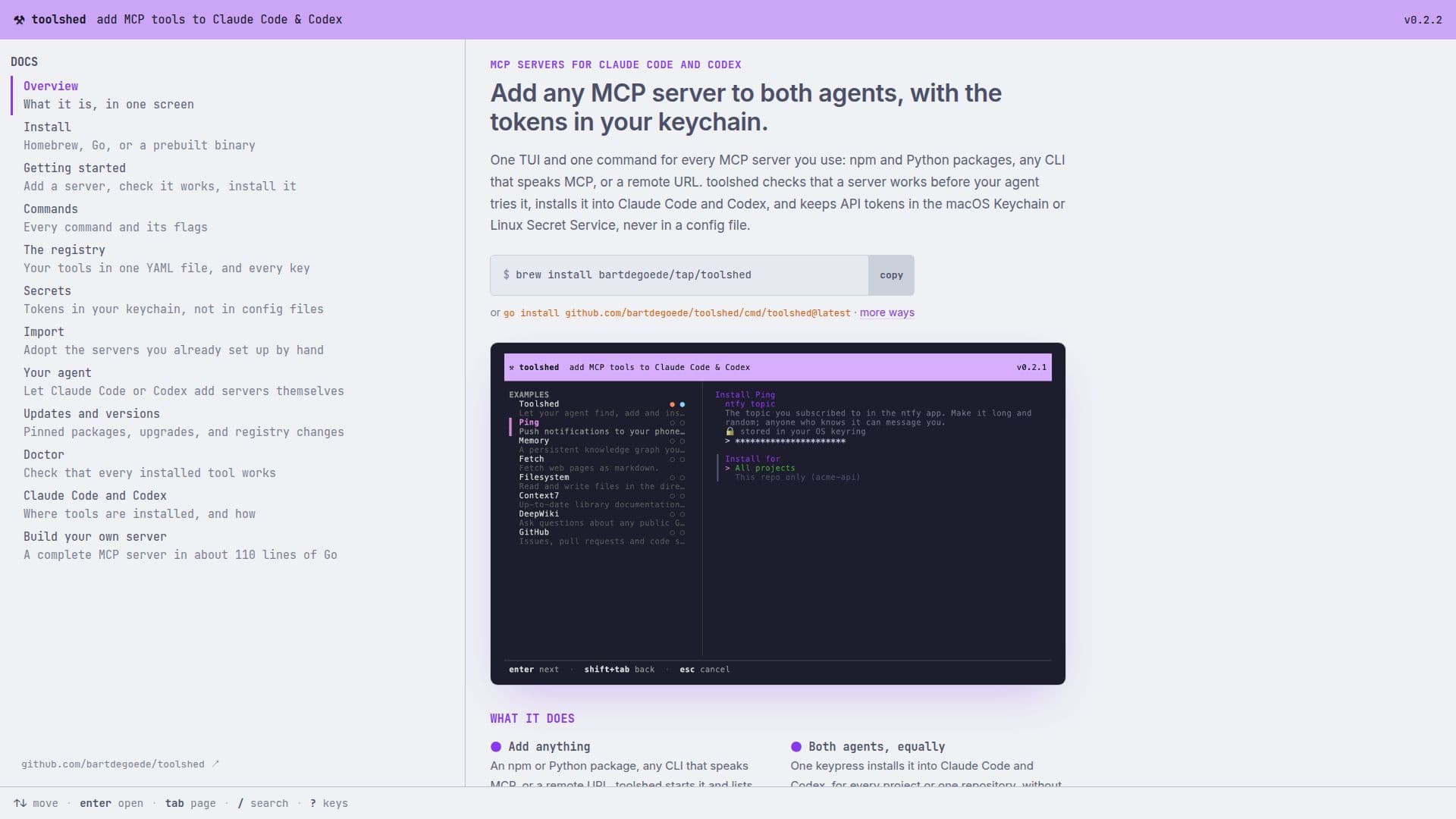
toolshed screenshot
toolshed screenshot

toolshed provides a unified interface for managing MCP (Multi-Agent Communication Protocol) servers, specifically designed for integration with Claude Code and Codex. This tool simplifies the process of adding and configuring various types of servers, including npm and Python packages, command-line interfaces that speak MCP, and remote URLs. A core feature is its ability to verify that a server is functional and lists its available tools before it's ever presented to an AI agent, preventing errors and ensuring smooth operation.

Read More

One of the significant advantages of toolshed is its secure handling of API tokens. Instead of storing sensitive credentials in plain-text configuration files, toolshed leverages the macOS Keychain or Linux Secret Service. This enhances security by keeping tokens encrypted and managed by the operating system's secure storage mechanisms. Servers are launched via a small wrapper that retrieves tokens from the keychain, applicable to both local and remote server setups.

The tool offers a user-friendly Text User Interface (TUI) and command-line options for managing tools. Users can easily add, start, inspect, install, uninstall, and delete tools. It also supports importing existing servers that were set up manually, allowing users to migrate their tokens to the secure keychain. For collaborative environments, toolshed enables sharing a consistent toolbox configuration across a team by committing a small YAML file to version control.

Furthermore, toolshed itself can act as an MCP server, allowing AI agents like Claude Code or Codex to directly request the addition of new servers. This agent-driven server management includes capabilities like `list_servers`, `inspect_server`, `add_server`, `install_server`, and `uninstall_server`. However, for security, any agent-added server requires explicit user approval before it can be started or installed, and agents cannot directly handle secrets or replace existing tools that might inherit secrets. This ensures that users maintain control over what runs on their machine and how sensitive information is handled. toolshed is open-source, MIT licensed, and available for macOS and Linux.

  • CategoryAI DevOps & Cloud Tools
  • Pricing ModelOpen Source
  • DeploymentSelf-hosted
  • PlatformsmacOS, Linux

  • Add npm or Python packages as MCP servers

  • Integrate any CLI that speaks MCP

  • Add remote URLs as MCP servers

  • Verify server functionality before agent use

  • Securely store API tokens in macOS Keychain or Linux Secret Service

  • One-keypress installation into Claude Code and Codex

  • Install tools for all projects or a single repository

  • Import manually configured servers and move tokens to keychain

  • toolshed acts as an MCP server for agent-driven management

  • Agent can list, inspect, add, install, and uninstall servers

  • User approval required for agent-added servers

  • Share toolboxes with teams via YAML configuration

  • Open-source and MIT licensed

  • Available for macOS and Linux

  • Text User Interface (TUI) and command-line interface

  1. Install toolshed: Use `go install github.com/bartdegoede/toolshed/cmd/toolshed@latest` or other provided methods.

  2. Run toolshed: Execute the `toolshed` command to view your current tools and built-in examples.

  3. Add a tool: Press 'a' in the TUI, specify the type (npm, Python, command, or URL), and name it.

  4. Check tool functionality: Press 't' to start the server and list its tools, ensuring it works.

  5. Install a tool: Press 'i' (or Enter) to install it into Claude Code or Codex, providing any necessary values and choosing installation scope.

  6. Manage secrets: When installing, secrets are prompted for securely and stored in your keychain.

  7. Import existing servers: Press 'm' to import servers already configured in Claude Code and Codex.

  8. Approve agent-added servers: If an agent adds a server, review and approve it in the TUI by pressing 'i' or using `toolshed approve <id>`.

  • AI Agent Tool Management
  • Secure Token Storage
  • Developer Workflow Enhancement
  • Team Collaboration
  • Automated Server Provisioning
  • Migrating Existing Servers

toolshed Reviews

Loading...

Popular AI Tools Like toolshed

Castov

AI Apps

Castov is a comprehensive, client-side developer platform offering a suite of tools for web, CLI, and AI agents. It provides utilities for time manipulation, cryptography, JSON…

AI DevOps & Cloud Tools
View Tool

AI Apps

Comprehensive, client-side developer platform offering a suite of tools for web, CLI, and AI agents. It provides utilities for time manipulation, cryptography, JSON…Castov is a comprehensive, client-side developer platform offering a suite of tools for web, CLI, and AI agents. It provides utilities for time manipulation, cryptography, JSON…

AI DevOps & Cloud Tools
See the Top 250 AI Apps

apilabs.ai

AI Apps

apilabs.ai provides a unified control layer for securing, testing, and governing agentic API and MCP workflows. It enables deterministic guardrails with SuperContracts across…

AI DevOps & Cloud Tools
View Tool

AI Apps

Provides a unified control layer for securing, testing, and governing agentic API and MCP workflows. It enables deterministic guardrails with SuperContracts across…apilabs.ai provides a unified control layer for securing, testing, and governing agentic API and MCP workflows. It enables deterministic guardrails with SuperContracts across…

AI DevOps & Cloud Tools
See the Top 250 AI Apps

Elva

AI Apps

Elva is an API management platform that discovers, scores, and governs APIs in your codebase. It exposes them to developers and AI agents through hosted MCP servers,…

AI DevOps & Cloud Tools
View Tool

AI Apps

API management platform that discovers, scores, and governs APIs in your codebase. It exposes them to developers and AI agents through hosted MCP servers,…Elva is an API management platform that discovers, scores, and governs APIs in your codebase. It exposes them to developers and AI agents through hosted MCP servers,…

AI DevOps & Cloud Tools
See the Top 250 AI Apps

MCP1 by Appwrite is a Model Context Protocol (MCP) gateway designed for teams. It centralizes access to multiple MCP servers behind a single URL, offering robust authentication,…

AI DevOps & Cloud Tools

Ranked #45 in MLOps & Model Deployment

View Tool

Model Context Protocol (MCP) gateway designed for teams. It centralizes access to multiple MCP servers behind a single URL, offering robust authentication,…MCP1 by Appwrite is a Model Context Protocol (MCP) gateway designed for teams. It centralizes access to multiple MCP servers behind a single URL, offering robust authentication,…

AI DevOps & Cloud Tools
Ranked #45 in MLOps & Model Deployment

NitroStack

AI Apps

NitroStack is a comprehensive Model Context Protocol (MCP) platform that enables teams to build, test, and deploy MCP servers and agentic AI applications. It offers an open-source…

AI Agent Builders

Ranked #108 for Fine-tuning AI models

View Tool

AI Apps

Comprehensive Model Context Protocol (MCP) platform that enables teams to build, test, and deploy MCP servers and agentic AI applications. It offers an open-source…NitroStack is a comprehensive Model Context Protocol (MCP) platform that enables teams to build, test, and deploy MCP servers and agentic AI applications. It offers an open-source…

AI Agent Builders
Ranked #108 for Fine-tuning AI models

Nango

AI Apps

Nango is a platform that enables seamless integration with over 1,000 APIs, allowing products and AI agents to connect effortlessly. It offers a developer-first approach with…

AI DevOps & Cloud Tools
View Tool

AI Apps

Platform that enables seamless integration with over 1,000 APIs, allowing products and AI agents to connect effortlessly. It offers a developer-first approach with…Nango is a platform that enables seamless integration with over 1,000 APIs, allowing products and AI agents to connect effortlessly. It offers a developer-first approach with…

AI DevOps & Cloud Tools
See the Top 250 AI Apps

DuploCloud is a DevOps Agent Platform that automates platform engineering tasks such as provisioning, compliance, and security. It enables faster deployment, cost reduction, and…

AI DevOps & Cloud ToolsHealthcare & Life Sciences

Ranked #45 for CTOs

View Tool

DevOps Agent Platform that automates platform engineering tasks such as provisioning, compliance, and security. It enables faster deployment, cost reduction, and…DuploCloud is a DevOps Agent Platform that automates platform engineering tasks such as provisioning, compliance, and security. It enables faster deployment, cost reduction, and…

AI DevOps & Cloud ToolsHealthcare & Life Sciences
Ranked #45 for CTOs

Nuphos

AI Apps

Nuphos provides a shared agent workspace for teams, integrating AI agents like Claude Code and Codex. It allows users to bring their existing subscriptions, share tools and…

AI DevOps & Cloud Tools

Ranked #173 for Explaining code

View Tool

AI Apps

Provides a shared agent workspace for teams, integrating AI agents like Claude Code and Codex. It allows users to bring their existing subscriptions, share tools and…Nuphos provides a shared agent workspace for teams, integrating AI agents like Claude Code and Codex. It allows users to bring their existing subscriptions, share tools and…

AI DevOps & Cloud Tools
Ranked #173 for Explaining code
1 of 8