Description
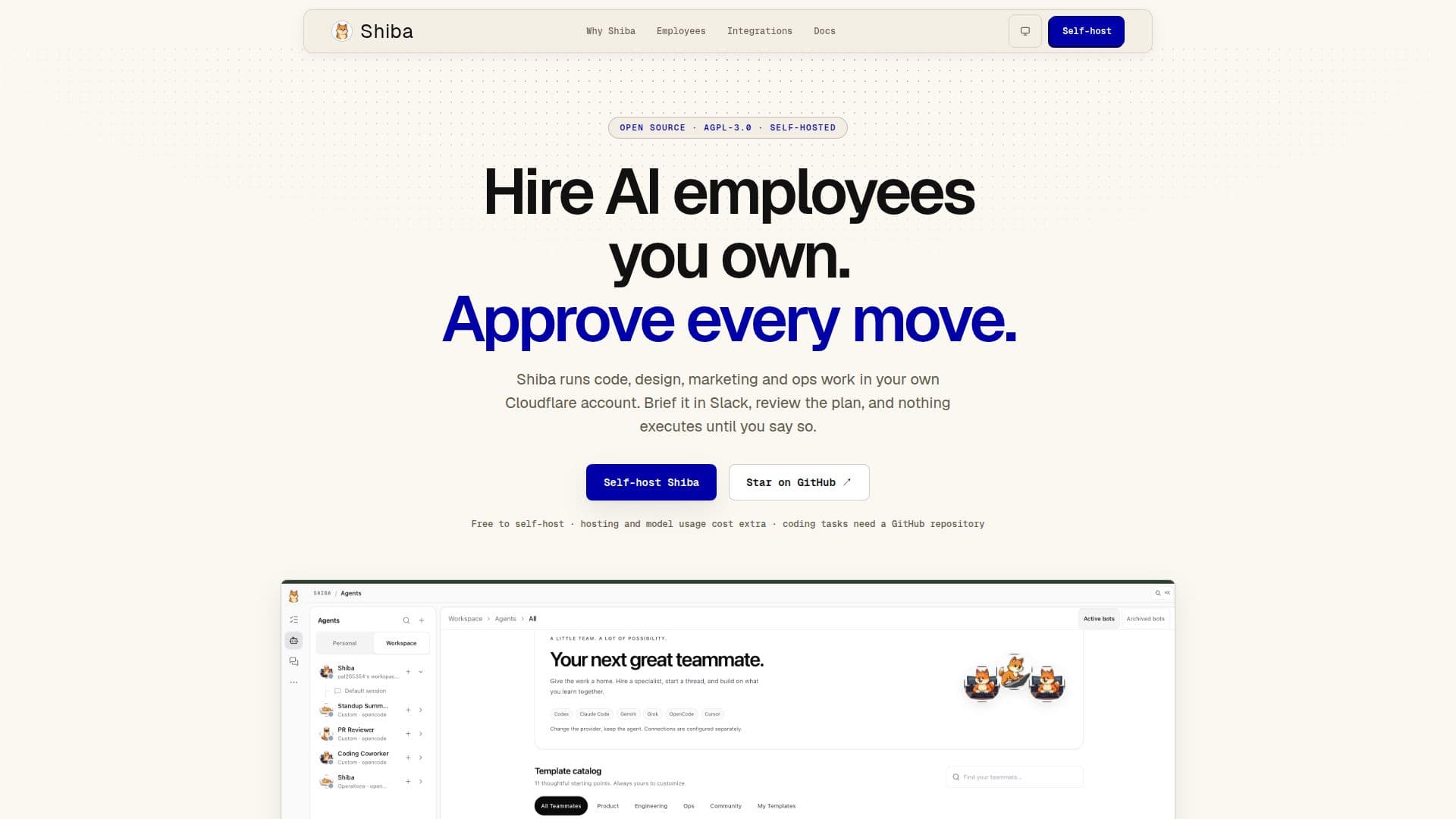
Shiba offers a unique approach to integrating AI into your workflow by providing self-hosted AI employees that operate within your own Cloudflare account. This open-source platform is designed to handle a wide range of tasks across different departments, including engineering, marketing, research, and operations. Users can brief these AI employees for specific tasks, such as generating campaign drafts, preparing account research, answering focused questions, or making code changes.
Read More
A core principle of Shiba is user control and transparency. Every proposed action by an AI employee requires human approval before execution. This "approval gate" ensures that you review the exact files, branches, and actions before anything runs, maintaining oversight and preventing unsupervised operations. The system returns pull requests and checks for coding tasks, with publishing and sending remaining a separate, human-controlled step.
Shiba comes with built-in templates for key roles like Engineering, Marketing, Research, and Operations, and allows for the creation of custom roles for other departments such as Sales, Product, Design, and QA. Users can define specific instructions and necessary files for any role, tailoring the AI's capabilities to their team's unique needs. The platform emphasizes that roles use supplied information to prepare drafts and do not automatically connect accounts, make payments, update external services, or grant publishing permissions.
Self-hosting Shiba in your Cloudflare account offers significant advantages in terms of trust and auditability. You retain full control over the infrastructure and data, with the ability to inspect the source code (licensed under AGPL-3.0). This setup ensures that AI operations are transparent and confined to your environment. While the software itself is free to self-host, users are responsible for their own hosting and AI model usage costs.
Shiba integrates with a wide array of tools and services, though these are presented as catalog entries and illustrative workflows rather than pre-connected accounts. Integrations span advertising platforms like Google Ads and Meta Ads, social media like X/Twitter and LinkedIn, CRM systems such as HubSpot and Salesforce, communication tools like Slack and Microsoft Teams, and development platforms like GitHub and Jira. This extensive integration catalog allows users to plan how Shiba fits into their existing tech stack, with the understanding that each connection requires configuration, verification, and explicit human approval.
- CategoryAI Agent Builders
- Pricing ModelFree to Self-Host
- DeploymentSelf-Hosted (Cloudflare)
- PlatformsWeb
Shiba's Core Features
Self-hosted AI employees in your Cloudflare account
Open-source under AGPL-3.0 license
Approval gate before every proposed AI run
Built-in templates for Engineering, Marketing, Research, and Operations
Customizable roles with specific instructions
Repository tasks and private file workspaces
Integration with GitHub for coding tasks
Slack integration for task briefing and approvals
Support for various business functions: Sales, Product, Design, QA, Finance
Draft generation for campaigns, reports, code changes, and more
Auditable source code for transparency
Read-only Gmail context for task framing
Integration catalog for planning tool connections
Reusable skill templates for common workflows
No automatic execution or publishing without human approval
How to use Shiba?
Set up Workspace: Configure Shiba in your Cloudflare account and choose a GitHub repository for code-related tasks or a private workspace for file-based work.
Choose an Employee Role: Select from built-in templates like Engineering, Marketing, Research, Operations, or create a custom role with specific instructions.
Describe the Task: Brief the AI employee with a clear task, specifying the desired output (e.g., code change, campaign draft) and the relevant workspace.
Review the Proposal: Examine the AI's proposed plan, including files, branches, and actions, before any execution begins.
Approve or Reject: Grant explicit approval for the AI to proceed with the task or reject the proposal if adjustments are needed.
Review Results: After execution, review the AI's output, such as pull requests, campaign drafts, or research reports, before publishing or further action.
Shiba's Use Cases
- Generate Marketing Campaigns
- Prepare Sales Outreach
- Conduct Focused Research
- Draft Product Specifications
- Map User Flows & UI Copy
- Automate Code Changes
- Create QA Test Reports
- Develop Operational Runbooks
- Review Pull Requests
- Summarize Inbound Email