ToolPotion
AI Advisor
Submit a Tool (Free)

SaaS Toolkit MCP Server

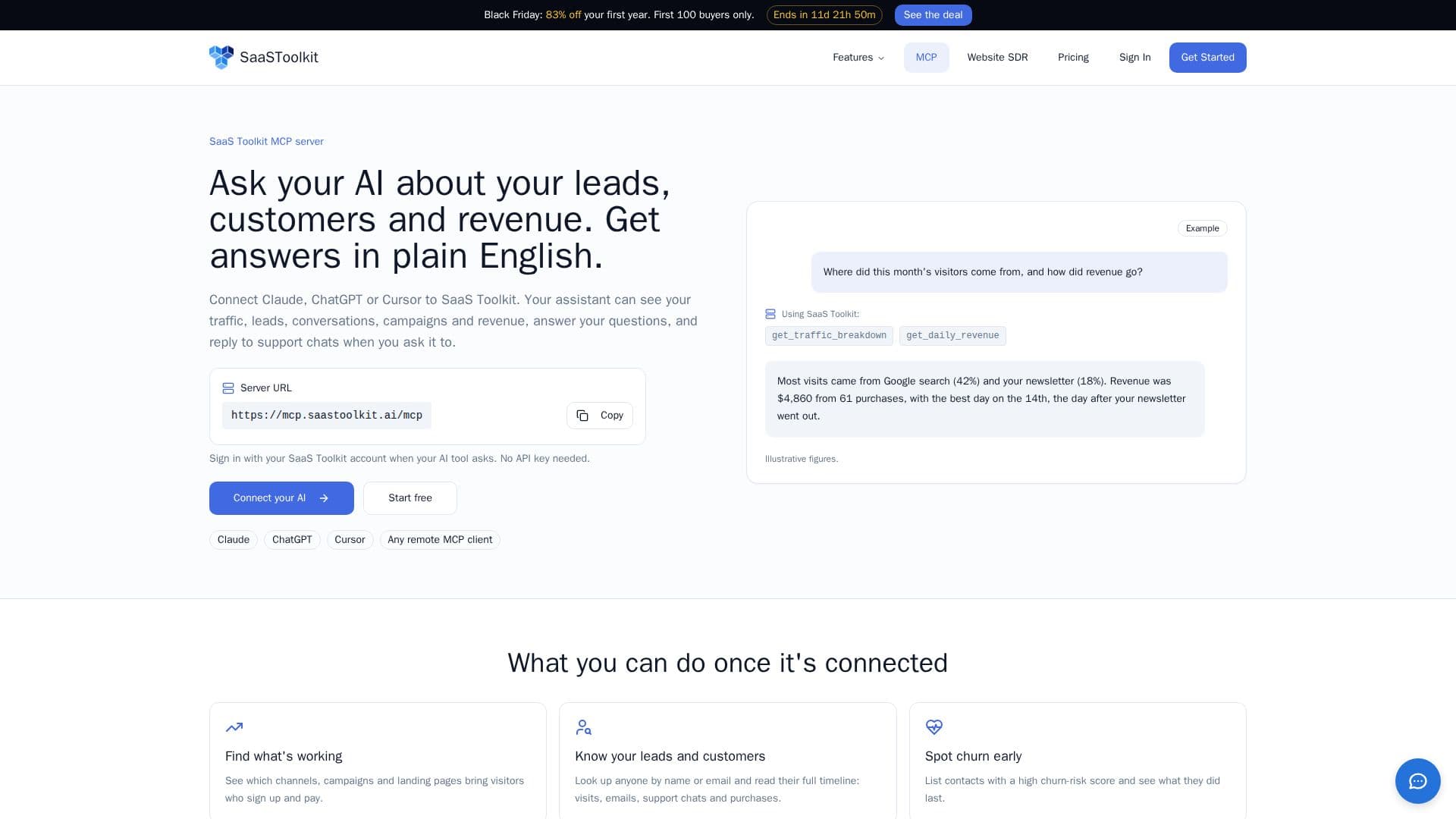
SaaS Toolkit MCP Server connects your AI assistant like Claude, ChatGPT, or Cursor to your SaaS Toolkit account. It enables your AI to access data on leads, customers, conversations, campaigns, and revenue, providing answers in plain English and assisting with support chats. Sign in securely with OAuth, eliminating the need for API keys.

Visit Website
Share
SaaS Toolkit MCP Server screenshot

SaaS Toolkit MCP Server acts as a bridge, allowing popular AI assistants such as Claude, ChatGPT, and Cursor to securely access and interact with your SaaS Toolkit data. This integration empowers your AI to understand your business operations by providing insights into traffic, leads, customer interactions, marketing campaigns, and revenue figures. Users can ask complex questions in natural language and receive clear, data-backed answers, enhancing decision-making and operational efficiency.

Read More

The server facilitates various functionalities, including identifying high-performing channels and landing pages, looking up detailed customer timelines (visits, emails, chats, purchases), and proactively spotting churn risks. It also streamlines support operations by allowing AI assistants to read and reply to support chats, or mark them as resolved. Furthermore, the AI can analyze email campaign performance, including sends, opens, clicks, and replies, and even draft new email automations or send test emails.

Connecting your AI tool to the MCP Server is designed to be straightforward and secure. It utilizes OAuth for sign-in, meaning no API keys are required, reducing security risks. The connection is limited to the projects and permissions you already have in SaaS Toolkit, ensuring data access aligns with your existing team structure. Most of the 39 available tools are read-only, with a few allowing specific actions like replying to support chats or updating ticket statuses, always with user control and approval mechanisms in place.

Before connecting, users need an active SaaS Toolkit account with at least one project and an AI tool that supports remote MCP servers over HTTP. The platform provides specific setup instructions for various clients like Claude Code, Codex, Gemini CLI, VS Code, Cursor, and Lovable, as well as general guidance for any compatible AI tool. This setup ensures that your AI agents can leverage your business data to provide valuable insights and automate routine tasks, all while maintaining data privacy and user control.

  • CategoryAutomation & Agents
  • Pricing ModelFreemium
  • DeploymentCloud
  • PlatformsWeb

  • Connects AI assistants (Claude, ChatGPT, Cursor) to SaaS Toolkit

  • Natural language queries for business data

  • Access to leads, customers, conversations, campaigns, and revenue data

  • AI-assisted replies to support chats and tickets

  • OAuth-based secure sign-in, no API keys required

  • Identifies high-performing marketing channels and landing pages

  • Provides detailed customer timelines (visits, emails, chats, purchases)

  • Spots churn risk based on customer activity

  • Monitors email campaign performance and replies

  • Allows drafting and testing of email automations

  • Accesses saved AI insights for projects and portfolios

  • Supports 39 tools, mostly read-only, with controlled write access

  • Compatible with various MCP clients and custom connectors

  • Ensures data access aligns with existing SaaS Toolkit project permissions

  • Provides real-time analytics for traffic, pages, funnels, and revenue

  1. Ensure SaaS Toolkit Account: Have an active SaaS Toolkit account with at least one project.

  2. Prepare AI Tool: Use an AI tool that supports remote MCP servers over HTTP, such as Claude, ChatGPT, or Cursor.

  3. Copy Server URL: Obtain the unique MCP server URL from your SaaS Toolkit account.

  4. Configure AI Tool: Add the server URL to your AI tool's MCP settings or custom connector configuration.

  5. Authenticate Access: Sign in to your SaaS Toolkit account via OAuth when prompted by your AI tool and approve access.

  6. Verify Connection: Test the connection by asking your AI tool to retrieve data or perform an action within SaaS Toolkit.

  7. Monitor & Control: Review your AI tool's settings for action approvals and disconnect access anytime if needed.

  • Customer Insight Analysis
  • Support Chat Automation
  • Churn Risk Identification
  • Marketing Campaign Optimization
  • Revenue Performance Tracking
  • Automated Email Engagement
  • Project Performance Overview
  • Landing Page Conversion Analysis

SaaS Toolkit MCP Server Reviews

Loading...

Popular AI Tools Like SaaS Toolkit MCP Server

thatChat

AI Apps

thatChat is a self-hosted AI platform designed for web and e-commerce sites. It captures leads, handles support, answers FAQs, and processes booking requests using your own AI…

AI ChatbotsRetail & Consumer Goods

Ranked #142 in Lead Generation Tools

View Tool

AI Apps

Self-hosted AI platform designed for web and e-commerce sites. It captures leads, handles support, answers FAQs, and processes booking requests using your own AI…thatChat is a self-hosted AI platform designed for web and e-commerce sites. It captures leads, handles support, answers FAQs, and processes booking requests using your own AI…

AI ChatbotsRetail & Consumer Goods
Ranked #142 in Lead Generation Tools

Respond.io

AI Apps

Respond.io is an AI-powered customer conversation platform that unifies WhatsApp, Instagram, Messenger, TikTok, calls, and email in one team inbox. It is built for mid-market B2C…

AI CRM Tools

Ranked #10 in AI CRM Tools

View Tool

AI Apps

AI-powered customer conversation platform that unifies WhatsApp, Instagram, Messenger, TikTok, calls, and email in one team inbox. It is built for mid-market B2C…Respond.io is an AI-powered customer conversation platform that unifies WhatsApp, Instagram, Messenger, TikTok, calls, and email in one team inbox. It is built for mid-market B2C…

AI CRM Tools
Ranked #10 in AI CRM Tools

Superflows enables SaaS products to integrate a powerful AI assistant without needing an AI team. It helps users get answers to complex analytics queries, perform actions, and…

AI Chatbot Builders

Ranked #94 in AI Chatbot Builders

View Tool

Enables SaaS products to integrate a powerful AI assistant without needing an AI team. It helps users get answers to complex analytics queries, perform actions, and…Superflows enables SaaS products to integrate a powerful AI assistant without needing an AI team. It helps users get answers to complex analytics queries, perform actions, and…

AI Chatbot Builders
Ranked #94 in AI Chatbot Builders

Concierge by Juniors AI offers AI-driven customer support across WhatsApp, email, and social channels. It integrates with your existing infrastructure, providing AI resolution,…

AI Help Desk Tools

Ranked #93 for Responding to customer reviews

View Tool

Offers AI-driven customer support across WhatsApp, email, and social channels. It integrates with your existing infrastructure, providing AI resolution,…Concierge by Juniors AI offers AI-driven customer support across WhatsApp, email, and social channels. It integrates with your existing infrastructure, providing AI resolution,…

AI Help Desk Tools
Ranked #93 for Responding to customer reviews

Fineguide.ai is an AI-powered platform that unifies customer conversations, CRM, channels, and workflows. It transforms business operations by connecting every interaction and…

AI Support Chatbots

Ranked #162 in AI Support Chatbots

View Tool

AI-powered platform that unifies customer conversations, CRM, channels, and workflows. It transforms business operations by connecting every interaction and…Fineguide.ai is an AI-powered platform that unifies customer conversations, CRM, channels, and workflows. It transforms business operations by connecting every interaction and…

AI Support Chatbots
Ranked #162 in AI Support Chatbots

Splutter AI offers a comprehensive platform for creating and deploying AI chatbots and voicebots for businesses. Enhance customer support, generate leads, and automate engagement…

AI Support Chatbots

Ranked #96 in AI Support Chatbots

View Tool

Offers a comprehensive platform for creating and deploying AI chatbots and voicebots for businesses. Enhance customer support, generate leads, and automate engagement…Splutter AI offers a comprehensive platform for creating and deploying AI chatbots and voicebots for businesses. Enhance customer support, generate leads, and automate engagement…

AI Support Chatbots
Ranked #96 in AI Support Chatbots

Jarvis AI

AI Apps

Jarvis AI is an AI assistant and multi-channel customer support platform that answers questions, translates and rewrites text, and automates support across channels like…

AI Support ChatbotsRetail & Consumer Goods

Ranked #104 in AI Support Chatbots

View Tool

AI Apps

AI assistant and multi-channel customer support platform that answers questions, translates and rewrites text, and automates support across channels like…Jarvis AI is an AI assistant and multi-channel customer support platform that answers questions, translates and rewrites text, and automates support across channels like…

AI Support ChatbotsRetail & Consumer Goods
Ranked #104 in AI Support Chatbots

Userdesk

AI Apps

Userdesk offers a no-code platform to build ChatGPT-like AI chatbots trained on your data. Easily collect leads, provide instant replies, and gain customer insights. Supports…

AI Support Chatbots

Ranked #124 in AI Support Chatbots

View Tool

AI Apps

Offers a no-code platform to build ChatGPT-like AI chatbots trained on your data. Easily collect leads, provide instant replies, and gain customer insights. Supports…Userdesk offers a no-code platform to build ChatGPT-like AI chatbots trained on your data. Easily collect leads, provide instant replies, and gain customer insights. Supports…

AI Support Chatbots
Ranked #124 in AI Support Chatbots
1 of 8