Description
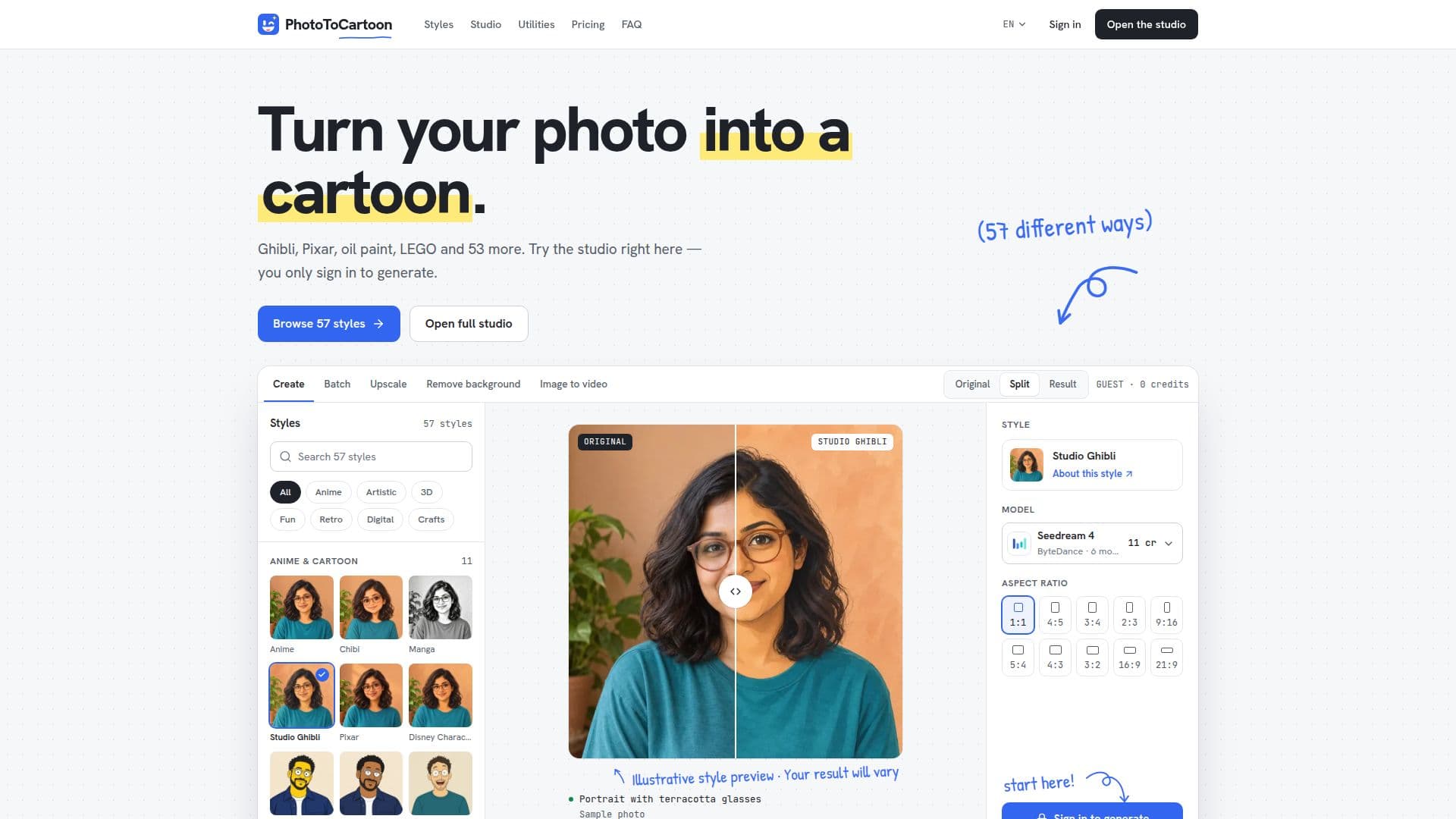
PhotoToCartoon is an online platform that leverages AI to convert personal photographs into a wide array of artistic styles. With 57 distinct options available across seven categories, users can transform their images into cartoons, anime, Ghibli-inspired scenes, oil paintings, 3D avatars, retro prints, or even LEGO-style figures. The platform is designed for simplicity, requiring no design skills or complex prompts, making it accessible for casual creators and professionals alike.
Read More
The process involves three straightforward steps: uploading a JPG, PNG, or WebP photo up to 10 MB, selecting one of the 57 styles and a model, and then generating and downloading the high-resolution PNG result. Users can explore all styles and preview them on sample photos without needing an account or spending credits. Credits are only consumed when a result is successfully generated.
Beyond basic style conversion, PhotoToCartoon offers several utility tools within the same studio. These include a background remover to cut out subjects for 4 credits, an image upscaler to enlarge and sharpen results for 3 credits, and an image-to-video converter that turns still photos into short moving clips for 12 to 57 credits per second, depending on resolution. Batch processing is also available, allowing users to convert up to 50 photos at once, either with a single style or a different style for each image.
The platform offers two main subscription plans: Starter and Creator. The Starter plan, priced at $9.99 per month (or $79 annually, saving about 34%), provides 1,000 credits monthly. The Creator plan, at $29.99 per month (or $239 annually), offers 3,000 credits monthly and includes a commercial license for generated images. Unused credits roll over each month. Credit costs vary by model and quality, ranging from 8 credits for a quick draft to 185 for high-quality 4K images. The studio displays the exact cost before generation.
PhotoToCartoon emphasizes user control and privacy. Photos and results are stored at unlisted links tied to the user's account, and items can be deleted from history. The service ensures that uploaded photos remain the user's property. It is entirely browser-based, requiring no installation and working seamlessly on both desktop and mobile devices. The platform is ideal for creating unique pet portraits, family photos, couple portraits, avatars, gifts, prints, and gaming avatars.
- CategoryImage Generation & Editing
- Pricing ModelFreemium
- DeploymentCloud
- PlatformsWeb
PhotoToCartoon's Core Features
57 distinct art styles for photo transformation
Seven style categories: Anime & Cartoon, Artistic, 3D & Avatars, Fun & Creative, Retro & Vintage, Digital & Modern, Sculptures & Crafts
Multiple AI models for image generation (Seedream, Nano Banana Pro, GPT Image)
Background removal tool for people, pets, and products
Image upscaler for larger, sharper prints (up to 4K resolution)
Image to video conversion for short animated clips
Batch processing for up to 50 photos simultaneously
No watermark on generated images
Supports JPG, PNG, and WebP uploads up to 10 MB
Browser-based access on desktop and mobile devices
Account history to store photos and results
Commercial license included with Creator plan
Credit-based system with unused credits rolling over
Free exploration of styles on sample photos without an account
How to use PhotoToCartoon?
Upload Photo: Drop a JPG, PNG, or WebP image up to 10 MB into the studio.
Pick a Style: Choose from 57 available styles and a preferred AI model. Preview on sample photos for free.
Generate Image: Sign in to your account and generate the image using credits from your plan.
Download Result: Save the high-resolution, watermark-free PNG image to your device.
PhotoToCartoon's Use Cases
- Pet Portraits
- Family Photos
- Couple Portraits
- Personal Avatars
- Gifts and Prints
- Gaming Avatars
- Sticker Creation
- Product Photography
- Team Pages
- Content Calendars