Description
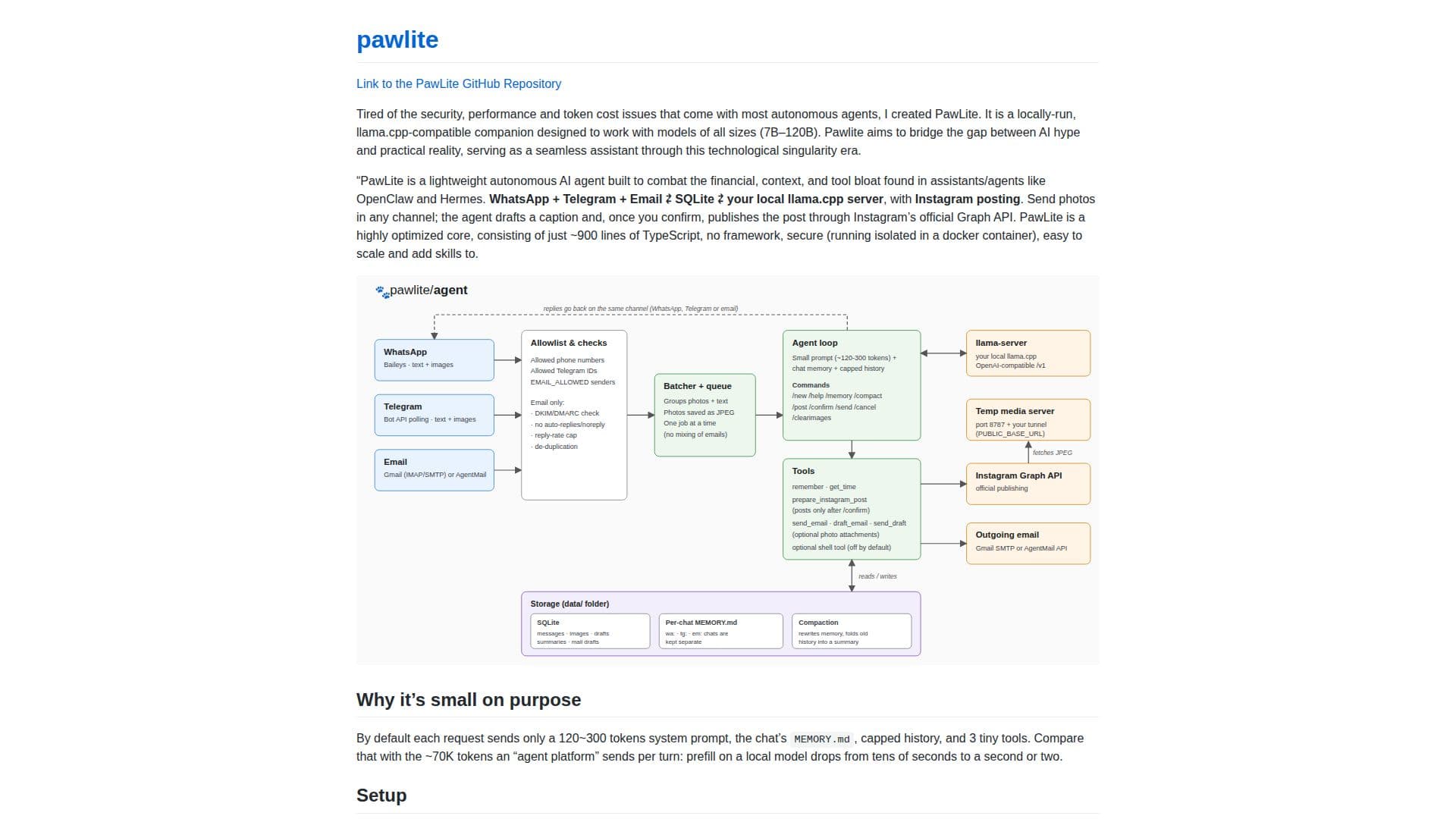
PawLite is an autonomous AI agent engineered for efficiency, privacy, and local operation. It addresses common issues found in other autonomous agents, such as high token costs, security concerns, and performance bottlenecks. Designed to be lightweight, PawLite's core consists of approximately 900 lines of TypeScript code, operating without a framework to ensure a secure, scalable, and easily extensible system.
Read More
This agent is compatible with `llama.cpp` and supports various model sizes, ranging from 7B to 120B parameters, making it versatile for different computational environments. PawLite aims to bridge the gap between theoretical AI capabilities and practical applications, serving as a seamless assistant in the era of technological singularity.
One of PawLite's key features is its ability to connect your LLM to popular communication channels. Users can integrate it with WhatsApp, Telegram, Email (Gmail or AgentMail), and Instagram. This allows the agent to manage communications, draft responses, and even automate social media posting. For instance, users can send photos through any connected channel, and PawLite will draft an Instagram caption. Upon user confirmation, it publishes the post via Instagram’s official Graph API.
Efficiency is a core tenet of PawLite. By default, each request sends a minimal system prompt (around 120-300 tokens), capped chat history, and three small tools. This contrasts sharply with other agent platforms that might send tens of thousands of tokens per turn, significantly reducing prefill times on local models from tens of seconds to just one or two. The agent also includes robust memory management and compaction features, ensuring that conversation history and long-term memory are efficiently stored and retrieved without overflowing context limits.
Security is enhanced by its Docker-ready architecture, allowing the agent to run in an isolated container. Configuration is straightforward, requiring Node 22+ and offering options for `npm` or Docker deployment. PawLite also incorporates safeguards for email and group chats, such as allowlists, de-duplication, and reply caps, to prevent bot-to-bot loops and ensure controlled interactions. While powerful, users should be aware of caveats such as WhatsApp's unofficial client status and the non-end-to-end encryption of Telegram bot chats, emphasizing the importance of tight allowlists for security.
- CategoryAI Agent Builders
- Pricing ModelOpen Source
- DeploymentLocal, Docker
- PlatformsWeb
PawLite's Core Features
Lightweight autonomous AI agent
Privacy-focused local operation
Connects LLM to WhatsApp, Telegram, Email, Instagram
Low token cost optimization
Docker-ready for isolated execution
Efficient core (~900 lines of TypeScript)
Supports llama.cpp compatible models (7B–120B)
Automated Instagram posting with caption drafting
Email management (Gmail/AgentMail) with reply capabilities
Conversation history and long-term memory compaction
Secure operation with isolated Docker containers
Configurable allowlists for communication channels
Image attachment support for email and Instagram
Command-line interface for agent control
MIT license for open-source use
How to use PawLite?
Install Node.js: Ensure Node 22+ and npm are installed on your system.
Set up PawLite: Run the agent using npm or build and run it with Docker for enhanced security.
Configure LLM: Connect your local `llama.cpp` server, ensuring sufficient context size for requests.
Integrate Communication Channels: Set up WhatsApp by scanning a QR code, configure Telegram with a bot token, and connect Email (Gmail or AgentMail) using app passwords or API keys.
Enable Instagram Posting: Obtain an Instagram Professional account, Meta developer app access token, and provide a public HTTPS URL for image serving.
Interact with the Agent: Use commands like `/clear`, `/commands`, `/memory`, `/tidy`, `/instagram`, `/publish`, `/send`, `/discard`, and `/delete` to manage chats, drafts, and posts.
Manage Memory: The bot automatically compacts chat history and long-term memory; use `/remember` to view saved facts.
Extend Functionality: Add new tools by defining model-facing text, schemas, and code, or modify existing model instructions.
PawLite's Use Cases
- Automated Social Media Posting
- Personal AI Assistant
- Email Management
- Content Creation Support
- Local LLM Integration
- Secure Agent Deployment
- Custom AI Skill Development
- Efficient Communication Handling