Description
Mika functions as an AI Product Operations Employee, designed to work across multiple software products within a unified workspace. It specializes in transforming customer questions, growth opportunities, and launch plans into actionable work, ready for user review and approval. The platform ensures that each product maintains its distinct audience, voice, learned rules, and work context, preventing a blended brand experience across a portfolio.
Read More
The core functionality of Mika involves preparing various operational tasks. This includes drafting customer support replies, generating social media content, implementing website and SEO changes, and executing browser-based operations. For customer support, Mika investigates threads and crafts responses in the specific voice of each product. For social distribution, it manages content and publishing separately for every product and brand account. In terms of website and SEO, Mika can propose bounded page changes and generate reviewable pull requests. Additionally, it offers browser operations, allowing users to watch Mika inspect live sites and third-party tools on its cloud computer.
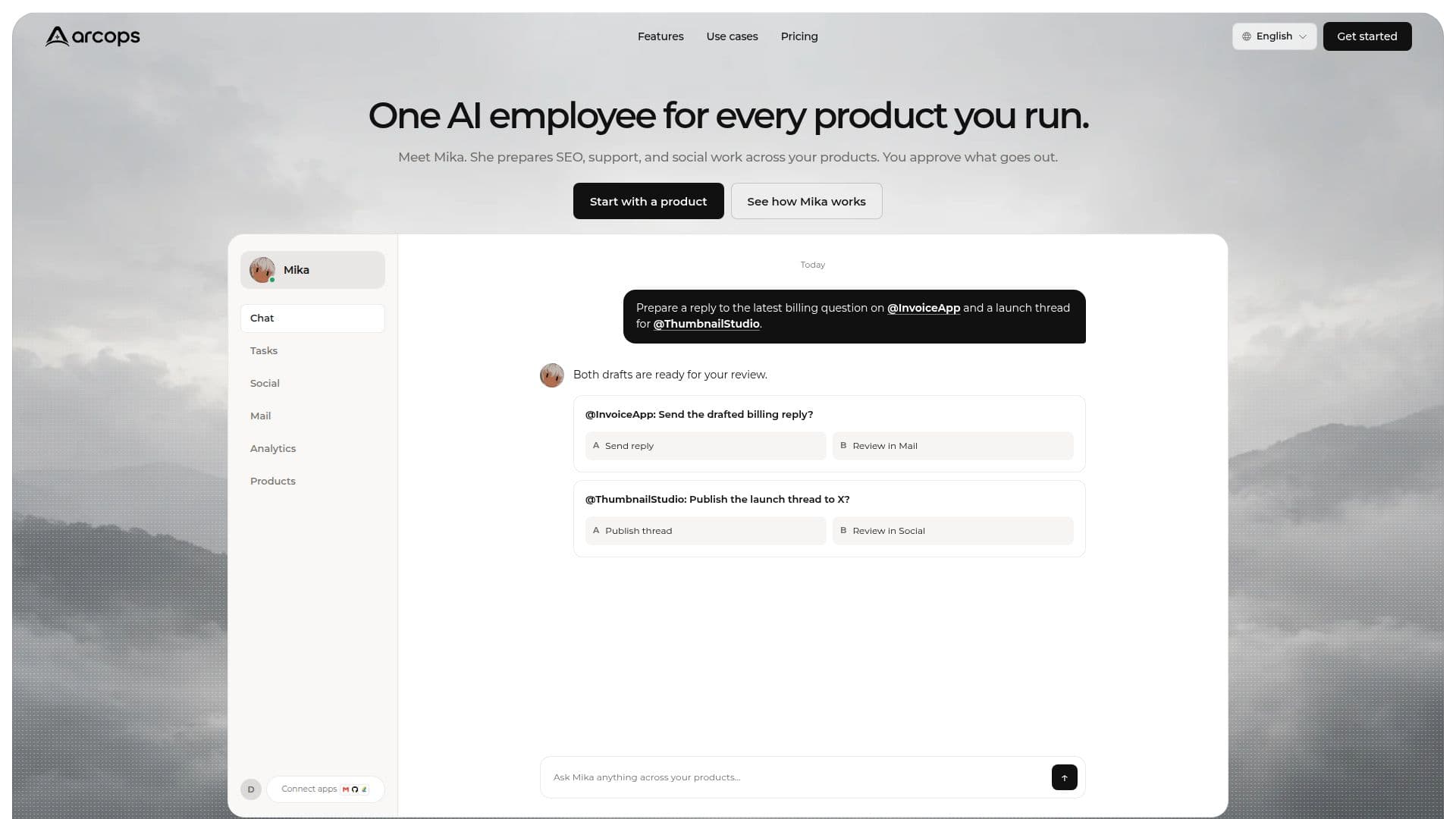
Users initiate tasks by describing the desired outcome in a conversation, mentioning any relevant product or connected application. Mika then prepares concrete drafts and changes, attaching the appropriate product context. For instance, it can prepare a reply to a billing question for one app and a launch thread for another, presenting both drafts for review. This ensures that external emails, social media posts, and production merges or releases always require user approval or a pre-approved scope.
Arcops serves as the workspace for Mika, providing the environment where this AI employee operates. It integrates with essential tools such as Mail, X (formerly Twitter), GitHub, Google Search Console, and Stripe. After work is deployed, Mika utilizes connected analytics to monitor and report on the outcomes, offering insights into performance. The platform offers a free plan for one product, with paid tiers like Starter and Pro providing expanded capabilities, including autonomous GitHub code and SEO pull requests, DataForSEO research, AI image generation, custom-domain mailboxes, and increased usage allowances.
Mika's cloud computer workstation, powered by boat.dev and Daytona, is a live desktop that users can inspect within Arcops. This feature is used for visual QA, competitor research, interacting with third-party consoles, and other browser-based workflows. The platform emphasizes user control, ensuring that Mika never sends emails, posts to social media, or merges code without explicit user permission, presenting all drafts for one-click approval.
- CategoryWorkflow Automation
- Pricing ModelFreemium
- DeploymentCloud
- PlatformsWeb
Mika's Core Features
Prepares customer support replies
Generates social media drafts
Manages website and SEO changes
Executes browser operations on a cloud computer
Provides product-specific context for each task
Requires user approval for all outgoing work
Integrates with various third-party applications
Offers first-party analytics and Search Console integration
Supports autonomous GitHub code and SEO pull requests
Includes DataForSEO research capabilities
Generates AI visual assets and launch graphics
Provides live custom-domain mailboxes
Enables 1-click X API publishing and thread scheduling
Features scheduled recurring routines
Maintains persistent working memory and standing rules
How to use Mika?
Start a Product: Begin by selecting one product within the Arcops workspace to put Mika to work.
Describe a Task: In a chat, describe the desired outcome or task, mentioning any specific product or connected app.
Connect Applications: Link necessary apps like Mail, X, GitHub, Search Console, or Stripe for Mika to perform the work.
Review Drafts: Mika will prepare concrete drafts and changes, presenting them for your review and approval.
Approve and Deploy: Approve the prepared work for external emails, social posts, or production merges/releases.
Monitor Outcomes: Utilize connected analytics to read what happened after the work goes out and track performance.
Mika's Use Cases
- Customer Support Automation
- Social Media Management
- Website & SEO Optimization
- Browser-Based Operations
- Product Launch Planning
- Growth Opportunity Analysis
- Revenue Attribution Reporting
- Keyword Research & SERP Analysis
- Automated Code & SEO PRs
- Visual Asset Generation