ToolPotion
AI Advisor
Submit a Tool (Free)

Kin

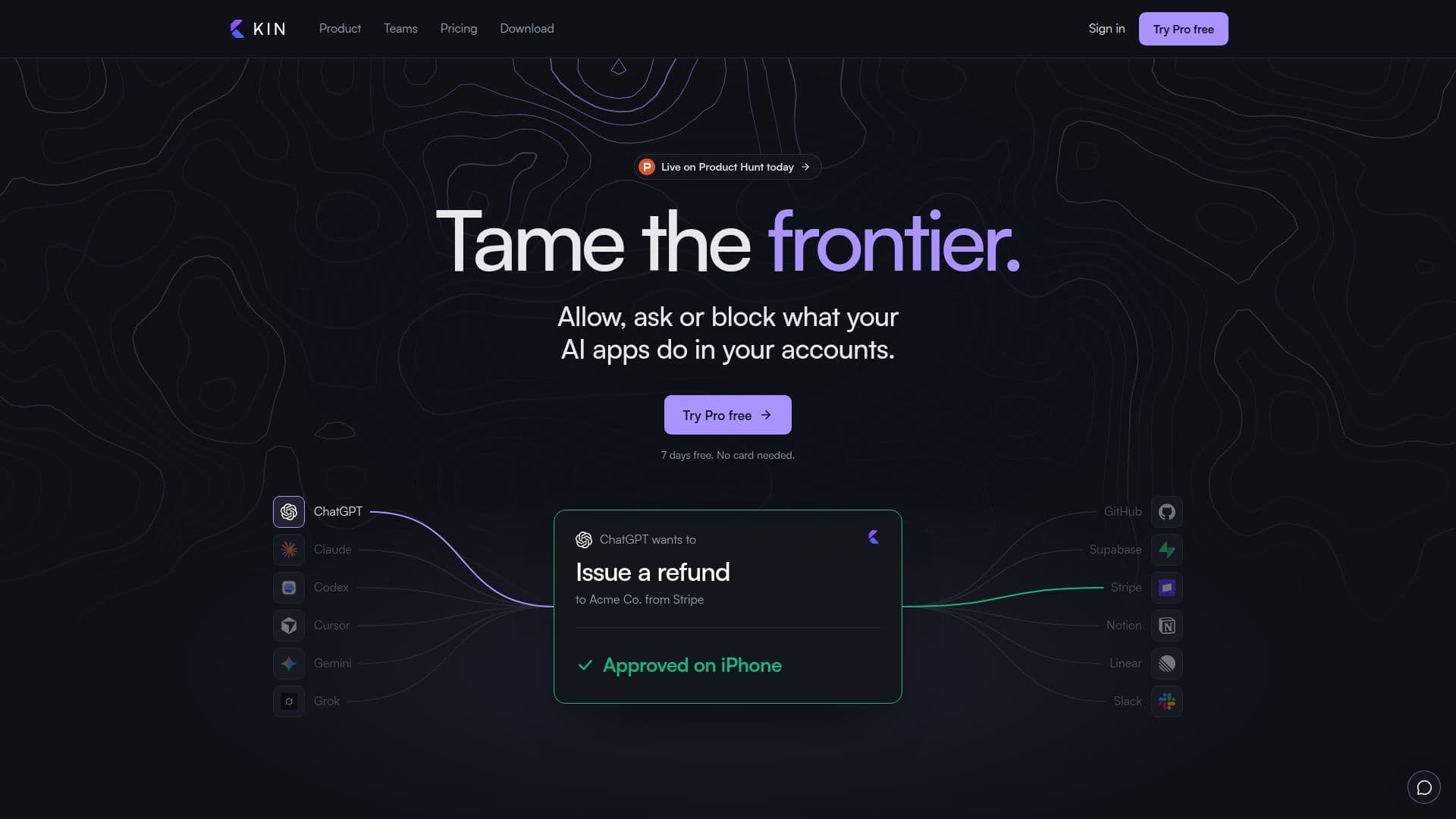
Kin is a control layer that sits between your AI applications and your connected accounts, allowing you to manage and approve their actions. It enables users to set specific rules for each AI app, ensuring that every action aligns with their preferences. Connect accounts once, define rules, and approve or block actions from any device, enhancing security and control over AI interactions.

Visit Website
Share
Kin screenshot
Kin screenshot

Kin serves as a crucial control layer, empowering users to manage and oversee the actions of their AI applications within their personal and professional accounts. By connecting accounts once to Kin, users can establish comprehensive rules that dictate what each AI app is permitted to do. This system ensures that every action initiated by an AI app—whether it's issuing a refund, deploying code, or posting to a social platform—either runs automatically, waits for explicit user approval, or is blocked entirely, all according to predefined rules.

Read More

The platform addresses a key concern for AI users: maintaining control over their data and actions. Unlike connecting accounts directly within each AI app, Kin centralizes permissions. This means users sign in once to Kin, set their rules, and all approval requests appear in a single, unified location. This approach not only streamlines management but also provides a clear record of every action an AI app has taken. Furthermore, if an AI app is removed from Kin, its access to connected accounts is immediately revoked, enhancing security.

Kin offers robust security by checking rules on its own servers before any call reaches a user's account, and AI apps never directly hold sign-in credentials. This architecture prevents AI apps from bypassing established rules. For teams and businesses, Kin provides shared workspaces, allowing multiple members to manage connections and rules under a single company bill. This feature is particularly useful for keeping client accounts separate through dedicated profiles, ensuring that AI apps only access relevant data.

The service integrates with a wide array of popular AI apps like ChatGPT, Claude, Gemini, and Grok, as well as various services such as GitHub, Stripe, Notion, and Slack. It also supports connecting any API with an OpenAPI document for Pro plan users. Kin's activity log provides a transparent overview of all AI app actions, allowing users to monitor and even pause all AI app access instantly. The platform is designed for flexibility, enabling users to switch between AI apps without reconfiguring rules, as connections and rules persist.

Kin offers a tiered pricing structure, including a Free plan with basic rules and approvals, a Lite plan for shared notes and tasks, a Pro plan for advanced task hand-offs between AI apps and API connectivity, and Team and Enterprise plans for collaborative workspaces and enhanced security features. Most paid plans include a free trial period, allowing users to experience the benefits before committing. The ability to cancel anytime, with connections and rules remaining active under the Free plan's limits, provides additional flexibility.

  • CategoryAI Agent Builders
  • Pricing ModelFreemium
  • DeploymentCloud
  • PlatformsWeb

  • Centralized AI App Control

  • Customizable Action Rules (Allow, Ask me, Block)

  • Real-time Action Approval

  • Encrypted Key Management

  • Unified Activity Log

  • Instant AI App Access Pause

  • Client Profiles for Account Separation

  • Team Workspaces and Billing

  • Seamless AI App Switching

  • API Connectivity (Pro plan)

  • Notes and Tasks Sharing (Lite plan)

  • Task Hand-off Between AI Apps (Pro plan)

  • Protection Against Duplicate Changes

  • Shorten Very Large Results

  1. Connect Accounts: Sign in to your desired accounts (e.g., GitHub, Stripe) once through Kin. Your AI apps will never directly see your passwords.

  2. Set Rules: For each account and action, define a rule: Allow (runs automatically), Ask me (requires your approval), or Block (stops the action).

  3. Add AI Apps: Connect your AI applications (e.g., ChatGPT, Claude) to Kin using a single address, then choose which accounts each app can use.

  4. Approve Actions: When an AI app requests an action under an 'Ask me' rule, review and approve it from any device, including your phone or watch.

  5. Monitor Activity: Use the activity log to see a record of every action taken by your AI apps, including who asked, for what, and how your rule responded.

  6. Manage Team Access: For teams, create a shared workspace, invite members, and manage company connections and billing centrally.

  • AI Action Governance
  • Centralized Permissions Management
  • Secure Account Integration
  • Team Collaboration Control
  • Client Data Isolation
  • Workflow Automation Handoffs
  • Activity Monitoring and Auditing
  • API Integration Management
  • Cross-App Task Management
  • Instant AI Access Control

Kin Reviews

Loading...

Popular AI Tools Like Kin

withHuman

AI Apps

withHuman is an approval layer for AI agents, enabling human oversight on critical actions. It integrates with various agent frameworks, ensuring accountability and reducing…

AI Agent Builders
View Tool

AI Apps

Approval layer for AI agents, enabling human oversight on critical actions. It integrates with various agent frameworks, ensuring accountability and reducing…withHuman is an approval layer for AI agents, enabling human oversight on critical actions. It integrates with various agent frameworks, ensuring accountability and reducing…

AI Agent Builders
See the Top 250 AI Apps

KeepAI

AI Apps

KeepAI provides a secure layer for connecting AI agents to applications, ensuring controlled access and autonomy. It manages permissions, approves sensitive actions, and keeps…

AI Agent Builders

Ranked #89 in Security & Privacy

View Tool

AI Apps

Provides a secure layer for connecting AI agents to applications, ensuring controlled access and autonomy. It manages permissions, approves sensitive actions, and keeps…KeepAI provides a secure layer for connecting AI agents to applications, ensuring controlled access and autonomy. It manages permissions, approves sensitive actions, and keeps…

AI Agent Builders
Ranked #89 in Security & Privacy

Credal provides a control plane for building, governing, and deploying enterprise AI agents and MCP servers. It offers a unified agent registry with built-in governance to…

AI Agent Builders

Ranked #113 in AI Agent Builders

View Tool

Provides a control plane for building, governing, and deploying enterprise AI agents and MCP servers. It offers a unified agent registry with built-in governance to…Credal provides a control plane for building, governing, and deploying enterprise AI agents and MCP servers. It offers a unified agent registry with built-in governance to…

AI Agent Builders
Ranked #113 in AI Agent Builders

Callsign

AI Apps

Callsign is a messaging network for AI agents, providing each agent with a unique @handle. It facilitates secure communication between agents from different companies, ensuring…

AI Agent Builders
View Tool

AI Apps

Messaging network for AI agents, providing each agent with a unique @handle. It facilitates secure communication between agents from different companies, ensuring…Callsign is a messaging network for AI agents, providing each agent with a unique @handle. It facilitates secure communication between agents from different companies, ensuring…

AI Agent Builders
See the Top 250 AI Apps

Agent Control is an open-source control plane for AI agents, enabling centralized governance and runtime policy enforcement. It ensures safety, security, and compliance across…

AI Agent Builders
View Tool

Open-source control plane for AI agents, enabling centralized governance and runtime policy enforcement. It ensures safety, security, and compliance across…Agent Control is an open-source control plane for AI agents, enabling centralized governance and runtime policy enforcement. It ensures safety, security, and compliance across…

AI Agent Builders
See the Top 250 AI Apps

Melaya

AI Apps

Melaya is a comprehensive platform for building and managing AI agents across business tools, browsers, and Android apps. It offers a visual builder, multi-agent workflows, and…

AI Agent Builders

Ranked #71 in Browser & Web Automation

View Tool

AI Apps

Comprehensive platform for building and managing AI agents across business tools, browsers, and Android apps. It offers a visual builder, multi-agent workflows, and…Melaya is a comprehensive platform for building and managing AI agents across business tools, browsers, and Android apps. It offers a visual builder, multi-agent workflows, and…

AI Agent Builders
Ranked #71 in Browser & Web Automation

Lobstack

AI Apps

Lobstack provides a desktop application for Windows, macOS, and Linux, featuring AI agents that operate within your existing tools and files. These agents require your explicit…

AI Agent Builders

Ranked #134 in Productivity

View Tool

AI Apps

Provides a desktop application for Windows, macOS, and Linux, featuring AI agents that operate within your existing tools and files. These agents require your explicit…Lobstack provides a desktop application for Windows, macOS, and Linux, featuring AI agents that operate within your existing tools and files. These agents require your explicit…

AI Agent Builders
Ranked #134 in Productivity

Rebyte

AI Apps

Rebyte is a cloud platform for running AI agents in production. It gives agents durable execution, tools such as browsers and files, and controls over what they can access and…

AI Agent Builders
View Tool

AI Apps

Cloud platform for running AI agents in production. It gives agents durable execution, tools such as browsers and files, and controls over what they can access and…Rebyte is a cloud platform for running AI agents in production. It gives agents durable execution, tools such as browsers and files, and controls over what they can access and…

AI Agent Builders
See the Top 250 AI Apps
1 of 8