
ToolPotion
AI Advisor
Submit a Tool (Free)

ilse

AI AppsAI UI & UX Design ToolsFreemium · Web (browser-based)

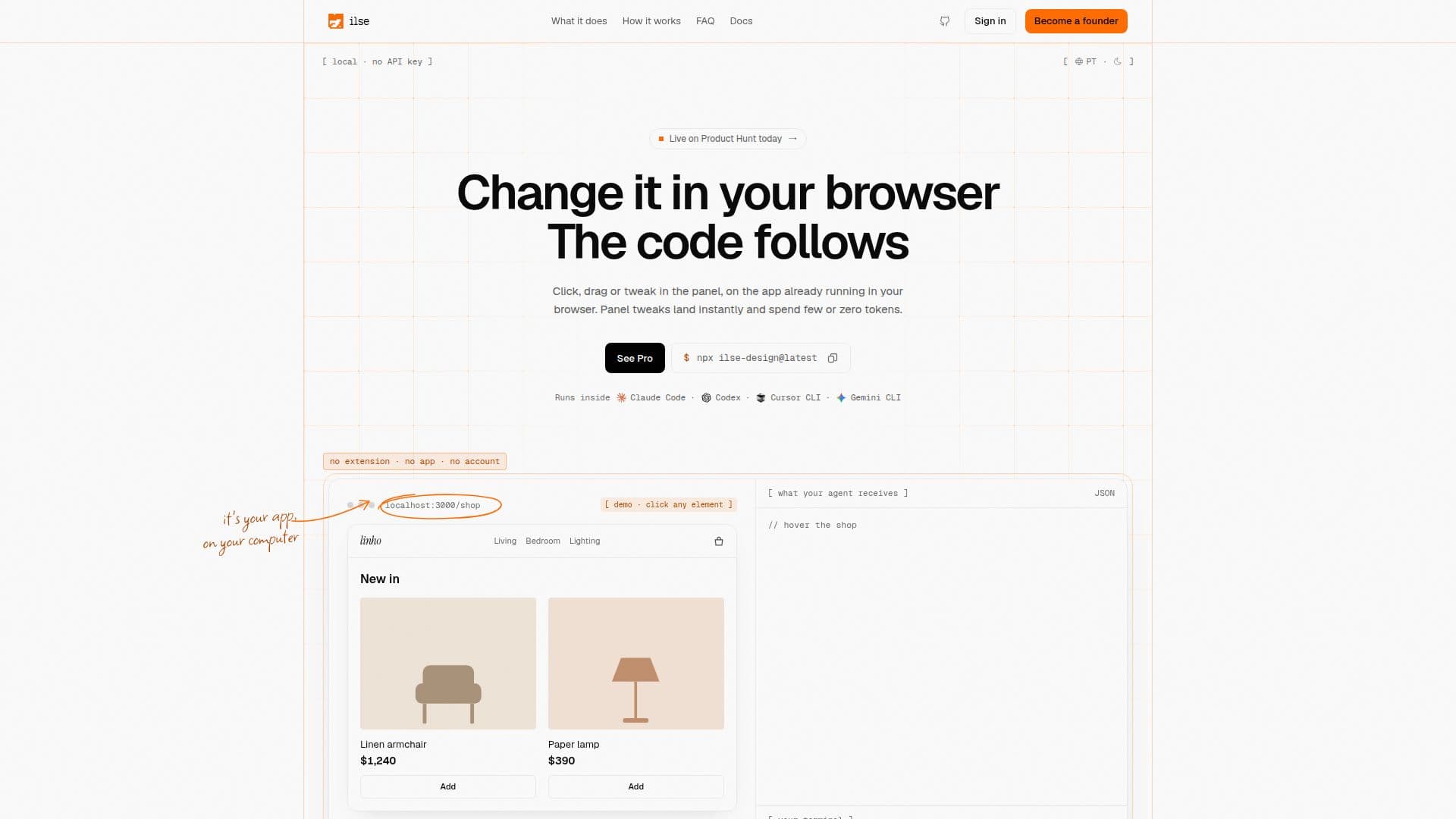
ilse is a visual feedback tool for code agents, enabling developers to refine their app interfaces directly in the browser. It allows users to point, annotate, and tweak elements, with their existing coding agent then automatically applying the changes to the codebase. This local-first solution integrates with popular frameworks and design systems, enhancing the development workflow without requiring extensions or accounts.

Visit Website
Share
ilse screenshot
ilse screenshot

ilse is an innovative visual feedback tool designed to streamline the process of refining application interfaces using coding agents. It operates as an agentic WYSIWYG editor, allowing developers to make changes directly on their running application in the browser. Instead of generating code from scratch, ilse focuses on refining existing interfaces by providing a visual layer for interaction and feedback.

Read More

The core functionality involves users clicking, dragging, or adjusting elements within a property panel on their live application. These visual inputs are then translated into precise instructions for the user's existing coding agent. ilse works by identifying the specific element's file and line, the component that wrote the JSX, and the project's design tokens. This detailed context, combined with user notes, panel tweaks, and gestures, is sent to the agent, which then modifies the code in the repository.

ilse is designed for developers who already have an application running and want to iterate on its interface without leaving their development environment. It runs locally on the user's machine as a CLI and an MCP server, ensuring that all code, context, and keys remain private and secure. It does not send code to any external server and integrates with agents like Claude Code, Codex, Cursor CLI, Gemini CLI, and any agent supporting MCP.

The tool supports various React projects with a dev server, including frameworks like Next.js, Vite, CRA, Remix, and Astro. It also works seamlessly with styling and component libraries such as Tailwind, shadcn/ui, Radix, and MUI. ilse offers different modes: Design Mode for direct visual tweaks, Test Mode (Pro feature) for simulating user journeys and identifying issues, and a forthcoming Review Mode for collaborative feedback.

Currently, ilse is free for its core functionality, with a PolyForm Shield license that permits free use, including for work, but prohibits turning it into a competing product. A "Pro" version is planned, which will enhance test mode capabilities with accessibility, errors, layout analysis, memory, and journeys, along with a component library feature. This Pro version is offered as a one-time purchase with 12 months of updates.

  • CategoryAI UI & UX Design Tools
  • Pricing ModelFreemium
  • DeploymentLocal
  • PlatformsWeb (browser-based)

  • Visual feedback for code agents

  • In-browser interface refinement

  • Click, annotate, and send changes to agent

  • Direct code modification by existing agent

  • Local-first operation (CLI and MCP server)

  • Supports various coding agents (Claude Code, Codex, Gemini CLI, Cursor CLI)

  • Works with any React project and dev server

  • Integrates with Next.js, Vite, CRA, Remix, Astro

  • Compatible with Tailwind, shadcn/ui, Radix, MUI

  • Design Mode for direct visual tweaks

  • Contextual information sent to agent (file, line, component, design tokens)

  • No extension, no app, no account required

  • Code and keys remain on user's machine

  • Free core functionality with PolyForm Shield license

  • Pro version with advanced test mode and component library (pre-sale)

  1. Open your app: Run `npx ilse-design@latest` in your project folder to open your app with the ilse bar.

  2. Refine design: Use Design Mode to point, write notes, tweak panels, or drag elements directly on your running app.

  3. Agent changes code: ilse gathers context and sends your visual feedback to your existing coding agent, which then modifies the code.

  4. Test functionality (Pro): Use Test Mode to simulate user actions and identify where the app gets stuck.

  5. Collaborate (soon): Reviewers can leave notes on your product's link without an account, feeding feedback to you and the agent.

  • Refining existing app interfaces
  • Providing visual feedback to AI agents
  • Accelerating UI development iterations
  • Local-first development workflow
  • Integrating with existing AI coding agents
  • Testing user journeys (Pro)
  • Collaborative design review (soon)

ilse Reviews

Loading...

Popular AI Tools Like ilse

Onlook is a visual code editor designed for designers and product managers to craft, edit, and ship web experiences using AI. It allows teams to work directly in real codebases,…

AI UI & UX Design Tools

Ranked #30 in AI UI & UX Design Tools

View Tool

Visual code editor designed for designers and product managers to craft, edit, and ship web experiences using AI. It allows teams to work directly in real codebases,…Onlook is a visual code editor designed for designers and product managers to craft, edit, and ship web experiences using AI. It allows teams to work directly in real codebases,…

AI UI & UX Design Tools
Ranked #30 in AI UI & UX Design Tools

Uizard

AI Apps

Uizard is an AI-powered UI/UX design tool that turns text prompts, screenshots, and hand-drawn sketches into editable mockups and multi-screen prototypes, built to be as easy to…

AI UI & UX Design Tools

Ranked #212 in AI Apps

View Tool

AI Apps

AI-powered UI/UX design tool that turns text prompts, screenshots, and hand-drawn sketches into editable mockups and multi-screen prototypes, built to be as easy to…Uizard is an AI-powered UI/UX design tool that turns text prompts, screenshots, and hand-drawn sketches into editable mockups and multi-screen prototypes, built to be as easy to…

FeaturedAI UI & UX Design Tools
Ranked #212 in AI Apps

Wonder

AI Apps

Wonders is a design tool that integrates AI to generate designs, make precise edits, and work with code context on the same canvas, enabling faster production and seamless…

AI UI & UX Design Tools

Ranked #46 in AI UI & UX Design Tools

View Tool

AI Apps

Wonders is a design tool that integrates AI to generate designs, make precise edits, and work with code context on the same canvas, enabling faster production and seamless…

AI UI & UX Design Tools
Ranked #46 in AI UI & UX Design Tools

Flowstep

AI Apps

Flowstep is an AI design tool that generates production-ready UI from text prompts on an infinite canvas. Iterate via chat, copy to Figma, export React code, or connect an IDE via…

AI UI & UX Design Tools

Ranked #24 in AI UI & UX Design Tools

View Tool

AI Apps

AI design tool that generates production-ready UI from text prompts on an infinite canvas. Iterate via chat, copy to Figma, export React code, or connect an IDE via…Flowstep is an AI design tool that generates production-ready UI from text prompts on an infinite canvas. Iterate via chat, copy to Figma, export React code, or connect an IDE via…

FeaturedAI UI & UX Design Tools
Ranked #24 in AI UI & UX Design Tools

Paper

AI Apps

Paper is a modern design tool that connects teams, code, and data on a single canvas. It enables seamless design-to-code workflows, ensuring nothing is lost in translation.

AI UI & UX Design Tools

Ranked #29 in AI UI & UX Design Tools

View Tool

AI Apps

Modern design tool that connects teams, code, and data on a single canvas. It enables seamless design-to-code workflows, ensuring nothing is lost in translation.Paper is a modern design tool that connects teams, code, and data on a single canvas. It enables seamless design-to-code workflows, ensuring nothing is lost in translation.

AI UI & UX Design Tools
Ranked #29 in AI UI & UX Design Tools

UX Pilot

AI Apps

UX Pilot is an AI-powered UX/UI design platform that turns ideas, sketches, or PRDs into wireframes, high-fidelity screens, complete user flows, and production-ready code, with…

AI UI & UX Design ToolsMarketing & Creative Agencies

Ranked #11 in AI UI & UX Design Tools

View Tool

AI Apps

AI-powered UX/UI design platform that turns ideas, sketches, or PRDs into wireframes, high-fidelity screens, complete user flows, and production-ready code, with…UX Pilot is an AI-powered UX/UI design platform that turns ideas, sketches, or PRDs into wireframes, high-fidelity screens, complete user flows, and production-ready code, with…

FeaturedAI UI & UX Design ToolsMarketing & Creative Agencies
Ranked #11 in AI UI & UX Design Tools

Frame0

AI Apps

Frame0 is a cross-platform, offline-first wireframing tool that creates hand-drawn style wireframes and prototypes for modern apps, with a rich component library, an AI agent, and…

AI UI & UX Design Tools

Ranked #41 in AI UI & UX Design Tools

View Tool

AI Apps

Cross-platform, offline-first wireframing tool that creates hand-drawn style wireframes and prototypes for modern apps, with a rich component library, an AI agent, and…Frame0 is a cross-platform, offline-first wireframing tool that creates hand-drawn style wireframes and prototypes for modern apps, with a rich component library, an AI agent, and…

AI UI & UX Design Tools
Ranked #41 in AI UI & UX Design Tools

VisualSnag

AI Apps

VisualSnag transforms visual references into AI-ready design prompts, CSS variables, and design tokens. Upload screenshots or URLs to generate a style brief, CSS variables, and AI…

AI UI & UX Design ToolsMarketing & Creative Agencies

Ranked #97 in AI UI & UX Design Tools

View Tool

AI Apps

Transforms visual references into AI-ready design prompts, CSS variables, and design tokens. Upload screenshots or URLs to generate a style brief, CSS variables, and AI…VisualSnag transforms visual references into AI-ready design prompts, CSS variables, and design tokens. Upload screenshots or URLs to generate a style brief, CSS variables, and AI…

AI UI & UX Design ToolsMarketing & Creative Agencies
Ranked #97 in AI UI & UX Design Tools
1 of 8