ToolPotion
AI Advisor
Submit a Tool (Free)

Fontaine

Fontaine is a terminal AI coding agent designed to work with any configured model. It features a guardian that assesses risky tool calls and an AFK mode for unattended operation. The agent provides comprehensive documentation covering installation, architecture, configuration, providers, and various operational modes, ensuring developers can effectively manage and deploy their AI coding tasks.

Visit Website
Share
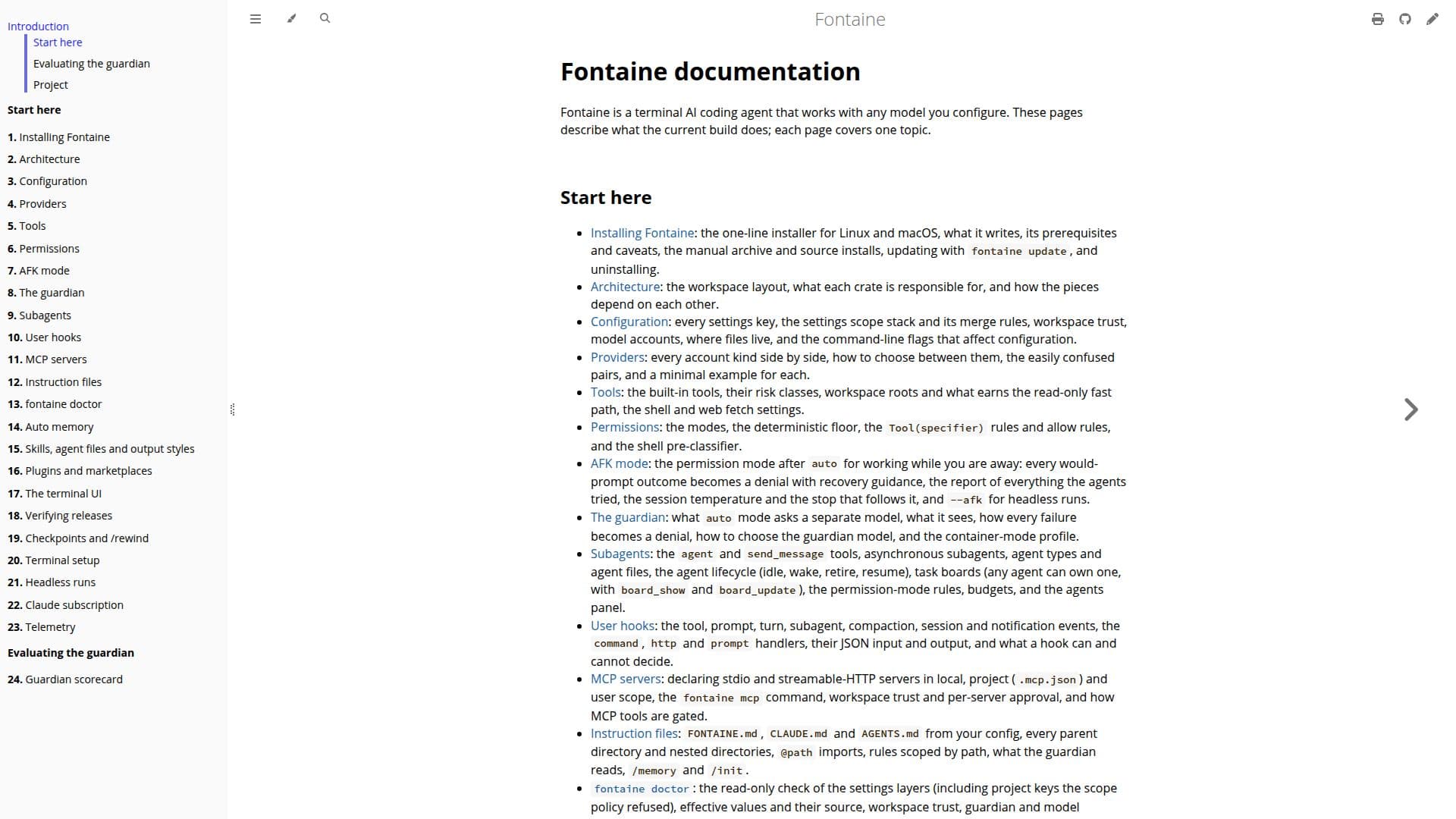
Fontaine screenshot
Fontaine screenshot

Fontaine is a versatile terminal AI coding agent engineered to integrate seamlessly with any AI model you choose to configure. This documentation provides a detailed overview of its current capabilities, with each page dedicated to a specific topic, guiding users from initial setup to advanced functionalities.

Read More

The core of Fontaine's design includes a robust guardian system that intelligently judges potentially risky tool calls, enhancing operational safety and reliability. For developers requiring continuous operation, Fontaine offers an AFK (Away From Keyboard) mode, allowing the agent to run unattended while providing recovery guidance for denied prompts and a comprehensive report of all attempted actions.

Installation is streamlined with a one-line installer for Linux and macOS, alongside options for manual archive and source installs, and easy updates via `fontaine update`. The architecture is clearly defined, detailing the workspace layout and the responsibilities of each component. Configuration is highly flexible, covering every settings key, merge rules, workspace trust, model accounts, file locations, and command-line flags.

Fontaine supports various providers, with side-by-side comparisons and minimal examples for each account kind. It includes a suite of built-in tools, categorized by risk class, and offers granular permission settings with deterministic floors and allow rules. Advanced features include subagents for asynchronous tasks, task boards, and user hooks for custom event handling.

For collaborative and complex projects, Fontaine supports MCP servers for declaring stdio and streamable-HTTP servers, instruction files for guiding agent behavior, and a `fontaine doctor` command for comprehensive system checks. Auto memory provides a per-project notes store, gated for writes and auditable. The platform also supports skills, agent files, output styles, and plugins from git-hosted catalogs, managed via the `fontaine plugin` CLI.

The terminal UI is rich with features, offering various commands for managing models, permissions, memory, and sessions, including `/recap` for session reports and `/cost` for token usage. Headless runs are supported for CI/CD environments, and Claude subscription integration is available for specific plans. Telemetry can be enabled for export, with privacy defaults in place. The documentation also covers verifying releases, checkpoints, and terminal setup, ensuring a complete development experience.

  • CategoryAI Coding Assistants
  • DeploymentTerminal
  • PlatformsLinux, macOS

  • Terminal AI Coding Agent

  • Configurable with Any AI Model

  • Guardian for Risky Tool Calls

  • AFK Mode for Unattended Operation

  • One-Line Installer for Linux/macOS

  • Detailed Architecture Documentation

  • Flexible Configuration Options

  • Support for Multiple AI Providers

  • Built-in Tools with Risk Classes

  • Granular Permission Management

  • Asynchronous Subagents

  • User Hooks for Custom Events

  • MCP Server Support

  • Instruction Files (FONTAINE.md, CLAUDE.md, AGENTS.md)

  • fontaine doctor for System Diagnostics

  • Auto Memory for Project Notes

  • Skills, Agent Files, and Output Styles

  • Plugin Management via CLI

  • Rich Terminal User Interface

  • Headless Runs for CI/CD

  • Claude Subscription Integration

  • Telemetry Export with Privacy Defaults

  • Checkpoints and /rewind for Code Restoration

  1. Install Fontaine: Use the one-line installer for Linux and macOS, or opt for manual archive/source installs.

  2. Configure Settings: Adjust every settings key, model accounts, and file locations to customize your agent's behavior.

  3. Select Providers: Choose and configure your preferred AI model providers based on your project requirements.

  4. Define Permissions: Set up permission modes, allow rules, and risk classes for tools to control agent actions.

  5. Utilize AFK Mode: Enable AFK mode for unattended operations, receiving recovery guidance and session reports.

  6. Manage Subagents: Create and manage asynchronous subagents and task boards for complex, multi-part tasks.

  7. Extend with Plugins: Install and manage plugins from git-hosted catalogs using the `fontaine plugin` CLI.

  8. Monitor and Debug: Use `fontaine doctor` for system checks and terminal commands like `/cost` and `/recap` for monitoring.

  • Automated Code Generation
  • Secure Tool Execution
  • Unattended Development Tasks
  • Custom AI Agent Workflows
  • Project Configuration Management
  • Multi-Provider AI Integration
  • Codebase Auditing and Debugging
  • Version Control and Rollback
  • CI/CD Integration
  • Extensible Development Environment

Fontaine Reviews

Loading...

Popular AI Tools Like Fontaine

Styx

AI Apps

Styx is a free, open-source desktop app that integrates Claude Code, Codex, Gemini, and Cursor agents into one platform. It allows developers to manage multiple projects and…

AI Coding Assistants
View Tool

AI Apps

Free, open-source desktop app that integrates Claude Code, Codex, Gemini, and Cursor agents into one platform. It allows developers to manage multiple projects and…Styx is a free, open-source desktop app that integrates Claude Code, Codex, Gemini, and Cursor agents into one platform. It allows developers to manage multiple projects and…

AI Coding Assistants
See the Top 250 AI Apps

PearAI is an open-source AI code editor designed to accelerate software development. It offers AI chat for contextual queries, an AI agent for coding and bug fixing, and a router…

AI Coding Assistants

Ranked #42 for Explaining code

View Tool

Open-source AI code editor designed to accelerate software development. It offers AI chat for contextual queries, an AI agent for coding and bug fixing, and a router…PearAI is an open-source AI code editor designed to accelerate software development. It offers AI chat for contextual queries, an AI agent for coding and bug fixing, and a router…

AI Coding Assistants
Ranked #42 for Explaining code

Codara Studio is a comprehensive desktop console for AI coding agents, integrating file exploration, editing, live agent terminals, git graph, and run orchestration. It supports…

AI Coding Assistants

Ranked #226 for Explaining code

View Tool

Comprehensive desktop console for AI coding agents, integrating file exploration, editing, live agent terminals, git graph, and run orchestration. It supports…Codara Studio is a comprehensive desktop console for AI coding agents, integrating file exploration, editing, live agent terminals, git graph, and run orchestration. It supports…

AI Coding Assistants
Ranked #226 for Explaining code

Visual Studio Code is a free, open source AI code editor for agent-first development, letting developers build with AI agents that plan, code, and debug, and manage multi-agent…

AI Coding Assistants
View Tool

Free, open source AI code editor for agent-first development, letting developers build with AI agents that plan, code, and debug, and manage multi-agent…Visual Studio Code is a free, open source AI code editor for agent-first development, letting developers build with AI agents that plan, code, and debug, and manage multi-agent…

AI Coding Assistants
See the Top 250 AI Apps

Freebuff

AI Apps

Freebuff is a versatile coding agent that allows users to code, build, and deploy applications directly from their browser, desktop, or terminal. It offers a seamless experience…

AI Coding Assistants

Ranked #85 in AI Code Review & Testing

View Tool

AI Apps

Versatile coding agent that allows users to code, build, and deploy applications directly from their browser, desktop, or terminal. It offers a seamless experience…Freebuff is a versatile coding agent that allows users to code, build, and deploy applications directly from their browser, desktop, or terminal. It offers a seamless experience…

AI Coding Assistants
Ranked #85 in AI Code Review & Testing

Zide

AI Apps

Zide is a comprehensive desktop application for developers, integrating code, Git, issues, pull requests, CI, terminals, and AI agents into one workspace. It supports GitHub,…

AI Coding Assistants

Ranked #182 for Explaining code

View Tool

AI Apps

Comprehensive desktop application for developers, integrating code, Git, issues, pull requests, CI, terminals, and AI agents into one workspace. It supports GitHub,…Zide is a comprehensive desktop application for developers, integrating code, Git, issues, pull requests, CI, terminals, and AI agents into one workspace. It supports GitHub,…

AI Coding Assistants
Ranked #182 for Explaining code

Goose is a native open source AI agent that operates as a desktop app, CLI, and API. It supports various tasks including coding, research, and automation, making it versatile for…

AI Coding Assistants

Ranked #46 for Analyzing data

View Tool

Native open source AI agent that operates as a desktop app, CLI, and API. It supports various tasks including coding, research, and automation, making it versatile for…Goose is a native open source AI agent that operates as a desktop app, CLI, and API. It supports various tasks including coding, research, and automation, making it versatile for…

AI Coding Assistants
Ranked #46 for Analyzing data

Farol

AI Apps

Farol is a free, open-source macOS terminal app designed for AI coding agents. It allows users to run Claude Code and Codex in parallel, each within its own git worktree,…

AI Coding Assistants
View Tool

AI Apps

Free, open-source macOS terminal app designed for AI coding agents. It allows users to run Claude Code and Codex in parallel, each within its own git worktree,…Farol is a free, open-source macOS terminal app designed for AI coding agents. It allows users to run Claude Code and Codex in parallel, each within its own git worktree,…

AI Coding Assistants
See the Top 250 AI Apps
1 of 8