Description
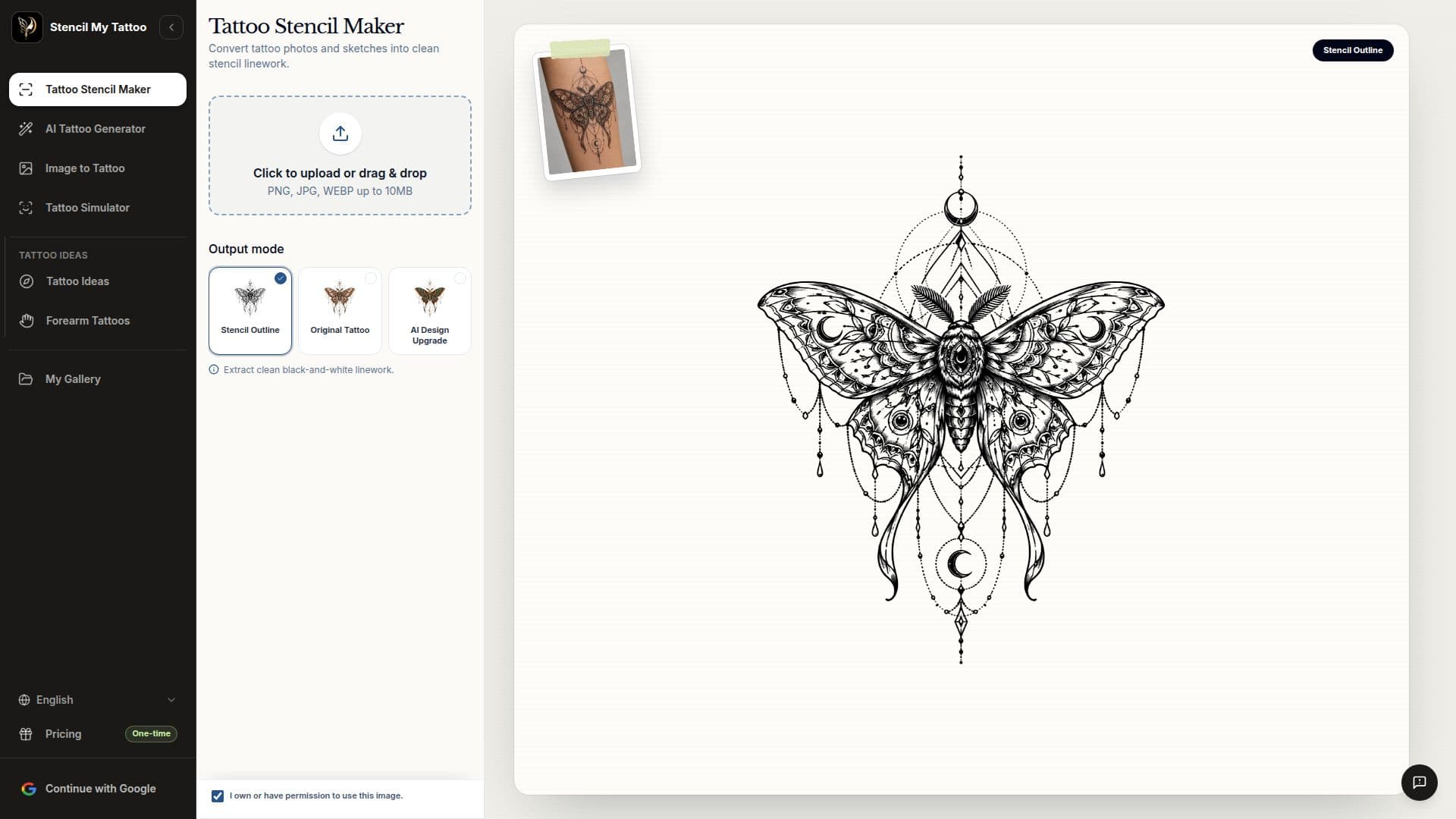
Stencil My Tattoo provides an AI-driven solution for transforming various image types—photos, sketches, flash sheets, or reference images—into clear, usable tattoo stencil drafts. This tool is designed to streamline the initial design preparation phase for both clients and tattoo artists, facilitating clearer communication and planning before an actual tattoo appointment.
Read More
The process is straightforward: users upload their image, choose an output mode, generate the stencil, and then download the result. The platform supports JPG, PNG, and WebP formats, with a maximum file size of 10MB. For optimal results, it recommends using clear, well-lit images with good contrast and cropping close to the artwork to minimize distracting backgrounds.
Three distinct output modes cater to different design needs. "Stencil Outline" extracts clean black-and-white linework, ideal for creating a tracing guide. "Original Tattoo" preserves the image as a color reference, maintaining detail. "AI Design Upgrade" refines unfinished or rough designs, enhancing clarity while retaining the core concept. Each generation is processed privately using AI models like Nano Banana and Gemini, ensuring user uploads are not made public or used for AI model training.
Users can download their generated stencils as white-background PNGs for sharing or transparent PNGs for further editing in other design tools. For printing, the tool allows users to create a Print PDF, setting the artwork size and choosing paper formats like A4 or Letter. Downloads, including those from trial generations, are free and do not carry watermarks. While the AI assists in creating a draft, the platform emphasizes that the stencil is a design-preparation reference, not a final tattoo transfer sheet, and advises artists to review and adjust details for skin and technique.
Stencil My Tattoo operates on a credit-pack system, with no subscription required. New visitors receive 8 trial credits without signing up, and new accounts get an additional 12 starter credits. Each generation costs 4 credits, with costs displayed before processing. Paid credits never expire, and credits for failed generations are automatically refunded. The tool also offers related functionalities like an AI Tattoo Generator for text-to-image concepts, Image to Tattoo for starting designs from photos, and a Tattoo Simulator for trying designs on body placements.
- CategoryAI Image Generators
- Pricing ModelPaid / Credit Packs
- DeploymentCloud
- PlatformsWeb
Stencil My Tattoo's Core Features
AI Photo to Stencil Conversion
Multiple Output Modes: Stencil Outline, Original Tattoo, AI Design Upgrade
Supports JPG, PNG, WebP image formats up to 10MB
Download Stencils as White or Transparent PNGs
Generate Print-Ready PDFs with Custom Sizes
No Account Required for Trial Use
Credit-Based Pricing with One-Time Packs
Free Trial Credits for New Users
Private Uploads and Generations
Credits Refunded for Failed Generations
Paid Credits Never Expire
Tattoo Simulator for Design Placement Preview
Commercial Use for Paid Generations
Mirror Artwork for Transfer Workflow
How to use Stencil My Tattoo?
Upload Image: Choose a JPG, PNG, or WebP tattoo design, sketch, flash sheet, or reference photo.
Select Output Mode: Pick Stencil Outline, Original Tattoo, or AI Design Upgrade based on your needs.
Generate Stencil: Review the credit cost and click generate to process your image.
Download or Print: Save a PNG to share or edit, or create a PDF for printing at your chosen size.
Stencil My Tattoo's Use Cases
- Tattoo Design Planning
- Artist Reference Preparation
- Client Inspiration Organization
- Design Refinement
- Printable Stencil Creation
- Digital Design Integration
- Tattoo Placement Preview