Description
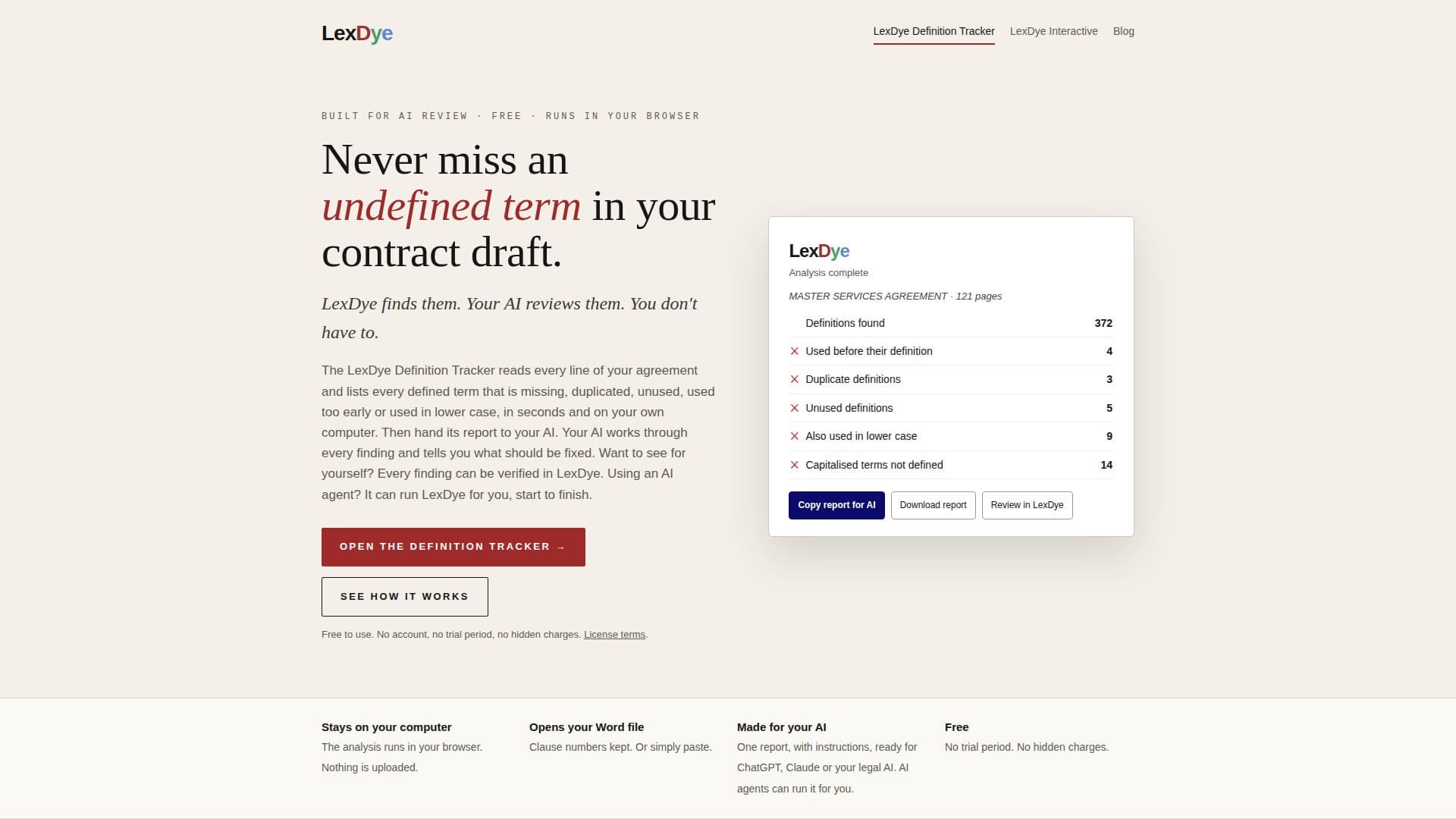
LexDye Definition Tracker is a specialized contract drafting tool engineered to enhance the efficiency and accuracy of legal document review, particularly when integrated with AI agents. This free, browser-based application meticulously scans legal agreements to pinpoint common drafting errors related to defined terms. It identifies terms that are used before their definition, duplicated, unused, or appear in lower case when they should be capitalized. The entire analysis process takes place within your browser, ensuring that sensitive client documents never leave your computer or are uploaded to external servers.
Read More
The tool performs five critical checks on every term: identifying capitalized terms that are used but never defined (including typos), duplicate definitions, unused definitions (often indicating a renamed term), terms used before their formal definition (excluding glossary pointers), and defined terms appearing in lower case. LexDye is designed to "over-flag," meaning it prioritizes showing a potential issue rather than hiding it, allowing AI agents to sort out what truly matters, often with the help of a Smart Filter.
LexDye is built to complement, not replace, AI review. It acts as a "completeness layer," providing a deterministic and exhaustive analysis that ensures every capitalized term is checked consistently. This contrasts with AI agents alone, which may miss errors if not given highly specific prompts. By generating a detailed report, LexDye provides a structured input for AI, enabling it to act as the "judgment layer" by reading for meaning, identifying overlapping definitions, wrong cross-references, or scope inconsistencies, and categorizing findings into 'Fix,' 'Consider,' or 'Ignore.'
The workflow is straightforward: users can open a .docx file directly or paste text from Word. LexDye then processes the document, typically in seconds for most agreements, or a minute or two for a 100-page document. Once the analysis is complete, a report can be copied directly into various AI assistants like ChatGPT, Claude, Wordsmith AI, or GC AI. The report includes instructions and quotes for every finding, allowing the AI to work through each issue and suggest fixes. Users can also verify any finding within LexDye itself, with every use of a term highlighted.
For advanced users, LexDye supports integration with AI agents that run on the user's computer, such as Codex, Claude Code, and Claude Cowork. These agents can run LexDye from its command-line version or in the browser, process the report, and return a reviewed list of recommended fixes. The tool's commitment to data privacy is paramount; it operates entirely offline after the initial download, making it verifiable by disconnecting from Wi-Fi. Cautious firms can even host the files on their own intranet. LexDye only reads documents and makes no changes to the original draft or its formatting. Founded in 2012 and based in New Haven, Connecticut, LexDye was created by lawyers for lawyers, aiming to make visible the drafting errors that are easy to miss.
- CategoryContract Review & Drafting
- Pricing ModelFree
- DeploymentBrowser-based
- PlatformsMac, Windows (Chrome, Edge, Safari, Firefox)
LexDye Definition Tracker's Core Features
Identifies undefined capitalized terms
Detects duplicate definitions
Flags unused definitions
Locates terms used before their definition
Finds defined terms used in lower case
Generates a comprehensive report for AI review
Runs entirely in your web browser
Processes .docx files directly
Allows text pasting from Word
Operates offline after download
Ensures client documents stay on your computer
Compatible with leading chat AIs (ChatGPT, Claude, etc.)
Supports AI agent integration for automated review
Provides a command-line version for AI agents
Highlights every use of a term for verification
How to use LexDye Definition Tracker?
Open Document: Open your Word file (.docx) or paste text directly from Word into the LexDye Definition Tracker.
Run Analysis: LexDye will automatically scan your agreement, performing five checks on every term within seconds to minutes.
Review Report: Copy the generated report into your preferred AI assistant (e.g., ChatGPT, Claude) for an AI-driven review.
Verify Findings: Optionally, click through any finding in LexDye to see every use of the term highlighted in your document.
Implement Fixes: Use the AI's recommendations and LexDye's verification to make necessary corrections to your contract draft.
LexDye Definition Tracker's Use Cases
- Contract Drafting Review
- AI-Assisted Legal Review
- Ensuring Definition Consistency
- Pre-Signing Document Check
- Legal Training and Education
- Automated Legal Compliance