Description
Invoice Data Extraction AI empowers users to transform PDF and image invoices into structured Excel spreadsheets with remarkable accuracy. The tool leverages AI to understand user prompts, allowing for custom data extraction based on specific needs. Users simply describe what they want to extract, such as vendor payments for 1099 reporting, and the AI handles the rest.
Read More
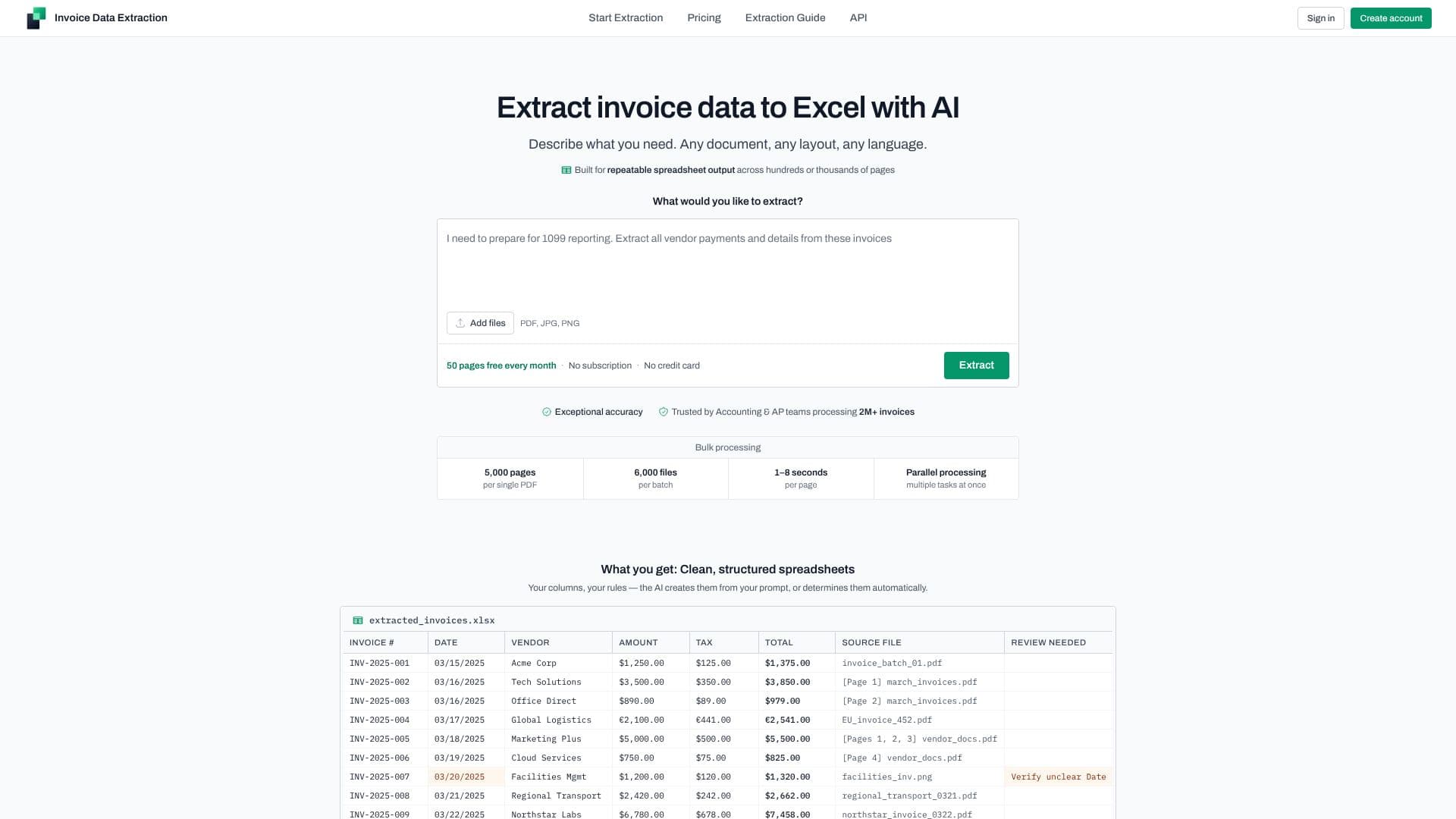
This AI-driven solution is designed for repeatable spreadsheet output, making it ideal for processing hundreds or thousands of pages. It supports any document layout and any language, ensuring broad applicability. The extracted data is presented in clean, structured spreadsheets where columns can be defined by the user's prompt or determined automatically by the AI. This ensures the output is immediately usable for formulas, pivot tables, and uploads to accounting or ERP systems.
The platform offers exceptional accuracy, trusted by accounting and AP teams processing millions of invoices. It supports bulk processing of up to 5,000 pages per PDF and 6,000 files per batch, with processing speeds of 1–8 seconds per page through parallel task execution. Users receive structured spreadsheets with columns like Invoice #, Date, Vendor, Amount, Tax, Total, and Source File. The tool also includes built-in review support, flagging low-confidence results with a 'Review Needed' warning and providing context for verification.
Invoice Data Extraction AI works with various document types beyond standard invoices, including credit notes, line items, payroll data, tax data, financial statements, inventory lists, receipts, and utility bills. It handles real-world document batches with mixed formats, languages, and layouts, automatically identifying document types and filtering out irrelevant pages. The service provides a free tier of 50 pages per month with no subscription or credit card required, making it accessible for immediate tasks and enterprise-scale processing alike. Security and compliance are paramount, with enterprise-grade security, DPA including CCPA + GDPR/UK GDPR terms, and short retention windows for data.
- CategoryAI Document & PDF Tools
- Pricing ModelFreemium
- DeploymentCloud
- PlatformsWeb
Invoice Data Extraction AI's Core Features
AI-powered data extraction from invoices
Supports PDF, JPG, and PNG formats
Customizable data extraction via natural language prompts
Automatic column generation or user-defined rules
Bulk processing capabilities for large volumes
High accuracy and trusted by finance teams
Outputs clean, structured spreadsheets (.xlsx, .csv, .json)
Built-in review support for low-confidence extractions
Handles multiple document types beyond invoices
Supports mixed formats, languages, and layouts in batches
Free tier with 50 pages per month
No subscription or credit card required for free tier
Enterprise-grade security and compliance features
API available for programmatic integration
LLM-ready documentation for AI coding assistants
How to use Invoice Data Extraction AI?
Upload Files: Add your PDF, JPG, or PNG invoices to the platform.
Describe Extraction Needs: Write a prompt detailing what data you want to extract (e.g., 'Extract Invoice Number, Vendor Name, and Total Amount').
Process Invoices: The AI extracts the specified data from your documents.
Review and Download: Verify extracted data, especially flagged items, and download your structured spreadsheet (.xlsx, .csv, or .json).
Invoice Data Extraction AI's Use Cases
- Automate Invoice Processing
- Financial Reporting
- Accounts Payable Automation
- Data Migration
- Expense Tracking
- Vendor Payment Reconciliation
- Tax Compliance