
Description
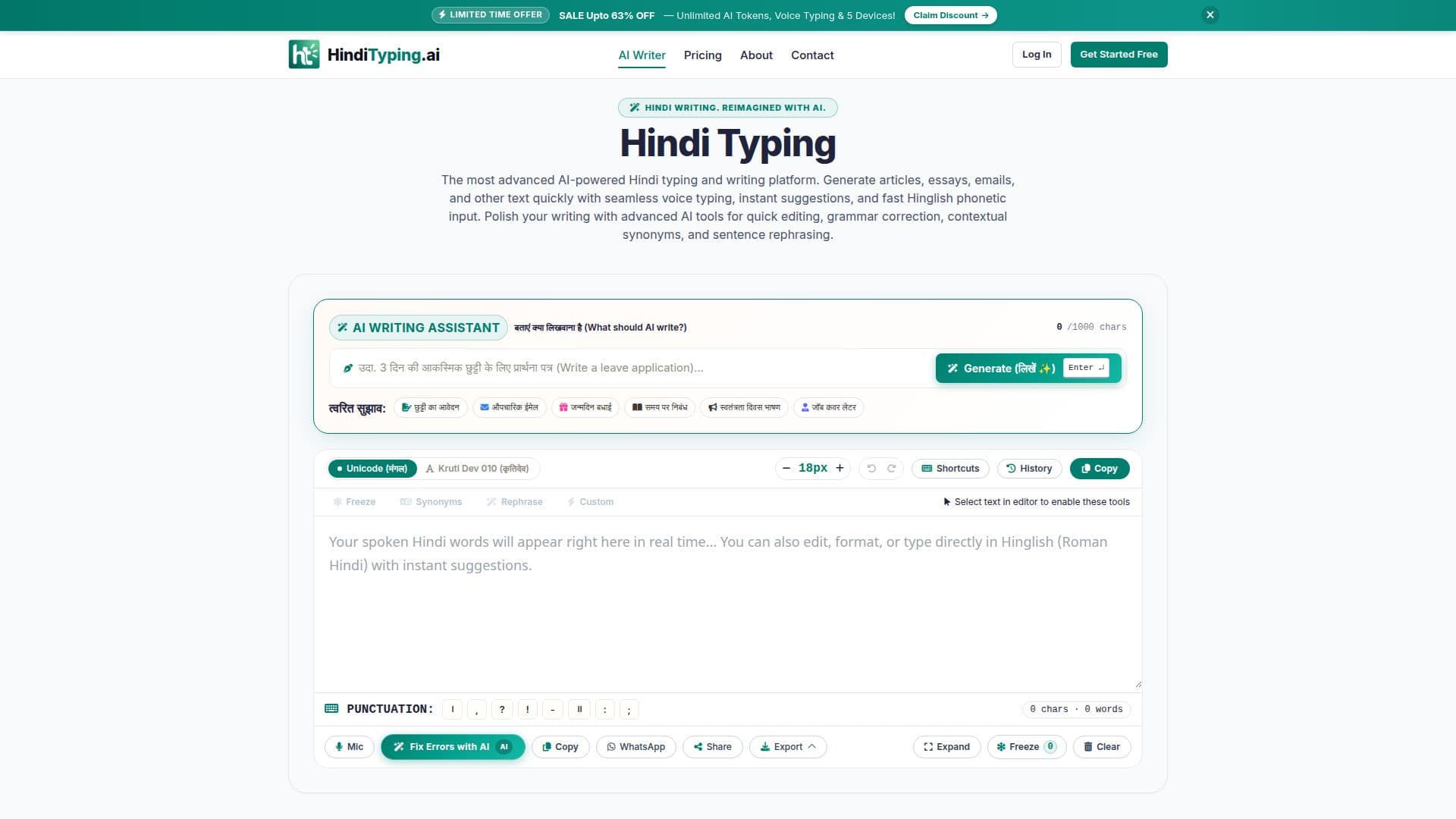
Hindi Typing is a comprehensive online AI studio designed to streamline and enhance Hindi writing. It addresses common challenges faced by Hindi writers, such as complex keyboard layouts, font compatibility issues, writer's block for formal drafting, inaccuracies in generic voice typing, and the lack of real-time editing in other AI chatbots. The platform integrates several advanced features to provide an all-in-one solution for creating, drafting, and finalizing Hindi texts.
Read More
Key capabilities include AI Generative Writing, which can draft applications, essays, emails, and articles up to 500 words in seconds. Users can also leverage real-time continuous Hindi speech recognition with a live audio waveform visualizer for hands-free typing. For font flexibility, it offers a dual-engine system allowing instant toggling between Unicode (Mangal) and legacy Kruti Dev 010. The platform also features a one-click AI spelling, matra, and grammar correction tool, powered by advanced AI, to polish writing effortlessly.
For ease of input, Hindi Typing provides predictive Hinglish to Devanagari transliteration with a floating suggestion candidate box, making it simple to type phonetically. A quick Devanagari punctuation bar allows for easy insertion of Poorna Viram, Deergh Viram, and other punctuation marks. Once content is finalized, users can export it in multiple formats, including Microsoft Word (.docx), PDF, Plain Text (.txt), Print, and WhatsApp. Additionally, a Custom Social Quote Image Card studio enables users to create aesthetic graphics from their Hindi text with various background themes.
Privacy is maintained with local draft auto-save and a Starred Notes History Drawer, ensuring 100% on-device privacy, with the option to turn history storage on or off. The platform is accessible across multiple browsers on Windows/Mac computers, iOS Safari, and Android Chrome, supporting tablets, desktops, and smartphones. Hindi Typing offers a generous free tier with instant access, allowing users to start typing immediately without mandatory sign-ups, with options to upgrade to Premium plans for advanced AI limits and specialized tools. The pricing structure is based on one-time payments, eliminating recurring subscriptions.
- CategoryAI Writing Assistants
- Pricing ModelFreemium
- DeploymentCloud
- PlatformsWeb, iOS, Android
Hindi Typing's Core Features
AI Generative Writing: Draft applications, essays, emails, and articles up to 500 words.
Real-time Continuous Hindi Speech Recognition: Live audio waveform visualizer for voice dictation.
Dual-Engine Typing: Instant toggle between Unicode (Mangal) and legacy Kruti Dev 010.
One-Click AI Spelling, Matra, and Grammar Correction: Powered by advanced AI.
Predictive Hinglish to Devanagari Transliteration: Floating suggestion candidate box.
Quick Devanagari Punctuation Bar: Insert Poorna Viram, Deergh Viram, Question Mark, Comma.
Multi-Format Export: Microsoft Word (.docx), PDF, Plain Text (.txt), Print, and WhatsApp.
Custom Social Quote Image Card Studio: Create graphics with 4 high-res aesthetic background themes.
Local Draft Auto-Save and Starred Notes History Drawer: 100% on-device privacy.
Complete Keyboard Shortcuts System: For efficient navigation and editing.
Adjustable Editor Font Size: From 14px to 32px with proportional line-height scaling.
Contextual Hindi Synonyms (पर्यायवाची): Explore vocabulary suggestions.
Sentence Rephrasing Studio: Effortlessly discover alternative ways to articulate sentences.
Bidirectional Unicode & Kruti Dev 010 Conversion: Seamlessly switch between font standards.
Ad-Free & Captcha-Free Interface: For a smooth user experience.
How to use Hindi Typing?
Prompt the AI or Speak Hands-Free: Type your needs into the prompt box (up to 1000 characters) or use the microphone button (Alt + S) for voice dictation.
Toggle Font Formats or Type Hinglish: Select between Unicode and Kruti Dev 010 (Alt + K) or type phonetically in English (Hinglish) and use the Spacebar for Devanagari translation.
Polish with AI: Run grammar checks and fix errors by pressing Alt + Enter.
Export and Share: Save your finalized document as Word, PDF, plain text, WhatsApp message, or an image card.
Hindi Typing's Use Cases
- Academic Writing
- Official Document Creation
- Content Generation
- Professional Correspondence
- Creative Writing & Sharing
- Business Communication
- Multilingual Document Preparation
- Error-Free Hindi Text